Project Zomboid Mods für Server
Für einen modifizierten Project-Zomboid-Server brauchst du pro Projekt die Steam-Workshop-ID und die interne Mod-ID. Prüfe zusätzlich Spiel-Build, Abhängigkeiten und Lade-Reihenfolge, bevor du deine Welt mit den Änderungen startest.
Project Zomboid Mods sicher installieren
Ein Workshop-Abo allein aktiviert eine Mod auf dem Dedicated Server nicht. Die Einträge in `WorkshopItems=` und `Mods=` müssen zusammenpassen; außerdem muss jede Mod den gewählten Build 41 oder Build 42 ausdrücklich unterstützen.
- 1. Build prüfen: Build-41- und Build-42-Mods nicht ungeprüft mischen.
- 2. Workshop-ID, Mod-ID, Abhängigkeiten und erforderliche Reihenfolge vollständig dokumentieren.
- 3. Welt und Konfiguration sichern, Server neu starten und Logs sowie den Beitritt mit einem Test-Client prüfen.
Die vollständige Schritt-für-Schritt-Anleitung findest du im Project-Zomboid-Mods-Guide. Oder starte direkt mit einem Project Zomboid Server mit Mod-Support.
Häufige Fragen zu Project Zomboid Mods
Was ist der Unterschied zwischen Workshop-ID und Mod-ID?
Die Workshop-ID bezeichnet das Steam-Workshop-Projekt und steuert den Download. Die Mod-ID aktiviert den enthaltenen Mod im Spiel. Auf dem Server müssen beide Listen vollständig und passend gepflegt sein.
Laufen Build-41-Mods automatisch mit Build 42?
Nein. Nutze eine Mod nur dann auf Build 42, wenn ihre Workshop-Seite diese Kompatibilität ausdrücklich bestätigt. Prüfe dabei auch alle Bibliotheken und weiteren Abhängigkeiten.
Wie teste ich ein Mod-Update ohne Risiko für die Welt?
Sichere zuerst Welt, Sandbox-Konfiguration und Server-INI. Aktualisiere danach die zusammengehörigen Mods, starte den Server neu und prüfe Logs, Kernfunktionen und einen vollständigen Client-Beitritt.
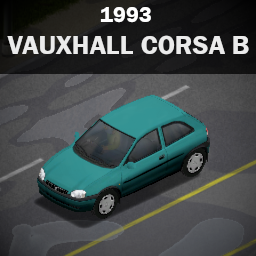
Vauxhall Corsa B
von 76561198180152967
(WORKS FOR 42.20) Vauxhall Corsa B 1993 The Vauxhall Corsa B (1993–2000) is a practical, lightweight car known for its rounded, friendly styling and nimble city handling. Available as a 3 or 5-door hatchback, it offered affordable motoring with a range of small petrol and diesel engines, making it incredibly popular for daily commuting. Features: - 2 variations - Transparent windows (Thanks to MrDanny!) - Fully armorable - Fully animated -Roof storage - Spare tire Notes: - This vehicle can be found in : traffic jams, trailerparks, junkyards and parkingstalls - This mod shouldnt cause any issues if added mid-save Wanna buy me an energy drink, or perhaps youre interested in commission? All support is greatly appreciated! https://ko-fi.com/xerdes Credit: - This vehicle mod is a commission work by the request of Alpha_Team_Stars - To MrDanny for his amazing Red Library which makes transparent windows possible! - To Hilvon for his animation knowledge and frequent and helpful tutorial streams on twitch! - To the modding community, which is keeping the game alive and fresh! - To Indie Stone for making such a great game like this! - To iBrRus and Tchernobill for amazing Tsars Library! [Copyright 2026 <Xerdess>. This item is not authorized for posting on Steam, except under the Steam account named <Xerdess>. Workshop ID: 3735119808 Mod ID: VauxhallCorsaB

True Music Addon Cyberpunk 2077 Complete
von 76561198010560006
Cyberpunk 2077 Score and Soundtrack Workshop ID: 3346950645 Mod ID: truemusiccp2077
![Pinecone Pig [B42] – Project Zomboid Mod](https://images.steamusercontent.com/ugc/9390834989370856257/A51BB485A8553E52FCB5A863D65BD93BDA684F2C/)
Pinecone Pig [B42]
von 76561198106295572
My best mod yet. Introduction This mod introduces the ability to craft your very own pinecone pig. Based on the precious little helper from one of my favorite games Fear & Hunger. Which are also based themselves on the "cone cow" (käpylehmä), a traditional handmade toy from Finland. In any iteration of their existence, they're typically made from a pine or spruce cone and sticks stuck between its scales. Now with this mod, you can put together your very own. I was gonna say something like "And it might even bring you good luck..", but I'll be honest this mod doesn't do anything but add the little fellas to the game. I'm not much for scripting but I might learn some more for the sake of adding some kind of little bonus. Or maybe I won't, or maybe I'll keep it a secret so it's more interesting. Guess you'll have to check the files for scripts to be sure... Crafting No experience needed, just imagination. 1x Pinecone, integral 1x Twigs, broken into four to create a hefty foundation a little bit of handcrafting, and there it is = Congratulations! You'll likely need to do some foraging for the pinecone at the very least, and the wiki says they're not likely to appear until between Sep-Dec. Credits Now there's something I have to address here. I was making this mod over the course of a day or two and never did it occur to me to search whether someone had done something similar to this already. Imagine my shellshocked, bloodshot eyes when I see it's been done. So shoutout to Glytch3r! Love to see it. Big kudos to LunaticViolent for the beautiful picmix I used there in the gallery. Check out my website if you like weird music, digital art, or just wanna follow my work! Workshop ID: 3726645455 Mod ID: pineconepig

Taxi chile
von 76561198097527936
Mod que modifica el skins de los taxis en el juego por los taxis que hay en Chile Workshop ID: 2931482089 Mod ID: Taxi Chile
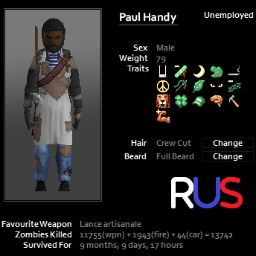
KillCount - Русификатор
von 76561199654837907
Полный русский перевод, ничего лишнего Workshop ID: 3577716013 Mod ID: KillCountRU
![[B42.20+] Add Iron Ore to Map – Project Zomboid Mod](https://images.steamusercontent.com/ugc/15100346197344188218/8CA7584531A22AF7BE35E8591234662ACE7F031A/)
[B42.20+] Add Iron Ore to Map
von 76561197992596851
Works on B42.20 SP and MP. I believe they may have changed how worldgen happens which has resulted in iron ore being much more rare, but it does spawn. This mod adds the new iron ore tiles to the boulder table during world gen. It doesn't replace boulders but is just added in so should just make it spawn randomly. Also includes a new smelting recipe that correctly returns crucible with iron instead of steel. 42.12 fixed this so I removed the iron smelting recipe. It shouldn't interact with other mods since it's only used during world generation and doesn't change any other functionality. Workshop ID: 3555102864 Mod ID: AddIronOreToMap
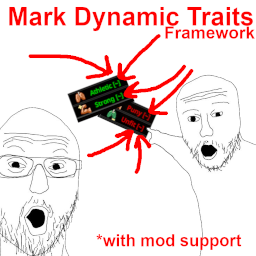
Mark Dynamic Traits Framework (MDTF)
von 76561198152820942
If you're a user Running some mod that makes traits dynamic? Don't know which traits can be earned/lost midgame? At character creation want to pick only static traits? Now achievable (assuming your favorite trait mod added support for this, which is very simple). Features - Marks dynamic traits with . - That's literally it. Supported Mods - Evolving Traits World (ETW) If you're a modder Very simple to use. Use included .lua file that registers base game traits as guidance. One nuance that's not in the example file: if you for example do custom UI and you need to display trait names in there without suffix, there are 2 functions available for that so you don't have to bother with it, example use: local MarkDynamicTraitsFramework if getActivatedMods():contains("MarkDynamicTraitsFramework") then MarkDynamicTraitsFramework = require("MDTF_Main") else return end local characterTrait = CharacterTrait.FIT local traitDefinition = CharacterTraitDefinition.getCharacterTraitDefinition(characterTrait ) local undecoratedUIName = MarkDynamicTraitsFramework.getUndecoratedUIName(traitDefinition) local undecoratedUIName2 = MarkDynamicTraitsFramework.getUndecoratedUIName(characterTrait) local undecoratedLabel = MarkDynamicTraitsFramework.getUndecoratedLabel(traitDefinition) local undecoratedLabel2= MarkDynamicTraitsFramework.getUndecoratedLabel(characterTrait) Works both with CharacterTrait or CharacterTraitDefinition as you can see. GitHub and Discord If you want to submit translation files, make suggestions or report bugs, the easiest way to do it would be on Discord. Afterword and Permission If you like this mod, check out collection on top of page for other mods I made or collaborated on! Rate ups are appreciated, and if you wanna send me a coffee, that's a real homie move, and you can do it here: ⛔ Permissions Redistribution of this mod without explicit permission from the creator is prohibited under any circumstances. This includes, but not limited to, uploading this mod to the Steam Workshop or any other site, distribution as part of another mod or modpack, distribution of modified versions. © 2026 MusicManiac (SteamID64: 76561198152820942) Workshop ID: 3766701843 Mod ID: MarkDynamicTraitsFramework
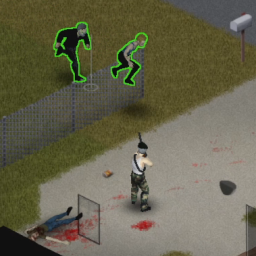
Easy Mode Guns
von 76561198112553005
Personal tweaks. When you need vanilla guns to be more accurate. Based on 41.78.13 build of the game. Gun Previous Chance To Hit Tweaked Chance To Hit Previous CTH Bonus Per Aiming Level Tweaked CTH Bonus Per Aiming Level M16 20 50 7 8 M14 50 60 5 10 MSR700 Rifle 27 65 17 15 MSR788 Rifle 25 65 15 15 JS-2000 70 80 5 10 Sawed-off JS 100 100 0 0 Double-Barreled Shotgun 80 100 5 0 Double-Barreled Sawed-off 80 100 5 0 M9 50 60 8 12 M1911 40 60 10 10 DE .44 20 50 12 12 M625 Revolver 30 70 10 10 Magnum 20 60 12 12 M36 Revolver 65 80 8 10 Workshop ID: 2896940077 Mod ID: Easymodeguns

SurgicalMask White (Blue)
von 76561198129019933
Surgical Mask re-texture in white ! This version will Remplace the Blue version of the Surgical Mask into White ! Now you'll be able to perfectly make a rp character while fighting against the Covid ! Workshop ID: 2153258544 Mod ID: SurgicalMask White (Blue)

HD Main Menu Suite (B42)
von 76561198048833753
TO MAKE THIS WORK ON VERSION B42.15 PLEASE FOLLOW RYUKU THE AUTHOR OF MMF'S INSTRUCTIONS. B42.15 NOTICE Unfortunately, due to changes in B42.15, you now need Reflection Enabler. Reflection Enabler link: https://steamcommunity.com/sharedfiles/filedetails/?id=3682136459 I understand installing a Java mod to play custom music in the main menu is overkill, but, that's the way it is at present. When/if this changes, I'll update the mod to support a non-Java solution. ----Description---- B42 version! B41 version HERE All of my 16:9 main menu's rolled into one pack! The Background Framework will automatically resize this mods HQ 3840x2160 background images to fit your screens 16:9 resolution (1920x1080, 2560x1440 and 3840x2160). This ensures maximum quality at these resolutions. All images above are made with this suite. -REQUIRES: BACKGROUND FRAMEWORK -REQUIRES: MUSICAL MENU FRAMEWORK Use the Background Framework switcher to mix and match or even randomize my menu mods logos and backgrounds, find it in the games options under the "mod" category. Also you can enable as many music tracks as you like from this modpack and they will play randomly! This includes other authors menu mods if they also use Ryuku's Musical Menu Framework. To add other menu mods music, just load my mod after the other enabled MMF based mods and their music track will be added to the rotation. This works both ways as you can enable just the music tracks from this pack and they will work with all other authors MMF based menu mods! If using Blessed Mothers UI options you can change the highlight colour in the games options under the "mod" category. You can also disable the main menu credits roll and watermark by using the respective included sub-mods. Use these with any combination of this modpack. IF USING A UI OPTION, MAKE SURE YOU FIRST ENABLE "HDMMS - Backgrounds and Logos (B42)" "BANDIT CREATOR" AND/OR "MAP MOD MANAGER" USERS: - YOU MUST USE A DEFAULT SHORT UI OPTION IF YOU ARE USING ANY COMBO OF THESE MODS WITH THIS SUITE. - MAP MOD MANAGER ONLY USERS, YOU CAN SAFELY DISABLE THE MAP MANAGER WHEN NOT IN USE (CONFIRMED BY MOD AUTHOR), THIS MEANS YOU CAN STILL CHOOSE ANY OF THE UI'S. ENABLE ONLY ONE UI HIGHLIGHT SUB-MOD AT A TIME. Want even more options to use with this pack? Find other authors MMF based main menu mods here: Musical Menu Framework: Menu Replacers Check out the standalone mods that are included in this pack to listen to the music tracks: - Shaun of The Dead Main Menu with Music - Speed Demon Main Menu with Music - A Journeys End Main Menu with Music - Dead Island Main Menu with Music - We are F*cked Main Menu with Music - False Hope Main Menu with Music - Hope is Lost Main Menu with Music - Left 4 Dead Main Menu with Music - The Last Of Us Main Menu with Music - The Walking Dead Main Menu Remix - 28 Days Later Main Menu with Music - An Alternative Main Menu - Days Gone Main Menu with Music - Dying Light Main Menu with Music - DayZ Main Menu with Music - Refashioned Main Menu Remix - Xirszo Main Menu Remix - MaDeInCCCP Main Menu Remix Yes the sub-mod list is quite large I'm hoping the "Mod Manager" Gets updated to B42 so you can hide the unused sub-mods again. I’ve added a decent amount of colours and centered options for the UI sub-mods. I may take suggestions on new colours. Massive thanks to UnCheat for his Background Framework! Serious massive thanks to Ryuku for his Musical Menu Framework, support and help with the UI coding! Please go and like/favourite both of these frameworks if you like this mod! Another massive thanks to Blessed Mother for her highlight code! Credit to Siam for his “False Hope” and “Hope is Lost” backgrounds! You must credit Siam if you want to use his art in any form. Credits to Martin Renner for allowing me to use his amazing TLOUxTWDxPZ Main Theme Mix. Credits to MaDeInCCCP for his awesome remixes! Credits for other music tracks and images will be found on the respective mods standalone page. Workshop ID: 3490948057 Mod ID: HDMMS_BG-LOGO_B42 +++++

No Stress Buddy
von 76561198020635667
No Stress Buddy Your livestock stops panicking. Build 42 gives every animal a stress meter that climbs on its own: upstairs, in the rain, whenever you jog past, whenever you milk them, whenever another animal is killed nearby. A stressed animal bolts as soon as you walk up to it, charges you if it is a bull or a ram, and eventually smashes its way through the fence. This mod pins that meter to zero. What changes - Your animals stop bolting when you approach them. - Bulls, rams, cockerels and turkeys stop charging. - No more broken fences: not by a panicking animal, not by a hungry or thirsty one. - Taming starts higher and moves faster: the trust you build was throttled by stress, which now stays at zero. - Keeping animals upstairs or out in the rain costs you nothing. Zero stress alone was not enough to keep that first promise: as long as an animal does not know you, the game makes it run on the sheer distance between you, whatever its stress level. So the mod also keeps your farm animals at a minimum familiarity, above the point where fleeing stops. One case stays out of reach: an animal born with the craven genetic disorder always flees, no matter what you do. Same story for fences: the game also has a hungry or thirsty animal smash a barrier without ever looking at its stress. So the mod flatly removes the ability of cows, bulls, sows, boars, ewes and rams to break anything at all. What does not change - Wildlife (deer, rabbits, raccoons, rats, mice) behaves exactly as before. Hunting is still hunting. - Hunger, thirst and health are untouched. You still have to feed them, and an animal shut in without water will no longer break out to go and find some, it waits for you to fill the trough. - Egg, milk and wool yields are untouched: despite what you often read, stress never affected them. Settings Two sandbox options, under No Stress Buddy: - Disable animal stress: on by default, the master switch. - Minimum familiarity: 50 by default. The game stops making an animal run at 40 familiarity; below that it bolts on the sheer distance between you, whatever its stress. So the mod holds your farm animals at 50, a little above the line. Set it to 0 and taming goes back to strictly vanilla. On a dedicated server - Workshop ID: 3783799144 - Mod ID: NoStressBuddy Your server config needs both lines: 3783799144 in WorkshopItems= and NoStressBuddy in Mods=. With only the first one, players download the mod but it never loads into the game. Every line of the mod is shared between client and server, so DoLuaChecksum=true is fine as long as both sides have it. Compatibility - Build 42. Singleplayer, co-op and dedicated servers. - Safe to add to and remove from an ongoing save. Uninstalling just leaves your animals calm. - Overwrites no vanilla file: compatible with anything that does not rewrite stress itself. If it works for you A thumbs up and a favorite on the mod page, and other farmers get to find it. That is all it costs. A bug, an animal still misbehaving, an idea: the comments. The last two fixes came from there.

Essentials for Sir Z PZ Chile Server
von 76561198087456830
Mod experimental para el Servidor Sir Z - PZ Chile. No se dará soporte a esta modificación puesto que solo fue pensado para utilizarse en mi servidor... Workshop ID: 3269305588 Mod ID: SirZEssentials
![sch1zk's Tainted Clothing [B42] – Project Zomboid Mod](https://images.steamusercontent.com/ugc/2483251409057839270/056FA9258958B35548EE65108740EB1159B8C5A5/)
sch1zk's Tainted Clothing [B42]
von 76561198073982327
Works on Stable 42.20! Why in Project Zomboid can you freely wear clothes from zombies without any consequences? This mod makes all clothes you pick up from any dead body tainted. Wearing them makes your character depressed and sick. Traits like "Desensitized", "Brave" or "Resilient" can help you reduce or remove the impact of tainted clothing completely. "Cowardly" makes your character depressed faster when wearing tainted clothes, and "Prone to Illness" boosts sickness. This mechanic works just like in Rimworld: you cannot wash clothes to remove tainted status, it is permanent, so you should find new clothes or make them yourself if you have any mods related to crafting clothing. However, there's sandbox option if you still want to wash away the tainted status, but it'll cost you twice the amount of soap and water. There's also an option to disable the tainted status from being applied to clothing after a player's death, so it'll only apply to zombie clothing. Sickness from tainted clothing must be enabled in sandbox options to work, as it's can be quite performance-heavy for heavely populated servers, as it checks all players' worn clothing for the tainted status every server tick. Use it with caution! About compatibility: This mod should work with any mods that adds new clothing. This mod should work in MP, but not properly tested. If you encounter any bug please let me know in the comments :3 Workshop ID: 3260848785 Mod ID: sch1zksTaintedClothing
![[COS] Descendant_Bunny_Ultimate – Project Zomboid Mod](https://images.steamusercontent.com/ugc/2481012926651484112/8A31487671B55AC90F9CF5D282408279B42065C3/)
[COS] Descendant_Bunny_Ultimate
von 76561199178116693
How Do I Use It? - You can go to the link below to see how to use it. - Link Recommended mode - Fashionoid - Gear Transmog - Hide All Attached Items - Clipping animation Fix How to use COS mode in build 42. - Navigate to the path where the mod is installed. - Create a 42.0 folder. - Create a common folder. - Paste the media folder / mod.info / preview.png into the 42.0 folder. The recipe code writing method has been changed in 42Build. Since COS (Costume) mode has approximately over 200 modes, converting to 42Build's recipe code is an extremely laborious task. In 42Build, you cannot create costumes in (42 build) the crafting tab. There are two methods: Spawn items in cheat mode. Select items in the clothing selection screen when creating a character. Like My Mode? - Join Our Discord If You Want Commission Workshop ID: 3354297459 Mod ID: Descendant_Bunny_Ultimate
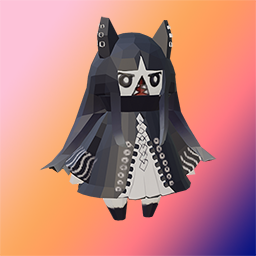
猫鲨生存指南+猫鲨背包 繁體版!
von 76561198859966056
这个MOD包含一个对新人很有帮助的生存手册,以及一个有着强大减重率和容量的背包。在新角色的出生时,就会随身生成这两个物品。如果你把猫鲨弄丢了,可以在制作栏里用碎布条给自己再做一个。不用的猫鲨背包可以放在屋子里作为装饰品。 猫鲨生存手册中记录了当前版本的游戏攻略,新手需要注意的事项,技能效果和训练方式,各种突发状况的处理方式,以及一份可供参考的生存日程表。 猫鲨背包有90%的减重率,强大无比!不要试着把自己装进去。 该模组由Bilibil的GoldCatBall提供的MOD编程制作,布偶旧猫提供建模,猫鲨Catshark提供文案,非常感谢大家的支持。 原本的模組: https://steamcommunity.com/sharedfiles/filedetails/?id=2813675257 Workshop ID: 2907601245 Mod ID: CatSharkGuide_CH

Non-Perishable Melted IceCream
von 76561198152820942
Why? Mod for those who loved stacking 100 melted icecreams in the back of their truck and going on adventure. Removed rot period from melted icecream, as it was before 41.78 Other mods To see a couple more mods I made or collaborated on, feel free to check collection at the top of the page :) Tags: melted, ice-cream, icecream, ice cream, rotten, non-perishable Workshop ID: 2887891404 Mod ID: MMNonPerishableIceCream Free for all This mod can be added to and extended by the whole community. Crediting the original author would be lovely, but isn't necessary. (Then again, this community values loveliness above all else.)
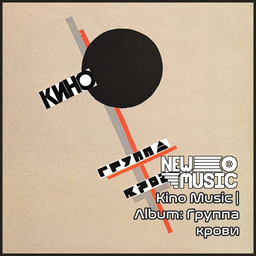
Kino Music | Album: Группа крови
von 76561199258285984
Kino Music | Album: Группа крови Generated with New Music Builder Группа крови Side A 01 Группа крови 02 Закрой за мной дверь, я ухожу 03 Война 04 Спокойная ночь 05 Мама, мы все сошли с ума Группа крови Side B 01 Бошетунмай 02 В наших глазах 03 Попробуй спеть вместе со мной 04 Прохожий 05 Дальше действовать будем мы 06 Легенда Workshop ID: 3753830929 Mod ID: 6AlbumKino
GIGACHAD Level Up Theme
von 76561199375019455
Changes the level up sound (30.11 fixed loud) Workshop ID: 2890373205 Mod ID: GigachadLVLUP

WCN Brita Settings
von 76561198007495099
Brita settings for my server. Workshop ID: 2783791476 Mod ID: WCNBritaSettings

True Music Addon 1.01: 【BanG Dream!】It's MyGo!!!!!
von 76561199172109557
一些bandDream企划MyGo的歌 Some songs from bandDream MyGo Workshop ID: 3298310335 Mod ID: TrueMusic_BanGDream_MyGo_001

Insurgent KR patch
von 76561198157546807
5 Insurgent Profession 모드 번역 특성 설명 추가 Workshop ID: 2908890464 Mod ID: InsurgentKRtranslate
![[B41/B42] More Bourbon Spawns In Louisville Distillery – Project Zomboid Mod](https://images.steamusercontent.com/ugc/2500142617346588618/72B6D32D93F54F2732C52B4A17559F5DE25FCFF4/)
[B41/B42] More Bourbon Spawns In Louisville Distillery
von 76561198045742109
Build 41 and Build 42 compatible. Adds a greater chance of Bourbon spawns to the Louisville Scarlet Oak Distillery to make the journey through the city more rewarding. This was created with the very low loot games in mind, although was tested at several loot settings. The game has two spawn lists in the Distillery - 'WhiskeyBottlingFull' and 'WhiskeyBottlingEmpty' - instead of spawning less Bourbon bottles within the container, the game changes the boxes to use the empty list at low loot settings more often. At insanely low loot settings I have found looting the area to be disappointing as I could only retrieve two bottles of bourbon. I added a chance of bourbon to the WhiskeyBottlingEmpty. Now you can expect a satisfying yet realistic reward. Compatible with existing saves and multiplayer as long as the distillery area (and so the loot) has not been generated by the game yet. If my mod is deleted you are welcome to reupload to Steam Workshop only. Thanks. Workshop ID: 3285527096 Mod ID: morebourbonlvdistilleryspawns
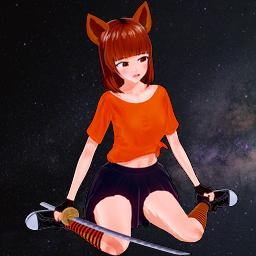
Spiffo Girl Title Screen
von 76561197990989389
Spiffo Girl themed main title, intro logos and more. Character inspired by Amz's Spiffo Girl Avatar VRoid Speed Build https://www.youtube.com/watch?v=83z27c-kXsk Now comes with two versions , you have to choose only one! Contains a new 50% larger Spiffo Girl hand cursor. The game uses the cursor file from the game's folder instead of the mod's. Without manual file copying the mod cursor won't show. If you want to use it you have to copy it to the game folder. The game renders the cursor differently depending on Lock Cursor to Window setting . BACKUP your original "cursor_white.png" located in "\steamapps\common\ProjectZomboid\media\ui" and rename or move it somewhere else!!! If Lock Cursor to Window is enabled you have to copy the "cursor_white.png" from "\steamapps\workshop\content\108600\2753948019\mods\SpiffoGirlTitle\media\ui" to "\steamapps\common\ProjectZomboid\media\ui". If Lock Cursor to Window is disabled you have to copy the "cursor_whiteBGR.png" from "\steamapps\workshop\content\108600\2753948019\mods\SpiffoGirlTitle\media\ui" to "\steamapps\common\ProjectZomboid\media\ui" AND rename it to "cursor_white.png" (remove the BGR from the filename). Mod contains a retextured/renamed rare vanilla item and a bonus icon for Debug mode. Workshop ID: 2753948019 Mod ID: SpiffoGirlTitle Mod ID: SpiffoGirlTitleAlt

Last Hope RP ShopX Money Patch
von 76561198082088147
LAST HOPE RP MONEY PATCH for SHOPX All currency even Base.Money will be converted into your wallet digitally. No more FPS dropping money stacks! Converts Bills when placed in a wallet to XCOIN. Now all shop use XCOIN! Workshop ID: 3382128733 Mod ID: LastHopeMoneyPatch
Project Zomboid Details →
Project Zomboid Guides
Project Zomboid Mods installieren - Workshop Guide
Installiere Project-Zomboid-Mods sauber per Steam Workshop: IDs eintragen, Reihenfolge prüfen, Server neu starten und typische Fehler beheben.
Project Zomboid Build 42 auf dem eigenen Server: Umstieg, Spielstände und Mods
Build 42 ist Stable: Spielstände aus Build 41 sind nicht kompatibel. Umstieg, legacy41-Zweig, neue Serveroptionen, Anti-Cheat und der Hotfix 42.20.1 gegen Serverlag.
Project Zomboid Server mieten – Multiplayer Guide
Project Zomboid Server einrichten: RAM, Sandbox-Einstellungen, Workshop-Mods, Admin-Rechte und typische Fehler sauber prüfen.
Project Zomboid Server mit Mod-Support
Kompatible, unterstützte Mods über das Server-Dashboard installieren.
Project Zomboid Server mieten