Project Zomboid Mods für Server
Für einen modifizierten Project-Zomboid-Server brauchst du pro Projekt die Steam-Workshop-ID und die interne Mod-ID. Prüfe zusätzlich Spiel-Build, Abhängigkeiten und Lade-Reihenfolge, bevor du deine Welt mit den Änderungen startest.
Project Zomboid Mods sicher installieren
Ein Workshop-Abo allein aktiviert eine Mod auf dem Dedicated Server nicht. Die Einträge in `WorkshopItems=` und `Mods=` müssen zusammenpassen; außerdem muss jede Mod den gewählten Build 41 oder Build 42 ausdrücklich unterstützen.
- 1. Build prüfen: Build-41- und Build-42-Mods nicht ungeprüft mischen.
- 2. Workshop-ID, Mod-ID, Abhängigkeiten und erforderliche Reihenfolge vollständig dokumentieren.
- 3. Welt und Konfiguration sichern, Server neu starten und Logs sowie den Beitritt mit einem Test-Client prüfen.
Die vollständige Schritt-für-Schritt-Anleitung findest du im Project-Zomboid-Mods-Guide. Oder starte direkt mit einem Project Zomboid Server mit Mod-Support.
Häufige Fragen zu Project Zomboid Mods
Was ist der Unterschied zwischen Workshop-ID und Mod-ID?
Die Workshop-ID bezeichnet das Steam-Workshop-Projekt und steuert den Download. Die Mod-ID aktiviert den enthaltenen Mod im Spiel. Auf dem Server müssen beide Listen vollständig und passend gepflegt sein.
Laufen Build-41-Mods automatisch mit Build 42?
Nein. Nutze eine Mod nur dann auf Build 42, wenn ihre Workshop-Seite diese Kompatibilität ausdrücklich bestätigt. Prüfe dabei auch alle Bibliotheken und weiteren Abhängigkeiten.
Wie teste ich ein Mod-Update ohne Risiko für die Welt?
Sichere zuerst Welt, Sandbox-Konfiguration und Server-INI. Aktualisiere danach die zusammengehörigen Mods, starte den Server neu und prüfe Logs, Kernfunktionen und einen vollständigen Client-Beitritt.
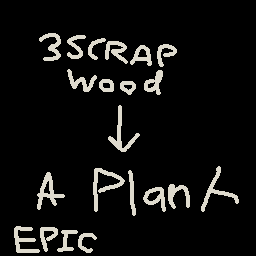
scraptoplank
von 76561198044721722
3 scrap -> 1 plank i hate grinding carpentry Workshop ID: 2681009570 Mod ID: PlankScrap
![[B42] Stable Weights – Project Zomboid Mod](https://images.steamusercontent.com/ugc/17957574704536823711/A45E6158A4693BA9B856D59F6375F6331EFC1F1E/)
[B42] Stable Weights
von 76561198130899626
This is a B42 ONLY update to the mod by JS, original description below This version exposes separate weight change increase and decrease multipliers in the sandbox options instead of just a single multiplier. By default you gain 50% more weight, and lose 30% less weight. Description This is a very simple mod that scales weight gains and losses by an adjustable factor. I was annoyed by how quickly my characters' weights changed and how finicky staying at a healthy weight felt, so I decided to make this mod. How It Works Every ten in-game minutes, this mod calculates each player's change in weight, then scales it by a factor that can be set in sandbox options. Compatibility There shouldn't be compatibility issues, but if some crazy mod depends on changes in player weights, it's possible this mod could disrupt it. You should be able to add this mod to existing saves with no issues. Multiplayer I'm a very amateur modder and this mod was only minimally tested in a locally hosted server, so I can't guarantee it will work in multiplayer. Github Workshop ID: 3529361118 Mod ID: StableWeightChange
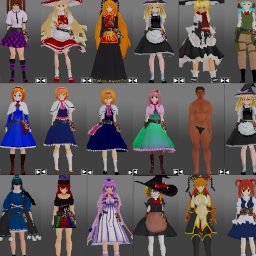
DA Models(TOUHOU&Cookie☆&inmu)
von 76561198101434647
test 自分で遊ぶためのmodel追加MOD 雑です 東方Project 姫海棠はたて(HATATE) 純狐(β版)(JUNKO) 紅夢の魔女(akaiMARISA) 飯綱丸龍(MEGUMU) ヘカーティア 霧雨魔理沙 クッキー☆シリーズ UDK姉貴 UDK姉貴(メガネ) MZ姉貴 ALCTIS ALCHNS ALCHNS2 ICG姉貴 TIS姉貴 MGR姉貴 RU姉貴 BNKRG姉貴 DIYUSI FMRIM HSI姉貴 CRN 死相姉貴 例のアレ 野獣先輩(YAJU) その他 リリィ(パルワールド) ミタ(miside:Normalmita) 狂ったミタ(miside:crazymita) クールなミタ(miside:Coolmita) 今だけダブチ食べ美(Tabemi) Workshop ID: 3423986252 Mod ID: DA models Workshop ID: 3423986252 Mod ID: DA models
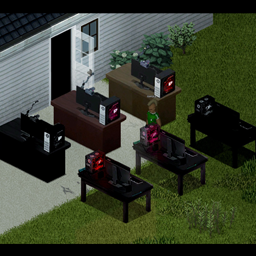
AP_DesktopTiles
von 76561199042257388
AP_DesktopTiles by Glytch3r Adds a few desktop computers on a table Glytch3r Commissioned by ArcherPerezz www.tiktok.com/@archerperezz Donations: https://ko-fi.com/glytch3r/ Contact me if you need any custom mod for your server Discord: Glytch3r#2892 Workshop ID: 2911085653 Mod ID: AP_DesktopTiles

Peachey's Distillation & Homebrew
von 76561198120637027
Twelve drinks, five ways to make them, and vinegar you can actually make. Farm it, ferment it, cut it, sour it, and run it through a still. Nothing ferments on demand Time is the only thing that turns mash into alcohol. Every batch starts the moment you make it and ferments on its own time, whether it is in your bag or on a shelf. Right click a batch to check how long until the batch is done fermenting. Craft with yeast instead of sugar and it ferments in a third of the time. 1. Distilling Chop corn, potatoes, barley or fruit into a bucket of water and feed it. Rotten produce works fine. A day later the mash has soured into wash, and wash goes through a still. The portable Still Kit needs a live fire under it, i.e. a lit campfire, barbecue, fireplace, powered oven, or antique stove. 2. Brewing Beer, wine and mead never touch a still. They are bottled at the start and ferment straight into the finished drink. - Wort - threshed barley, wheat or rye with hops, in beer bottles. Ale in a day and a half. - Must - crushed grapes or orchard fruit, in jars. Wine in two days. Can age into a finer wine. - Honey Must - honey, and water. Mead in three days. 3. 'Casking' Whiskey and scotch require both the still and time. The still only hands back new make, or raw spirit, and waiting does the rest: five days for whiskey, ten days for scotch. Country Wine works the same way, leave it alone for a week and it will become aged wine. 4. Blending Vermouth and Malort are neither distilled nor fermented, just mixed. Vermouth needs both wine and moonshine, while malort needs sweets, absinthe, and moonshine. 5. Souring Vinegar is loot-only in vanilla. Nothing in the game makes it, and preserving a vegetable harvest in jars is the one thing that spends it, so the only sustainable food preservation in Build 42 runs on a resource that never comes back. This branch fixes that. Set wine, ale or mead to sour, or tip windfall fruit and citrus into a bucket of water. Either way you get a Souring Crock, and three days later that crock is an ordinary bottle of vinegar - the vanilla item, so the vanilla jarring recipe takes it without argument. Souring is always deliberate. Nothing you own ever turns to vinegar on its own, so your aged wine is safe on the shelf. Spirits cannot be soured at all: moonshine, vodka, whiskey, scotch and the rest are simply too strong for the culture to survive. The scrap route has no skill requirement and wants exactly the fruit the wine and brandy recipes refuse - rotten produce, oranges, lemons, limes and grapefruit. Acid stalls an alcoholic ferment, but acid is the entire point here. Every finished crock leaves a Mother of Vinegar behind. Pitch one into the next batch and it sours in a day instead of three, and you get it back when that batch finishes. One mother works one crock at a time, so running several batches at once means growing several cultures the slow way first. Two stations - Moonshine Still - a welded drum with its own firebox, so no campfire needed. Runs three washes at once and its condenser recovers a fourth jar the portable kit misses. Moonshine, vodka, brandy and absinthe, and the only place whiskey and scotch can be started. - Fermentation Cask - The cask is the vessel, so bulk ale, wine, mead and vinegar at a better return. Two new herbs to forage - Wormwood - roadsides, field edges and waste ground, months 4 to 10. Absinthe and vermouth both need it. - Anise - a garden plant, so farmland and townships rather than deep woods, months 7-10. The drinks - Moonshine - blows the boredom straight out of you. Expect to be drunk, and expect to crash hard about twenty minutes later. - Potato Vodka - clean, double-distilled. Takes the edge off stress and misery. - Berry Brandy - low proof, sipped for the ache. Dulls muscle soreness and pain. - Homebrew Ale - liquid bread. Quenches thirst and has high carbohydrates. - Country Wine - drinkable the day it finishes, or leave it a week and it becomes aged wine. - Aged Wine - the best mood repair in the cellar. Cannot be brewed directly; only patience makes it. - Mead - honey wine, warming, and the one you keep for when you are ill. - Whiskey - corn spirit with five days of waiting. Everything moonshine does for a black mood, without the punishment afterwards. - Scotch - ten days of waiting and the best thing you will pour. Nothing else touches it for boredom, misery or stress. - Absinthe - lifts a black mood further than anything else here, then hands most of it back twenty minutes later. - Vermouth - wine fortified with spirit and steeped with wormwood. Low proof, faintly bitter, and it settles a bad stomach. - Malort - absinthe cut with fruit juice and melted sweets. Genuinely horrible, the only drink here that leaves you unhappier than it found you, and it closes every wound, break and burn on your body. Requires cooking 9, leaves you drunk in one go, and it will not save you from zombification. Also adds - Still Kit, the portable way to distil, just needs a heat source. - Corn, potato, fruit and barley mash, fresh and fermented - Spent Mash, a distilling byproduct usable as compost or animal feed - Souring Crock and Mother of Vinegar, the reusable culture behind the vinegar line - Empty jars and beer bottles handed back when you finish a drink - A right-click readout on every batch telling you exactly how long it has left Sandbox settings Everything about the wait is adjustable, on its own page in the sandbox options. - Fermentation Time, Ageing Time and Souring Time scale the three kinds of waiting separately, so you can leave mash on a day and still cut scotch down from ten. 100 is the balance described above. - Yeast and Culture Speed sets what pitching yeast or a mother actually buys you. 33 by default; set it to 100 and sugar is just as fast. - Fermentation Range is how far from you a container still counts. Anything you are carrying always ferments. - Still Kit Needs a Fire can be turned off if you would rather not babysit a campfire. The Moonshine Still has its own firebox either way. - Alcohol Strength scales how drunk the drinks get you, and nothing else about them. Homebrew in the world Three separate loot settings: - Homebrew in Loot puts ale, country wine, mead and moonshine in survivor safehouses, squats, trailer parks, farm and garage fridges, drug shacks and floorboard stashes. On by default, at Rare. A found bottle of country wine still ages into aged wine on its own. - Aged Spirits in Loot does the same for vodka, brandy, vermouth, absinthe, aged wine, whiskey and scotch. Off by default, because those cost days to make and finding one hands you the back half of the mod. - Distilling Gear in Loot covers the Still Kit and the Mother of Vinegar. Off by default, since the still is the gate on the whole spirits line. Malort never spawns at any setting. It closes every wound on your body; you can go and earn it. Compatibility Built and tested against Build 42.20. Safe to add to an existing save. No vanilla items, recipes or scripts are overwritten, so it sits alongside other food and farming mods without argument. Pairs naturally with Peachey's Biofuel, which runs the same corn through a still for fuel instead of drink. The two share no items and can be run together or apart. WIP Currently all icons and sprites are assets which were unused in vanilla, some make more sense than others, but ultimately I would like to eventually add my own sprites, icons, and animations. Workshop ID: 3784741776 Mod ID: peacheysdistillation Workshop ID: 3784741776 Mod ID: peacheysdistillation
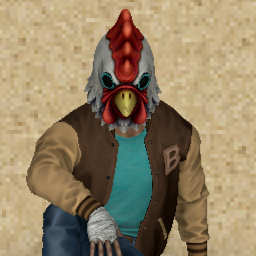
P3_CJacket
von 76561199178116693
How Do I Use It? - You can go to the link below to see how to use it. - Link Recommended mode - Fashionoid - Gear Transmog - Hide All Attached Items - Clipping animation Fix Like My Mode? - Join Our Discord If You Want Commission Workshop ID: 3636245108 Mod ID: P3_CJacket
![[B42] Rebalance - My Own Well – Project Zomboid Mod](https://images.steamusercontent.com/ugc/14501916746789781115/DD1F915E8B3A57E917D32FF2B8BFFF22398EACA7/)
[B42] Rebalance - My Own Well
von 76561198143806739
Creating a well has become more accessible Build Requirements: Woodwork: 5 Metal Welding: 3 Materials Needed: Hammer Shovel Sharp Knife Welding Mask Blow Torch-10 Log-4 Plank-12 Nails-44 Stone-28 SheetMetal-6 Bucket-1 Rope-8 MetalPipe-2 Workshop ID: 3587487275 Mod ID: MOW Tsalik Rebalance
![Limitless Jaw Stab Insta Kills [B42] – Project Zomboid Mod](https://images.steamusercontent.com/ugc/46831454742126090/2596908C36A0F01D0292C3E5CF60602715499688/)
Limitless Jaw Stab Insta Kills [B42]
von 76561198410133704
The updated version for B42.7 has been released. Please unsubscribe then resubscribe, enable the mod and copy-paste the zombie folder, as usual. Sandbox option settings have changed. Due to the recent vanilla update, the previously set maximum values for "Condition Lower Chance One In" and "Condition Max" no longer work as intended, resulting in significantly reduced maximum allowable values for the melee weapon durability. The corresponding sandbox option settings also no longer take full effect either. Therefore, a new "Indestructibility" checkbox has been introduced, preventing melee weapons from losing condition and sharpness. This option is disabled by default. At last, this mod lets you add the jaw-stab insta-kill to your arsenal. Jaw stabbing is the only silent insta-kill move and has one of the coolest animations in PZ, yet hardly anyone uses knives as their main weapon due to the following issues, which this mod addresses: * The jaw stab won't trigger in real combat situations with zombies, because the game automatically disables it when more than one zombie is chasing you. The distance doesn't even matter. No matter how high your stabbing weapon's critical hit chance is, it won't trigger neither. * If your short blade skill is low, there's a high chance your knife will get stuck in your victim's body after performing a jaw stab, suddenly leaving you empty-handed and vulnerable in the middle of the fight. * The jaw stab can be somewhat risky when facing multiple zombies because stabbing weapons have a short range, forcing you to get dangerously close. * Besides knives, although there are numerous other stabbing weapons capable of performing a jaw stab, such as pens, pencils, spoons, forks, compasses, glass shivs, scissors, scalpels, stakes, letter openers, smashed bottles, old-style tin openers, and carving forks, etc., their durability is usually far too low to be practical. Features * A jaw stab can be triggered when multiple zombies are chasing you. (In Vanilla, this is impossible) * Knives no longer get stuck in the victim's body. However, if you'd prefer to keep the vanilla knife-sticking feature, copy the zombie folder from the following directory, rather than the one specified in the next instruction: C:\Program Files (x86)\Steam\steamapps\workshop\content\108600\3455626548\mods\LimitlessJawStabInstaKills\42\Version retaining VANILLA knife-sticking feature (high probability of sticking) Or, If you want knives to stick less frequently than in vanilla, copy the zombie folder from the following directory: C:\Program Files (x86)\Steam\steamapps\workshop\content\108600\3455626548\mods\LimitlessJawStabInstaKills\42\Version retaining low probability of knife-sticking feature (NONE VANILLA) * In very close-range combat with zombies, your ability to defend yourself against bites has improved, but only when directly facing the zombie (to trigger the self-defence mechanism, you need to face the zombie directly from the front, not from the side) and holding a knife, not a pen, a fork, or any other objects. * The range and durability of stabbing weapons has increased and can be adjusted through Sandbox Options or mods. * This mod can be safely added to existing saves as well as new games. How to Install This mod modifies a vanilla Java file, so it requires both a subscription and manual installation. Follow the installation instructions below carefully to manually install the mod. Uninstallation can be done by verifying the integrity of game files through Steam (However, be aware that this process removes ALL mods that modify Java code, "the Java mods", so you’ll need to copy and paste them again afterward for any you want to keep.) 1. Subscribe to the Mod - First, make sure your game version is B42, not B41, and that the game is fully closed. - Then, subscribe to and enable Limitless Jaw Stab Insta Kills on the Steam Workshop. 2. Locate the Mod Folder In File Explorer, navigate to your Steam Workshop directory, which by default is: C:\Program Files (x86)\Steam\steamapps\workshop\content\108600\3455626548\mods\LimitlessJawStabInstaKills\42 (You may copy and paste the above path into the Windows search bar or File Explorer to quickly open it.) 3. Copy the “zombie” Folder Within the 42 folder, locate a folder named “zombie.” Right-click this folder and select “Copy.” 4. Find the Project Zomboid Installation Directory Open a File Explorer window and navigate to your Project Zomboid installation folder. Typically, this can be found here: C:\Program Files (x86)\Steam\steamapps\common\ProjectZomboid Make sure you see an existing “zombie” folder in this directory. 5. Paste and Replace Files Paste the “zombie” folder from Step 3 into your main Project Zomboid folder. When prompted with a warning message indicating that 2 files already exist, choose “Replace the files in the destination.” This will overwrite the necessary files. You have successfully installed Limitless Jaw Stab Insta Kills . Now you can play as Tiny, the Green Beret from the Commandos series. Tips 1. If you're using low-damage weapons like pens or pencils, a jaw stab might not result in an instant kill, but it will definitely knock the zombie down. Always use a knife when you can. 2. The same thing applies to moodles. When there are many negative moodles on screen, even performing a jaw stab will often only knock the target down rather than kill them. 3. If you're having trouble with close combat, try using these mods: * Slow-Mo Fast-Mo: Limitless Game Speed Change : https://steamcommunity.com/sharedfiles/filedetails/?id=3437810600 * Slower Zombie Bite : https://steamcommunity.com/sharedfiles/filedetails/?id=3391320013 * How Many Zombies on Your Tail? : https://steamcommunity.com/sharedfiles/filedetails/?id=3354928605 * Resurrect Character : https://steamcommunity.com/sharedfiles/filedetails/?id=3433579563 Credits The following mods were used to create the screen shots and GIFs for the posters: * Character models: VSkin v2 https://steamcommunity.com/sharedfiles/filedetails/?id=3444516315&searchtext= * Hair models: Ash & Mae's Hair Salon: New Frontier V6 https://steamcommunity.com/sharedfiles/filedetails/?id=3026307069&searchtext=ash+%26+mae * Zombie models: 【B42】 Waifu Zombie https://steamcommunity.com/sharedfiles/filedetails/?id=3389203112&searchtext=waifu Waifu Zombie Re-Textured https://steamcommunity.com/sharedfiles/filedetails/?id=3434803060 Super Girl Zombie (B42 only) https://steamcommunity.com/sharedfiles/filedetails/?id=3402496217 Workshop ID: 3455626548 Mod ID: LimitlessJawStabInstaKills Mod ID: LimitlessJawStabInstaKills
Ronald's Vanilla Gun Rebalancing Tweaks
von 76561198030575315
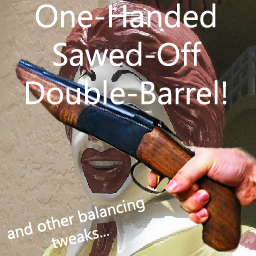
An overhaul to vanilla gun balance and stats. This started as a way to make vanilla guns break less often and avoid having to consume other guns to clean your gun after a day at the zombie range. it's evolved into a full-fledged rebalancing of vanilla guns. All guns behave much more uniquely now, and serve their own unique rolls with pros and cons such that every gun now has a real purpose. HIGHLIGHTS- both bolt-action rifles no longer require stupid external magazines. both are how bolt-actions should be; you just shove loose bullets into them. the Sawed-Off Double-Barrel shotgun is now 1-handed and can be carried in a holster/dual-wielded with a flashlight or tool. The 3D model has been adjusted to be more like a proper hand-held sawed-off. the scaling off aim skill is reworked such that some guns are very user friendly and do not require aim skill to be useful, but others will become much better with higher skill. same for critical hit change, max range at different levels of aim skill. some are very reliable tight damage spread with limited capacity to scale up crit change, others are the other way around. Revolvers for example are pretty reliable damage per hit, but the snub-nose .38 doesn't offer much scaling for range or crit chance... meanwhile, the long magnum revolver now has great scaling with aim skill, but is harder to use at lower levels. it has massive damage, and can penetrate multiple targets. All shotguns do huge damage to doors so that you can "Master Key" your way through most wooden residential doors in 1-hit if you're right up on it. I'll be continually rebalancing this as my friends and I play with it and see how it feels. Cheers! Workshop ID: 2809797111 Mod ID: RonaldsVanillaGunRebalancing

P.A.R.C 42
von 76561198083857446
Автор _LemeS_(update SHADOW) Оригинальный мод: https://steamcommunity.com/sharedfiles/filedetails/?id=2734164805 Mod ID: P.A.R.C Workshop ID: 3662567901 Mod ID: P.A.R.C 42
SpritesScrapperMadness
von 76561198049576578
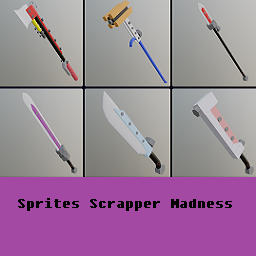
Scrap Weapons Add Scrap made Melee weapons to your world with an Apocalyptic Engineer vibe to the lot! With the proper tools; use Scrapper Weapons to run down hordes while using your freshly gained Scrap and Scrapper Toolset to keep your weapons going! Find the "Mad Scrappers Guide" around the world in Bookstores, Libraries, and other places Engineers might hangout! Craft a Scrapper Toolset to access actions like quick Accessory Scrapping and Material Crafting from Scrap. The Scrapper Toolset shoudld be carried with you if you want to create new Scrapper Weapons or repair your Scrapper Weapons while out and about. Note: You will need to find the magazine and also have Metalworking Level 2 to start using this mod's weapons; you can use the scrap recipes to gain Metalworking XP! This Mod Adds: -9 Melee Weapons --Scrap Bonk --Scrap Dagger --Scrap Hammer --Scrap Sword --Scrap Spear --Scrap Rocket Axe --Scrap Katana --Scrap Smasher --Scrap Cleaver -1 Item --Scrappers Toolset -35 Recipes --Make Scrap Weapon x9 --Repair Scrap Weapon x9 --Repair Broken Scrap Weapon x9 --Scrap Accessory --Scrap Silverware --Make Scrapper Toolset --Make Screws from Screap --Make Nails from Scrap --Make Small Metal Sheet from Scrap --Make Metal Pipe from Scrap --Make Welding Rods from Scrap Workshop ID: 3196209274 Mod ID: spritesscrappermadness

28 Days Later Main Menu with Music (B42)
von 76561198048833753
TO MAKE THIS WORK ON VERSION B42.15 PLEASE FOLLOW RYUKU THE AUTHOR OF MMF'S INSTRUCTIONS: B42.15 NOTICE Unfortunately, due to changes in B42.15, you now need Reflection Enabler. Reflection Enabler link: https://steamcommunity.com/sharedfiles/filedetails/?id=3682136459 I understand installing a Java mod to play custom music in the main menu is overkill, but, that's the way it is at present. When/if this changes, I'll update the mod to support a non-Java solution. ----Description---- B42 Version! B41 version HERE A 28 Days Later themed main menu! For all you crazy's who play with runner zombies XD Replaces the game's original background and music with a 16:9 comic image and 2 epic tracks from the movie's OST and now with an awesome "28DL x PZ Mashup" courtesy of MaDeInCCCP! With a separate mod for each track! They will play randomly when enabled together, so you may hear the same track twice in a row every now and then. I also changed the flavour text to reflect the 28 Days Later theme when you start a new game :) The tracks included are: In the House, in a Heartbeat - John Murphy Godspeed You Black Emperor (FenScree Edit) - East Hastings 28 Days Later x Project Zomboid Theme REMAKE - MaDeInCCCP -REQUIRES THE "MUSICAL MENU FRAMEWORK" -RESET YOUR GAME TO SEE ALL CHANGES This mod is also included in my mix and match pack: HD Main Menu Suite Also did you know you can use all MMF main menu mods together? Use my Menu Suite as a base! Check out the other standalone mods in this series: - Shaun of The Dead Main Menu with Music - Speed Demon Main Menu with Music - A Journeys End Main Menu with Music - Dead Island Main Menu with Music - We are F*cked Main Menu with Music - False Hope Main Menu with Music - Hope is Lost Main Menu with Music - Left 4 Dead Main Menu with Music - The Last Of Us Main Menu with Music - The Walking Dead Main Menu Remix - An Alternative Main Menu - Days Gone Main Menu with Music - Dying Light Main Menu with Music - DayZ Main Menu with Music - Refashioned Main Menu Remix - Xirszo Main Menu Remix - MaDeInCCCP Main Menu Remix Serious massive thanks to Ryuku for his framework, support and help with most of the coding! Please go and like/favourite his Framework! Another massive thanks to Blessed Mother for her highlight code! Also thanks to Zodiac for his logo code and dannyboy for allowing me to use his mod as a base. Image courtesy of Dan Mumford check out his art here! Credits to MaDeInCCCP for the awesome 28DLxPZ mashup track. Workshop ID: 3487470445 Mod ID: 28DaysLaterMM_GODSPEED_B42 Mod ID: 28DaysLaterMM_HEARTBEAT_B42 Mod ID: 28DaysLaterMM_MICCCP-B42
Disassemble Containers With Items: Improved (42.19)
von 76561198009251303
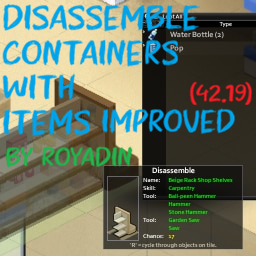
Based on the original mod (with a lot of changes by me) I have brought back the original functionality + items will now drop on the ground from the container. Original mod: https://steamcommunity.com/sharedfiles/filedetails/?id=2835852387 Works with both the toggle menu route for mass disassembling + the Context menu (using the vanilla function so it runs very smoothly!) Got it error free now, and wooden items have the correctly animation (the welding using the screwdriver is unrelated to this mod and is a vanilla bug) Changelog: Day one fix, everything good 6/18: fixed another error stream from the hook into how the mod connects to the container Now both the toggle menu option and the right click context menu route for disassembly will work with this mod, Huzah! Workshop ID: 3747009375 Mod ID: DisassembleContainerWithItemsRoy

Upgraded Pickup truck and Trailer
von 76561199045881134
This mod improves the Chevalier D6 and adds an improved Trailer. If you use the that DAMN Library mod from the great KI5 you will have access to the Gun Rack. It is fully compatible with: "Standardized Vehicle Upgrades 3 - Vanilla Addon" and "Vanilla vehicles animated". This is a personal use mod, so no additional improvements are planned unless you have the time and motivation to do so. (Load before any mod that alters the state of vehicles). Este mod mejora el Chevalier D6 y agrega un Trailer mejorado. Si usas el mod that DAMN Library del gran KI5 tendrás acceso al estante de armas. Es completamente compatible con: "Standardized Vehicle Upgrades 3 - Vanilla Addon" y "Vanilla vehicles animated" Este es un mod de uso personal, por lo tanto, no se planean agregar mejoras adicionales, a menos que disponga del tiempo y la motivacion necesarios. (Cargar antes de cualquier mod que altere el estado de los vehiculos). Workshop ID: 3543194590 Mod ID: 'Upgraded Pickup truck and Trailer

(18+) yiff posters
von 76561199548399660
a bundle of 8 yiff posters --------- (THIS IS MY FIRST MOD BTW SO IT MAY HAVE BUGS) ---------- poster 5 does not work unless you wanna perma delete the poster so dont use yiffy 5 ------------------------- YOU WILL NEED GUNS POSTER FACTORY FOR THIS TOO WORK! HOW TO USE: 1 MAKE POSTER. 2 PLACE THE POSTER (it will appear invisible just remember where you put it) 3 RIGHT CLICK THE POSTER AND SET IT TO THE ONE YOU WANT (NEWS) IF THIS GETS AT LEAST 3 STARS I WILL MAKE A FEMBOYS POSTER PACK WITH A SFW AND NSFW VERSION SEEING AS HOW YOU FREAKY BASTARDS LIKE THIS SHIT! //////////////////////////////////////////////////////////////////////////////////////////////////////////////////////////////////////// DUE TO CURRENT ISSUES WITH B42 BEING UNSTABLE FEMBOYS POSTERS PACK WILL BE REALESED WHEN B42 STABLE IS OUT AND I WILL REWORK THIS MOD ASWELL //////////////////////////////////////////////////////////////////////////////////////////////////////////////////////////////////////// Workshop ID: 3500572962 Mod ID: yiffposters
Reading Glasses +
von 76561197977412934
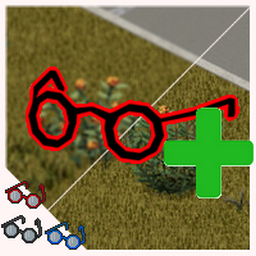
In a nutshell, this mod enables people who uses 'Short Sighted' to use the Reading Glasses without a blurry vision. Version 2.0 brings TWO distinct ways of using the mod: Reading Glasses + 'Classic' └─ Reading Glasses + 'Classic Colors' Reading Glasses + └─ Reading Glasses + 'Colors' Reading Glasses + 'Classic' The 'Classic' version is the one people who already have the mod installed will be placed when it updates. It changes all the 'Reading Glasses' in the game so they can be used as a Prescription Glasses. The 2.0 version also brings a little feature where now the icons on the inventory screen will have colors to differentiate between the 3 available in Vanilla (Blue, Black & Red). The 'Classic Colors' is a addon to the 'Classic' version. It cannot be used by itself, it needs the Classic activated to take effect. This addon adds 9 more colors for the Reading Glasses: Grey, Purple, Green, Pink, Dark Blue, Orange, Yellow, Brown and White. Reading Glasses + The 'Reading Glasses +' is the new update, made for people who plays MP and/or prefers options to collect/choose. This version does not change the vanilla glasses (exept for adding the 3 new icons), instead it adds a new variant of the glasses called "Prescription Reading Glasses". They can be found on the same places as the vanilla counterpart, even in zombies wearing it. Equal to the 'Classic Colors', the 'Colors' does the same thing, but for this new version of the mod. It will add the same colors, to both 'Reading Glasses' and 'Prescription Reading Glasses', totalling 12 colors to each variant. The Colors addons are completly optional, but I hope you like them if you decide to give it a try. The only thing I couldn't do for now is add the new 'Prescription Reading Glasses' to the Foraging loot table. Im still doing baby steps in the modding scenario, so my knolage is very limited. Sorry. Allows Reading Glasses to help with 'Short Sighted' trait. Its a simple mod, but it will make a big difference for me since I love these glasses. Hope I can make someone elses playthrough a bit more fun with this. Workshop ID: 3455892101 Mod ID: ReadingGlasses++ Mod ID: ReadingGlasses+ Mod ID: ReadingGlasses+Colors Mod ID: ReadingGlasses+ColorsClassic
![[B42/B41] Encumbrance Column + CleanUI Compatible – Project Zomboid Mod](https://images.steamusercontent.com/ugc/13565043214392012254/38ECC77EB89F644DD586A5C953512793C62BDB52/)
[B42/B41] Encumbrance Column + CleanUI Compatible
von 76561199190194269
Abstract Show a weight column. Keep your inventory neat and efficient — instantly see item weights, sort them with one click by weight, and customize how they’re displayed. Description A simple mod for displaying the weight (encumbrance) of each item in the inventory. Features - Shows the weight of each item directly in the inventory list. - Allows sorting by weight by clicking the # column title. - Lets you place the weight column next to the item icon or after the item name. - Lets you choose 0, 1, or 2 decimal places for displayed weights. Updates / Fixes - Updated for Build 42 compatibility. - Reworked as a lightweight patch instead of replacing the complete inventory UI script. - Fixed actual weight display for items in the Hotbar and equipped slots. - Fixed issue where custom column width could not be saved and restored. - Added a dedicated CleanUI-compatible version that preserves CleanUI's current inventory implementation. Compatibility - Vanilla UI: enable Encumbrance Column / 负重列. - CleanUI: enable Encumbrance Column (CleanUI) / 负重列(CleanUI). - Do not enable both Encumbrance Column versions at the same time. - The CleanUI-compatible version requires the current CleanUI release and loads after it automatically. Todo - Custom font color for displayed values CleanUI CleanUI Workshop Page

Immersive Spawns & Loot
von 76561198280907285
Immersive Spawns & Loot Immersive Spawns & Loot improves loot coherence and vehicle variety in Project Zomboid without turning the game into a loot fest. The mod is not meant to make survival easy. Its goal is to make the world feel more logical, more readable, and more immersive. What the mod does - Increases loot quantities in the right places. - Makes locations feel more coherent based on their purpose. - Improves early-game progression without breaking balance. - Increases generated vehicle variety. - Gives modded vehicles a stronger presence. - Does not aim to heavily increase total vehicle quantity. Locations and loot improved The mod affects many places and containers in the game, including: - Houses: kitchens, bathrooms, bedrooms, wardrobes, dressers. - Garages and industrial areas: tools, improvised weapons, useful utility items. - Pharmacies, hospitals, ambulances: more coherent and more useful medical supplies. - Bars, restaurants, groceries, gas stations: food, alcohol, cigarettes, magazines, and everyday items. - Clothing stores: more useful clothing, shoes, belts, and bags. - Vehicles: gloveboxes, trunks, truck beds, police vehicles, ambulances. - Zombies: better chances to carry actually useful items, and sometimes weapons. - Police, military, gun store, and other specialized areas: more firearms, more ammo, and more believable loot. Vehicles The mod mainly improves vehicle variety. - More diversity between cars, vans, utility vehicles, small trucks, campers, and specialized vehicles. - Modded vehicles appear more often. - Vanilla vehicles still remain relevant to preserve overall coherence. - The goal is to make the world feel more alive, not to flood it with more vehicles everywhere. Configuration The mod is designed to feel good right after installation. - You do not need to configure it to benefit from its improvements. - The default setup is meant to already provide a better experience. - Sandbox options are mainly there for fine-tuning if needed. In short: - install the mod - start playing - and you should already notice the difference without touching dozens of settings My other mods: Workshop ID: 3702122771 Mod ID: ImmersiveSpawnsLoot

HydeCo. Clay! 42.20.4
von 76561198076382626
Stop stepping over broken pottery. Smash ceramic loot into shards, grind it into grog, mix slip in a bucket, then cast, fire and paint your own ceramics. - 🧸 Five borrowed shapes — cow, bull, stag and human skulls, and a goblet. Each in terracotta or any of the 15 colours. - 🧙 Gnome — a two-coat figurine. Hat first, then the coat: 225 combinations, and repainting the coat keeps the hat you chose. - 🍄 Mushroom — the same by cap and stem. Another 225. - 🐸 Three original sculpts — a frog, a deer and a jack o'lantern, modelled rather than borrowed. Paint the frog and it becomes vanilla's own Pot Scrubber Frog. - 🥚 Ceramic Eggs — six patterns across all 15 colours. 90 eggs to hunt, hide, or line a shelf with. - 🪴 Plant Pots — make one, fire it, paint it any of the 15 colours, fill it with soil and repot a houseplant into it. Five species: cast iron plant, Chinese evergreen, dragon tree, ficus and snake plant. - 🏺 Recycle ceramic loot — 28 vanilla ceramics and 49 world fixtures smash down, and so does every piece this mod makes. - 🪣 Three pottery fluids, in real buckets — Clay Slip, Grog Slurry and Grogged Slip are proper B42 fluids. Mix them in any bucket you own, pour them, carry them. - 🎨 15 paint colours on every finished piece, straight from vanilla paint cans — one dab per coat. - 🧙 Two-colour figurines — paint the gnome's hat, then his coat: 225 combinations, and repainting the coat keeps your hat colour. - 🎓 Potter — a profession: Pottery and Maintenance boosts, the artisan trait, and slip and modeling clay known from the start. - 📖 Two magazines teach the recipe sets; your Pottery skill still decides what you can make. - Every ceramic in the game runs down one chain, and most of it can be done on any crafting surface. Shape it on the Pottery Bench, fire it in a kiln with fuel and a light, then paint it. - Sculpt one master, pour a plaster mold off it, and cast hollow copies until the mold wears out. The master is used up; the mold is not. - Take a sledgehammer to a toilet, a sink or a bathtub. Porcelain runs down its own chain into a white slip that fires bright white instead of terracotta — and it is the only source of the crucible below. Yield has a sandbox slider. - The base game ships the glaze bowl, the glazed jar, their models and a whole skill book about glazing — and no recipes to reach any of it. Mix glaze from slip and quicklime, brush it on, fire it. A glazed jar is non-porous, so it carries 2.5 litres. - Vanilla melts iron and steel and nothing else, so scrapped jewellery has nowhere to go. Porcelain crucibles cast gold, silver, brass, copper and aluminium into vanilla bars. - Bowls, jars, mugs, plates, molds, crucibles, teacups, pipes and the glassblowing pipe — plus every piece this mod makes, painted or not. - It is not only what you are carrying. Bathroom fixtures give porcelain; the amphora and the indoor flower pots give ordinary shards, so a house you have already looted is still worth something. - ♻️ Cleanup that pays — run looted ceramics down the chain and knead Modeling Clay back to Clay to get some of it returned. - 🔁 Nothing is a dead end — any finished ceramic here, painted or not, smashes back into shards. A bad colour choice is three seconds of hammering away from being fixed. - 🔪 Ceramic Shiv — knapped from shards with a hammer. Fragile, but it hits hard when it lands. - 🏹 Ceramic Spear Head — knapped the same way, then bound to a shaft. - 🪵 Both use Flint Knapping, so shards are worth keeping even before you own a kiln. - 📖 Find the magazines — HydeCo. Slip Casting and HydeCo. Ceramic Decorations turn up in bookstores, libraries, classrooms, craft shelves and pottery crates. Reading one unlocks its recipes early; otherwise you learn them as Pottery climbs. - 🐝 HydeCo. Bees! . With it you get the beeswax Modeling Clay recipe and the Pine Needle Paintbrush; without it, sand and dirt cover the same job. - 🖥️ Singleplayer and multiplayer — crafting resolves on the server, fluids and repaints sync to everyone. - 🪣 Updating from an older version? Slip used to be its own bucket item. Those buckets convert automatically the first time you log in, keeping whatever was inside them. - ➕ Safe to add mid-save. Removing it can orphan items left in containers. - 🧩 Other pottery overhauls may change which vanilla items exist to recycle; load order decides who wins. 🔗 Check Out My Other Mods! 🔗 - HydeCo. Automatic Garage Doors! + Gates! https://steamcommunity.com/sharedfiles/filedetails/?id=3594285774 - HydeCo. Bees! https://steamcommunity.com/sharedfiles/filedetails/?id=3430224478 - HydeCo. Fillable Gas Tanks! https://steamcommunity.com/sharedfiles/filedetails/?id=3451542660 - HydeCo. Pyromaniac! https://steamcommunity.com/sharedfiles/filedetails/?id=3730972348 - HydeCo. Unlimited Cars https://steamcommunity.com/sharedfiles/filedetails/?id=3438759949 💬 Discord - Join / Support / Updates: https://discord.gg/Xs6xcAPMKG If you enjoy this mod, please rate and favorite — it helps others find it! Dedicated servers — copy exactly, the mod ID is case-sensitive: Mods=HydeCoClay WorkshopItems=3551124480
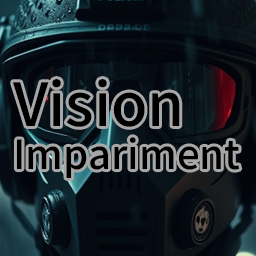
Vision Impariment Zero
von 76561198062695591
Removes all VisionModifier figures, including mod outfits. It is compatible with existing saves Workshop ID: 3407030107 Mod ID: VisionModifierZero
![[B42] Shout To Remove Stress [DEPRECATED] – Project Zomboid Mod](https://images.steamusercontent.com/ugc/9653552392540658604/15B1FE73203A138474557C2D695A2507038A7356/)
[B42] Shout To Remove Stress [DEPRECATED]
von 76561198008387517
🗣️ Shout To Remove Stress (Tarzan Mode) Stressful day in the apocalypse? Scream it out! This mod lets your survivor reduce stress by shouting. Whether you're panicking, cornered, or just really need to scream into the void… now it actually helps. Because sometimes, mental health means going full jungle mode. How to Use • SHOUT — press Q (default key) ‣ Reduces stress by 0.03 (Sandbox customizable) ‣ Wait 20 in-game minutes until it's effective again • TARZAN YELL — hold . (period key, or your rebound key) for at least 2 seconds ‣ Reduces stress by 0.1 ‣ Wait 30 in-game minutes https://github.com/pavel-voronin/pz-shout-to-remove-stress Workshop ID: 3493062213 Mod ID: shoutToRemoveStress
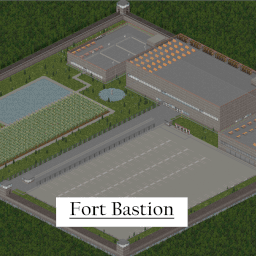
*Discontinued* Fort Bastion
von 76561199062429673
Currently working on porting this mod to B42 *This mod was built for B41 and has yet to be tested on B42 A heavily fortified, and well stocked fortress in the middle of nowhere. Enough supplies, and housing for an entire army to survive doomsday. Located in 15x33, 15x34 (west side of the map, off the road to the north of the military research facility, west of muldraugh) *This is my very first Zomboid map (took me 4-5 days and 100+ hours) *I initially made it just for me, and my friends, but i thought I'd share for anyone else who wanted to use it *I intend to continue making maps for Project Zomboid in the future post B42 release (hopefully of increasing quality) *This mod is completely vanilla and has 0 mod dependencies *This mod is only approximately 90% complete (fixing the road and map) *This base is so OP it may remove some of the fun for you (or possibly even add more fun) *I couldn't figure out how to add it to the overhead map unfortunately, so you wont be able to see it on the map (in progress) *Still attempting to connect the road (also in progress) This map contains 3 buildings, 1 parking lot, 8 generators, 1 cafeteria, 1 bar, 1 farm, 1 reservoir for fishing, 1 cemetery, 1 garage, 4 kitchens, 2 dorms, 1 armory, 1 range, 1 classroom, 2 offices, 1 jail, 1 warehouse, 1 library, 3 bathrooms, 1 set of showers, 5 gas pumps, 1 medbay, 1 laundry room, and 1 gigantic wall to keep away any unwanted guests. If you notice anything broken/bugged or have any suggestions please feel free to let me know :) Workshop ID: 3369454105 Mod ID: Fort Bastion Map Folder: Fort Bastion

自用材质大聪明与橘子联合王国
von 76561198227102696
自用的捏 Workshop ID: 3070484475 Mod ID: CongJuDiTu

Traducciones Beavermods
von 76561198057850443
Traducciones para: that DAMN Library Tsar's Common Library 2.0 Mod Options Server poins (Puntos requiem) bikini tools bikini tools server SNAKE MOD PACK Faction Safehouses With Friends Auto updater restarter Udderly Safe Login Rain Cleans Blood Server tweaker errorMagnifier Reduce lag of Crafting menu Vehicle Blacklist Sleep With Friends v1.2.1 Alternative Inventory Rendering MandoDB - Custom Icon URL with Link Definitive Zombies Improved Hair Menu Another Vehicle Claim System Shops Map extra symbols Weapon Condition Indicator Better Sorting Equipment UI - Paper Doll Equipment Interface - CONTROLLER SUPPORTED! UI: ExtraSauce Item Merge (B41) Craft Helper Continued Map Symbol Size Slider Take Any Amount Mini Health Panel Inspect Weapon KillCount Smarter Storage Container Tooltips Proximity Inventory Noir's Attachments SafehouseNameIndicator AutoMechanics Load All Magazines item GPS itemGPS Radial Wheel Button Radial Medicine Menu GSBQoL Rankings Building Menu Authentic Z RV Interior PACK: SNAKE WarHead's Hazardous Zones Susceptible Trait - Airborne Infection Susceptible WarHead's Hazardous Zones - Overhaul Advanced Trajectory's Realistic Overhaul Journal Dynamic Traits Lifestyle: Hobbies Primeros Auxilios Ampliados Machines! Crafting Enhanced Core Crafting esencial Authentic Animations True Crawl Read While Walking Undead Survivor (Stalker) Fitness & Workout Overhaul True Actions. Act 3 - Dancing Water Dispenser The Workshop Gasohol Snow is water Ladders!? Tidy Up Meister True Music Skizot's Carryable Everything Grab and Drop Boots and Clothes Expanded 10.6 Frockin’ Splendor! Scrap Weapons! Scrap Armor! Commonwealth Armor Pack New Horizon Uniforms Wasteland Canid's Tactical Pack Immersive Solar Arrays (v41, GitHub reupload) Military Ponchos Siowar's Guns Automatic Gate Motors Sleeping Bags! Noir's Rifle Slings ahz clothing Pocket Kittens Better Masks DIY Engine Parts! Refillable Lighters Light Switch Plus Eliaz Better Bags & Backpacks B41 Fridges Off! Peinados Spongie's Hair Workshop ID: 3314420201 Mod ID: TRA
Project Zomboid Details →
Project Zomboid Guides
Project Zomboid Mods installieren - Workshop Guide
Installiere Project-Zomboid-Mods sauber per Steam Workshop: IDs eintragen, Reihenfolge prüfen, Server neu starten und typische Fehler beheben.
Project Zomboid Build 42 auf dem eigenen Server: Umstieg, Spielstände und Mods
Build 42 ist Stable: Spielstände aus Build 41 sind nicht kompatibel. Umstieg, legacy41-Zweig, neue Serveroptionen, Anti-Cheat und der Hotfix 42.20.1 gegen Serverlag.
Project Zomboid Server mieten – Multiplayer Guide
Project Zomboid Server einrichten: RAM, Sandbox-Einstellungen, Workshop-Mods, Admin-Rechte und typische Fehler sauber prüfen.
Project Zomboid Server mit Mod-Support
Kompatible, unterstützte Mods über das Server-Dashboard installieren.
Project Zomboid Server mieten