Project Zomboid Mods für Server
Für einen modifizierten Project-Zomboid-Server brauchst du pro Projekt die Steam-Workshop-ID und die interne Mod-ID. Prüfe zusätzlich Spiel-Build, Abhängigkeiten und Lade-Reihenfolge, bevor du deine Welt mit den Änderungen startest.
Project Zomboid Mods sicher installieren
Ein Workshop-Abo allein aktiviert eine Mod auf dem Dedicated Server nicht. Die Einträge in `WorkshopItems=` und `Mods=` müssen zusammenpassen; außerdem muss jede Mod den gewählten Build 41 oder Build 42 ausdrücklich unterstützen.
- 1. Build prüfen: Build-41- und Build-42-Mods nicht ungeprüft mischen.
- 2. Workshop-ID, Mod-ID, Abhängigkeiten und erforderliche Reihenfolge vollständig dokumentieren.
- 3. Welt und Konfiguration sichern, Server neu starten und Logs sowie den Beitritt mit einem Test-Client prüfen.
Die vollständige Schritt-für-Schritt-Anleitung findest du im Project-Zomboid-Mods-Guide. Oder starte direkt mit einem Project Zomboid Server mit Mod-Support.
Häufige Fragen zu Project Zomboid Mods
Was ist der Unterschied zwischen Workshop-ID und Mod-ID?
Die Workshop-ID bezeichnet das Steam-Workshop-Projekt und steuert den Download. Die Mod-ID aktiviert den enthaltenen Mod im Spiel. Auf dem Server müssen beide Listen vollständig und passend gepflegt sein.
Laufen Build-41-Mods automatisch mit Build 42?
Nein. Nutze eine Mod nur dann auf Build 42, wenn ihre Workshop-Seite diese Kompatibilität ausdrücklich bestätigt. Prüfe dabei auch alle Bibliotheken und weiteren Abhängigkeiten.
Wie teste ich ein Mod-Update ohne Risiko für die Welt?
Sichere zuerst Welt, Sandbox-Konfiguration und Server-INI. Aktualisiere danach die zusammengehörigen Mods, starte den Server neu und prüfe Logs, Kernfunktionen und einen vollständigen Client-Beitritt.

自用太阳能电池-B42
von 76561198154805804
自用太阳能电池-B42 1.需要取消其他相同太阳能板的依赖mod和mod本体 2.这个mod只需要订阅就好,出现错误,先只开启本mod测试。如果是mod冲突,自己解决吧。 3.我修改了电池制作配方,DIY电池.有线循环电池.有线神秘电池.200Ah.400Ah.600Ah.800Ah.可以制作。 4.终极超级循环电池.神秘终极循环电池还没想好怎么制作。 5.我修改了太阳能沙盒设置是为了方便我。 6.中文订阅‘https://steamcommunity.com/sharedfiles/filedetails/?id=3556544454&searchtext=3556544454’。 7.这个mod本身就是我自己想玩的模式改动,望见谅!!!! 8.努力升级吧,如果想电池板在世界生成多一点,就进沙盒修改一下。 9.上班时间忙....... 🔋 电池性能参数一览(递进优化) 电池名称 容量 (Ah) 每Tick消耗 (UseDelta) 衰减系数 (Degrade) 定位 Wired Car Battery 50 0.030 5.0 最低容量 / 最短寿命 DIY Battery 150 0.090 0.125 手工劣质电池 200Ah Deep Cycle Battery 200 0.0070 0.070 标准工业电池 400Ah Super Battery 400 0.0007 0.007 高性能电池 600Ah Heavy Duty Battery 600 0.00005 0.003 重型工业电池 800Ah Premium Battery 800 0.00003 0.0003 顶级民用电池 Ultimate 4000Ah Battery 4000 0.00001 0.00003 史诗级电池 Ultimate Plus 4500Ah 4500 0.000008 0.00001 最高容量 / 最长寿命 ✅ 优化规则 - 容量从小到大严格排序 - 容量越大 → 消耗越低(UseDelta↓)→ 续航更长 - 容量越大 → 衰减越慢(Degrade↓)→ 寿命更长 - 所有电池重量统一:10 - 适配 Project Zomboid Build /42+ Workshop ID: 3428778750 Mod ID: ISAB42 Mod ID: ISApatchB42
![[B42] Emergency Lights UI – Project Zomboid Mod](https://images.steamusercontent.com/ugc/29937078180924273/117053A5586BAFB955B705B7EEF769C5A34C09A3/)
[B42] Emergency Lights UI
von 76561198135117801
An altered version of the Lights Controller UI that makes it smaller and places it conveniently beside the Dashboard. Workshop ID: 3413874679 Mod ID: EmergencyLightsUI

无敌墙Invincible wall
von 76561198168977693
Based on "more builds" 基于更多建筑mod The loading order is placed after more buildings 加载顺序放在更多建筑的后面 The required conditions are the same as the panel 需要的条件和面板一致 Right click on the pillar to turn over 右击柱子可以翻过 Vehicles can pass through normally 车辆可以正常通过 It's not technically invincible. It only has 900 million HP 严格来说它不是无敌的,血量只有9亿 Default is north-south, press R to change to East-west 默认是朝向左下,按R改变至朝向右下 You can find it in more buildings → builds → fence posts 你可以从更多建筑→建筑→栅栏柱里找到它 因为原版的会被爬尸打坏,且消耗的材料与面板不一致,所以做了这个Mod 如有侵权马上删 Workshop ID: 2916433222 Mod ID: wypost
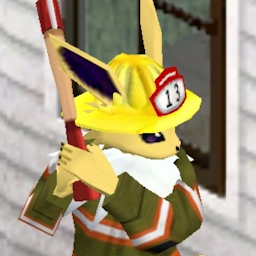
Anthro Jolteon
von 76561198068799211
Introduces the electric eeveelution Jolteon :3 Male and Female versions available. Character trademark belongs to Game Freak/TPC/Nintendo. Followed the guide here at https://wolfjackal.dev/projects/project-zomboid/anthro-survivors/mod-creator/#instructions and the pza tool to build the mod. Really appreciate the helpful information and resources provided! Workshop ID: 3258506700 Mod ID: AnthroJolteonSurvivor

UFP - Wild Fruit Farming Patch
von 76561198131954636
Adds general compatibility between Wild Fruit Farming and Ultimate Farming Patch . Workshop ID: 3222593314 Mod ID: UFPWFF
![Egg Laying [B41/B42] – Project Zomboid Mod](https://images.steamusercontent.com/ugc/1858302130101098381/2ACD2B390B39B48868DEA61C66BAA5DF6029D710/)
Egg Laying [B41/B42]
von 76561198273014565
Have you ever wanted to lay eggs in a zombie survival game? Have you ever been starving, restless, all alone hunkered down in a cold closet waiting for inevitable death of starvation because you ran out of supplies? Well fret no longer! With the "Egg Laying" mod your character will lay an egg once every few days, make sure to cook it though or you will die! Now updated to Build 42, where you can co-exist with your chicken buddies! Coop egg laying. Disclaimer: Waiting for long periods of time does NOT mean your egg will hatch into another creature. -Thank you to Robert Mölders and Fuyuno for the idea (and Fuyuno for reminding me to update this) ---------------------------------------------------------------------------------- DISCORD SERVER for my game development + other zomboid mods: https://discord.gg/2ZdPVnZAxu ---------------------------------------------------------------------------------- Workshop ID: 2764099082 Mod ID: EggLaying

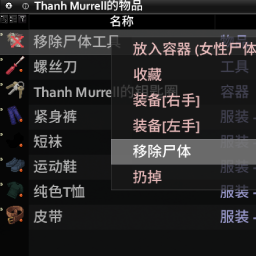
尸体移除工具/Corpse Removal Tool
von 76561199077123486
新物品:尸体移除工具,可删除玩家周围半径50格范围的僵尸尸体。 (若玩家死后未变成僵尸,那么该玩家尸体不会被删除。) 合成配方:垃圾袋*10,木棒*10;沙盒设置可关闭合成。 New Item: Corpse Removal Tool. It can delete zombie corpses within a 50-tile radius around the player. (If a player does not turn into a zombie after death, that player's corpse will not be deleted.) Recipe:Garbagebag*10,WoodenStick*10;Sandbox settings can disable the recipe. Workshop ID: 3576411316 Mod ID: jingremoveCorpse
![Indigo Park Plush Pack [Outdated] – Project Zomboid Mod](https://images.steamusercontent.com/ugc/15297208348039698/44D66B62C2DA00B45B01AC2729FD54F0C1704142/)
Indigo Park Plush Pack [Outdated]
von 76561198301804420
This mod does not work with B42 multiplayer, this will be fixed when Indigo Park CH2 releases, apologies for any inconviences. (High Quality Thumbnail) Yup, they're back and brand new, the whole gang in just 1 green subscribe button! This Mod Contains - 10 Indigo Park Collectables - Rambley - Golden Rambley - Conductor Rambley - ??? - Model Train - Mollie Macaw - Finley - Rambley 6 Inch Vinyl + Box - Retro Lloyd the Lion - Lloyd the Lion Saving the worsts for last, of course ;) The new plushies work with the old mods, Feel free to use them together This mod does work with B41 but is deprecated What to expect for the next update Porting the old CH1 models Porting the new CH2 models Other interesting CH2 stuffs Fun Secrets to Find & Decode Workshop Page Rework Large Plushies Actually Fixed Distributions for B41 and B42 Completely Reworked File Structure for B42 (Mainly just for me) Reworked Rambley Figure (Empty Boxes + Repackaging) B42 Multiplayer Support Readding B41 support :D Future updates after that one Clothing Ramble-pocalypse Misc collectables (not plushies) Obviously, all rights to these characters go the team behind Indigo Park. Check them out here! Workshop ID: 3346999241 Mod ID: IndigoPack

21L Water Dispenser
von 76561198894333071
21L water dispenser bottle. Only works on a new save! Workshop ID: 3494962113 Mod ID: 21LWD

RPG Skills Systems B42 – RPGMenu
von 76561198114635860
RPG Skills Systems B42 – RPGMenu (42.13 - 42.14 - 42.15 - 42.16 MP) A complete overhaul of the character progression system with an updated interface menu for Build 42. This mod converts character progression into an RPG-style leveling system while preserving the atmosphere and core mechanics of Project Zomboid. 🔥 CORE CHANGES - The vanilla direct skill progression system is not removed, but heavily reduced and slowed down to the point of being practically unusable. - Added a global character level system. - The overall level increases from all experience gained. - Each level grants skill points. - Skills are upgraded manually using level points. - All gained experience is redirected into the global level system. Progression is now based on character levels instead of direct XP gain in individual skills. ⚙ IMPORTANT WORLD SETTINGS - It is recommended to set the global XP multiplier to 0.01. - With default values, progression will be too fast. - For servers, base XP multiplier override is implemented. - Progression balance is automatically adjusted on the server side. - This ensures proper leveling speed in multiplayer. 🧬 CHARACTER MENU All core character information has been reworked into a new, more informative and compact interface, combined with the former health tab. The menu includes: - Character level - Experience progress bar - Available skill points - Profession - Character weight - Favorite weapon - Survival statistics - Zombie kill count - Attributes - Overall health condition - Wound display directly in the character menu The interface is now more cohesive and user-friendly. ⚔ SKILL SYSTEM - Skills are grouped in a familiar vanilla-style layout. - Replaced boxed visuals with a cleaner level display. - Added manual skill upgrading using level points. - Original category structure is preserved. Skills are now easier to read and visually cleaner. 🌡 TEMPERATURE & PROTECTION - Temperature and protection are based on the base game mechanics. - Both systems are combined into a single tab. - Layout is more flexible and convenient. - Gameplay logic remains unchanged. ❗ TROUBLESHOOTING & SUPPORT If the mod is not working correctly, please make sure: • The mod is enabled in the mod menu • The world or server was restarted after updating • No old version files remain in the mod folder If the issue persists: Join our Discord and describe your problem. Please attach your game logs — this will significantly speed up troubleshooting. Discord: https://discord.gg/RSV63vrhG7 Workshop ID: 3666281346 Mod ID: RpgSkillsSystemsB42 VanillaMenu

服务器热修复hanma1.1
von 76561198173293063
123 Workshop ID: 3162924678 Mod ID: hanmabug

HowTo Hot-wiring
von 76561198134436393
With this magazine you'll learn how to hotwire cars and get the trait burglar. You can find it in bookstore and mechanic store Workshop ID: 2755532357 Mod ID: Hotwiring

Stalker Menu Background + Music
von 76561198261332560
Fondo dinamico de supervivencia con truenos y musica de ambientaciòn para tu menu, disfruta de un pequeño ajuste a ese menu clasico de Project Zomboid y dale un ambiente mas post apocaliptico. (no olvides brindar sugerencias nos ayuda a crecer) _ ____________________________________ Dynamic survival background with thunder and ambient music for your menu, enjoy a little tweak to that classic Project Zomboid menu and give it a more post-apocalyptic vibe. (don't forget to give feedback, it helps us grow). Discord: https://discord.gg/5XCgRgxC Workshop ID: 3346107127 Mod ID: Stalker_menu_song
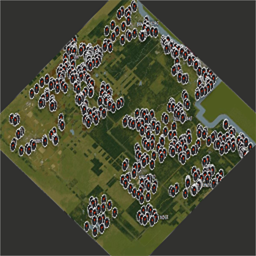
Random Spawnpoints
von 76561197999836347
Random Spawnpoints Start your journey somewhere completely unexpected. This mod adds more than 550 hand-placed outdoor spawn locations across the map. Every spawn point is located outside of buildings, usually somewhere in the countryside, farmland, near forests, barns, small structures, or other signs of civilization. You will often spawn near a dirt trail, footpath, fence line, field, or other recognizable landmark that can help you get your bearings and lead you toward the nearest buildings. You will not begin safely inside a house with supplies waiting for you. Instead, your first challenge is simply figuring out: Where am I — and which direction should I go? Follow paths, fences, fields, roads, and other clues in the environment until you reach civilization. With over 550 different spawn positions, every new character can begin in a completely different situation. INSTALLATION: 1st: copy the "Random Spawnpoints\spawnpoints.lua" in your game location at: SteamLibrary\steamapps\common\ProjectZomboid\media\maps\... 2nd: edit the "Server\servername_spawnregions.lua" and add: { name = "Random Spawnpoints", file = "media/maps/Random Spawnpoints/spawnpoints.lua" }, Workshop ID: 3420920639 Mod ID: Random Spawnpoints
![[B41] Upgrade Melee Weapons – Project Zomboid Mod](https://images.steamusercontent.com/ugc/2488882896036512957/1C62B6F849252BBFEF3F9CF2BDC23DEA55902CE2/)
[B41] Upgrade Melee Weapons
von 76561199163470546
With this modification you are able to upgrade melee weapons. All upgrades comes with new models and different stats. I will try focus more on realistic upgrades rather than upgrades like add toxic gas to machete. For now you can craft: -Barbed Wire Baseball Bat (23.06.2024) -Scythe On Stick (23.06.2024) -Saw Blade Axe (24.06.2024) -Serrated Machete (25.06.2024) -Wrench Sword (26.06.2024) -Pipe Axe (26.06.2024) -Hammer On Stick (27.06.2024) -Blade On Stick (28.06.2024) You can also craft: -Barbed Wire All weapons in this mod can only be acquired by crafting them! Mod supports EN, DE and PL languages for now. DE translation by stumpi. Questions: -What items do you need to craft? You can check each recipe in crafting menu, just type weapon name. -Is this mod compatible with others weapon mods? Yep. -Are you planning to add more upgrades? Yes but i dont have many ideas, so if you have one feel free to give me ideas in comments section (Focus on realistic upgrades). -Is (insert weapon name here) good/bad? -I am trying to balance all weapons so that none of them is too strong in comparison to the weapons in game. If you see a weapon that is too strong, please let me know in a comment. Contact: Discord: mcpax Check my other mods: Custom songs for Project Zomboid Custom Songs for mod New Music (with 650+ songs) Workshop ID: 3273682152 Mod ID: upgrade_melee_weapons
![[COS] Horangi – Project Zomboid Mod](https://images.steamusercontent.com/ugc/2044106057029593765/DF466D30B4F2FB55CB9E07D10BCADE985EA7FAD2/)
[COS] Horangi
von 76561199178116693
How Do I Use It? - You can go to the link below to see how to use it. - Link Recommended mode - Fashionoid - Gear Transmog - Hide All Attached Items - Clipping animation Fix How to use COS mode in build 42. - Navigate to the path where the mod is installed. - Create a 42.0 folder. - Create a common folder. - Paste the media folder / mod.info / preview.png into the 42.0 folder. The recipe code writing method has been changed in 42Build. Since COS (Costume) mode has approximately over 200 modes, converting to 42Build's recipe code is an extremely laborious task. In 42Build, you cannot create costumes in (42 build) the crafting tab. There are two methods: Spawn items in cheat mode. Select items in the clothing selection screen when creating a character. Like My Mode? - Join Our Discord If You Want Commission
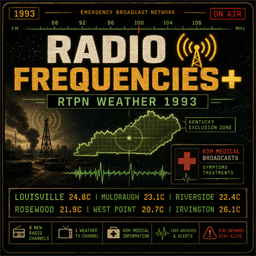
RADIO FREQUENCIES+ BUILD 42.17 | 42.16
von 76561198019636022
MULTIPLAYER COMPATIBLE ✅ 📻 RADIO FREQUENCIES PLUS – KENTUCKY 1993 Tired of the same old broadcasts? This mod expands the radio and TV system with new frequencies, emergency transmissions, medical reports, and dynamic weather updates. All integrated into a 1993 setting for a more immersive survival experience. 🔊 WHAT DOES IT ADD? 📡 8 new radio and TV channels Tune into unique broadcasts with dedicated frequencies across Kentucky. 🚨 Emergency transmissions Evacuations, roadblocks, warnings, and official updates that evolve over time. 🧠 Progressive medical knowledge Learn about diseases, symptoms, and treatments by listening to broadcasts. The more you listen, the more you unlock. 🌡️ Real-time weather reports Dynamic temperature updates for cities like Louisville, Riverside, and Rosewood. 📂 Outbreak archives CDC records, ham radio logs, and automated systems revealing what happened. ⏱️ Hourly updates Broadcasts change depending on survival days and in-game time. 📻 RADIO FREQUENCIES 87.900 — FEMA Relay South 90.600 — CDC Archive Loop 95.200 — WTFX Louisville Evac 99.400 — KDH Medical Relay 102.300 — US EBS Automated 103.700 — RTPN Radio Weather 1993 106.800 — HAM Archive K4RDN 📺 TELEVISION Channel 202 — RTPN TV Weather 1993 🧩 COMPATIBILITY ✔️ Multiplayer compatible ✔️ Works great with Regional Temperature 1993 mod ✔️ Work great with Knox Diseases Health Panel mod 🎯 MOD GOAL This mod does not alter core mechanics. Its purpose is to improve immersion, provide useful information, and turn the radio into a real survival tool. 💬 Enjoying the mod? Leave feedback, suggestions, or ideas for new channels. Adds new radio and TV channels set in 1993 Kentucky: external emergency archives, KDH medical broadcasts, and real-time regional climate bulletins. Workshop ID: 3712518794 Mod ID: RadioFrecuenciasPlus
Screw Screws!
von 76561198313812613
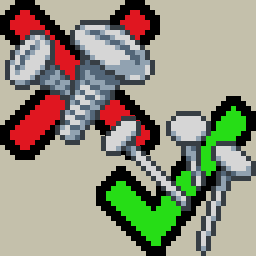
Brief: Adds an additional button on the right click menu for nails / screws to convert to each others. This spectacular mod allows you to quickly turn those pesky screws into useful nails, which are crucial to your survival in Project Zomboid. It is time to defend against the zombies with this amazing mod. Description: Are you tired of having excess amounts of screws in your inventory with barely anything to do with them? Well you are in luck, this mod is for you. Welcome to my mod, Screw Screws!, or the original name "Turn Screws Into Nails (and vice-versa!)." After researching online the different uses for screws, I came to realise that they are pretty abandoned and are only used for minor things, such as mods or cars. I also find countless posts complaining about excessively finding too many screws boxes and having nothing to do with them. I was also frustrated at seeing too many screws boxes and no nails boxes, so I made this mod to fix this issue. Guide On How The Mod Works - Have a nail or screw inside of your inventory. - Right click on "Turn Nail Into Screw" or "Turn Screw Into Nail". - This can also be done with the box variants too. Compatibility - Works on SP (Singleplayer) - Works on MP (Multiplayer) Special Thanks: - Shout out to Kobernaut for providing amazing artwork for my mod. Trying to create art can be a real challenge and he made these amazing designs fast too! - Shout out to @PhilJHerman, @alphaBEE and @albion for being extremely helpful and guiding me on how to fix and help make my mod. Without them, this mod would never exist. - Shout out to YOU for downloading and using this amazing mod. I really appreciate the support on it. Thankyou! Workshop: Workshop ID: 3008920679 Mod ID: TSINbyEndy Coming Soon "THE OVERHAUL": I'll eventually be updating this mod for B42 and overhauling it. As it is too much to code in to turn screws and nails to be used for every item, I will make it require some sort of tools (probably a screwdriver) to transfer it to each other, but will provide a negative of some sort, to prevent it being too overpowered. E.g., 2 screws for 1 nail.
Repairable Bushcraft Weapons
von 76561198015025761
Make tools from "Bushcraft Gear - Rare Weapons" repairable Workshop ID: 2962190436 Mod ID: RepairableBushcraftWeapons
![[Not Updated] Stop Burning – Project Zomboid Mod](https://images.steamusercontent.com/ugc/40067170778628104/C54836822C7E1BCF695030869A0DE623A7FCF1DA/)
[Not Updated] Stop Burning
von 76561198348138562
Lightweight mod which allows you to manage if YOU / ZOMBIES should burn. Default settings prevent you from burning while standing on campfire. (You can turn on / off what should burn and where in sandbox settings.) Details - Works in Singleplayer! - Safe to be added / removed for any save. - You can enable burning in any time by changing sandbox settings. - You can disable / enable burning from fire or just campfire for you and / or zombies. - In default settings, you can't burn yourself on campfire only. Want more? Join me on Discord to stay up to date! You can suggest or report anything there. Made by Kamer * Workshop_ID: 3388768268 * Mod_ID: KAMER_SB_b42 * Version: 0.1
喵服ISO集装箱
von 76561198181030346
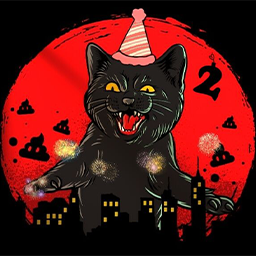
15款集装箱,欢迎群友带图来定制,均可作为房车刷新 该模组里有raboi车辆的刷新率调整文件,需要注意 Workshop ID: 3225539288 Mod ID: ziyongISOmiaofu
焊工面罩修改 Welder mask modification
von 76561198050176944
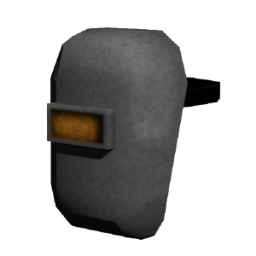
焊工面罩现在进行了大改。 变化1:眼睛部位,你可以穿着吃饭。 变化2:对脖子和头进行100%防御。并且不会被破坏,不会被攻击掉落。 变化3:模型变成了护目镜。 它现在依然拥有焊工面具的所有金工能力。 怎么看mod生没生效?你身上如果有焊工面罩会直接变成这个mod的版本。 这个mod可以随时添加/删除。 ------------------------------------------------------------------------------------------------------- Welder's mask has now been overhauled. Change 1: In the eye area, you can eat in it. Change 2:100% defense for neck and head. It will not be destroyed and will not be dropped by attacks. Change 3: Models become goggles. It still has all the metalwork capabilities of a welder's mask. How does the mod work successfully?If you have a welder's mask on you, it will change directly into this version of the mod. This mod can be added/removed at any time. ------------------------------------------------------------------------------------------------------- Workshop ID: 2806620895 Mod ID: 鐒婂伐闈㈢僵淇敼 Welder mask modification
Automatic Door Controller
von 76561198136676057
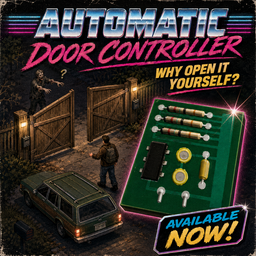
Automatic Door Controller Upgrade compatible existing doors and gates with a salvaged proximity controller. Once installed, the entrance automatically opens for approaching players and closes after the area is safely clear. Features - Craftable standalone controller requiring Electrical Level 3. - Installs on compatible closed and unlocked doors or gates. - Normal doors and pedestrian gates respond to players on foot. - Full-size four-panel gates also detect player-driven vehicles. - Automatic closing with player and vehicle safety detection. - Lock Gate completely disables automatic and manual opening until unlocked. - Controllers can be removed with a screwdriver or Multitool and reused. Crafting Requirements - 1 TV Remote - 1 Radio Receiver - 2 Electrical Wires - 2 Scrap Electronics - 1 Screwdriver or Multitool (retained) Access and Security Safehouse members share automatic access. Outside safehouses, installed controllers remain public infrastructure. Existing physical-key locks are preserved and cannot be bypassed by installing a controller. Compatibility Designed for Project Zomboid Build 42.20+. Automatic Wooden Gates created with earlier versions remain supported and retain their built-in controller. Workshop ID: 3777510303 Mod ID: AutomaticSensorGate
Project Zomboid Details →
Project Zomboid Guides
Project Zomboid Mods installieren - Workshop Guide
Installiere Project-Zomboid-Mods sauber per Steam Workshop: IDs eintragen, Reihenfolge prüfen, Server neu starten und typische Fehler beheben.
Project Zomboid Build 42 auf dem eigenen Server: Umstieg, Spielstände und Mods
Build 42 ist Stable: Spielstände aus Build 41 sind nicht kompatibel. Umstieg, legacy41-Zweig, neue Serveroptionen, Anti-Cheat und der Hotfix 42.20.1 gegen Serverlag.
Project Zomboid Server mieten – Multiplayer Guide
Project Zomboid Server einrichten: RAM, Sandbox-Einstellungen, Workshop-Mods, Admin-Rechte und typische Fehler sauber prüfen.
Project Zomboid Server mit Mod-Support
Kompatible, unterstützte Mods über das Server-Dashboard installieren.
Project Zomboid Server mieten