Project Zomboid Mods für Server
Für einen modifizierten Project-Zomboid-Server brauchst du pro Projekt die Steam-Workshop-ID und die interne Mod-ID. Prüfe zusätzlich Spiel-Build, Abhängigkeiten und Lade-Reihenfolge, bevor du deine Welt mit den Änderungen startest.
Project Zomboid Mods sicher installieren
Ein Workshop-Abo allein aktiviert eine Mod auf dem Dedicated Server nicht. Die Einträge in `WorkshopItems=` und `Mods=` müssen zusammenpassen; außerdem muss jede Mod den gewählten Build 41 oder Build 42 ausdrücklich unterstützen.
- 1. Build prüfen: Build-41- und Build-42-Mods nicht ungeprüft mischen.
- 2. Workshop-ID, Mod-ID, Abhängigkeiten und erforderliche Reihenfolge vollständig dokumentieren.
- 3. Welt und Konfiguration sichern, Server neu starten und Logs sowie den Beitritt mit einem Test-Client prüfen.
Die vollständige Schritt-für-Schritt-Anleitung findest du im Project-Zomboid-Mods-Guide. Oder starte direkt mit einem Project Zomboid Server mit Mod-Support.
Häufige Fragen zu Project Zomboid Mods
Was ist der Unterschied zwischen Workshop-ID und Mod-ID?
Die Workshop-ID bezeichnet das Steam-Workshop-Projekt und steuert den Download. Die Mod-ID aktiviert den enthaltenen Mod im Spiel. Auf dem Server müssen beide Listen vollständig und passend gepflegt sein.
Laufen Build-41-Mods automatisch mit Build 42?
Nein. Nutze eine Mod nur dann auf Build 42, wenn ihre Workshop-Seite diese Kompatibilität ausdrücklich bestätigt. Prüfe dabei auch alle Bibliotheken und weiteren Abhängigkeiten.
Wie teste ich ein Mod-Update ohne Risiko für die Welt?
Sichere zuerst Welt, Sandbox-Konfiguration und Server-INI. Aktualisiere danach die zusammengehörigen Mods, starte den Server neu und prüfe Logs, Kernfunktionen und einen vollständigen Client-Beitritt.
![The Last of Us Music [42.20] – Project Zomboid Mod](https://images.steamusercontent.com/ugc/11134679940136646519/4F8367FCC3E1357D4CA65D4276A5BEEE9A5718D8/)
The Last of Us Music [42.20]
von 76561199214960935
🎧 The Last of Us Music A full soundtrack replacement. Every piece of music in Project Zomboid is gone, replaced with the score of The Last of Us. 🎵 What it does All 318 music slots are filled. Nothing falls back to vanilla, and nothing plays into silence. The score follows what you are doing: - 🏠 Safehouse - sparse, quiet, room to breathe. Long stretches of nothing. - 🚶 Exploration - slow guitar and strings, the sound of walking through somewhere that used to be a place. - 😰 Tension - low drones and pulses when something is wrong but you cannot see it yet. - 🧟 Action - percussion and dissonance when the dead are on you. Music is drawn from The Last of Us Part I, Left Behind and The Last of Us Part II, picked so each piece sits where its mood belongs rather than playing at random. 🔊 Also replaced - 💀 Death - the music that plays when you die - ⭐ Level up - the skill increase chime - 👁 Spotted - the alert when a zombie notices you 📥 Install ⚠️ This mod needs one manual step. Subscribing alone is not enough. - Subscribe. - In the main menu, open Mods and enable The Last of Us Music . - Copy the sound bank into the game folder. Back up the original first if you ever want the vanilla music back. Take ZomboidMusic.bank from the subscribed mod: Steam\steamapps\workshop\content\108600\3790142543\mods\TLOUMusic\42\media\sound\banks\Desktop\ZomboidMusic.bank and put it here, replacing the file already in place: Steam\steamapps\common\ProjectZomboid\media\sound\banks\Desktop\ZomboidMusic.bank - Restart the game. Sound banks are only read at startup, so enabling the mod without restarting will not change anything. Already had version 1.0? Copy the bank across again. The old one is still sitting in your game folder, and Steam cannot replace it for you. To go back to vanilla music: restore your backup, or use Steam - Project Zomboid - Properties - Installed Files - Verify integrity of game files. 📝 Notes - Built for Build 42.20. - Replaces the music bank, so it will conflict with any other music replacement mod. Run one at a time. - Large download. It is a full soundtrack, not a patch. - Safe to add or remove at any point. It touches no save data. Workshop ID: 3790142543 Mod ID: TLOUMusic
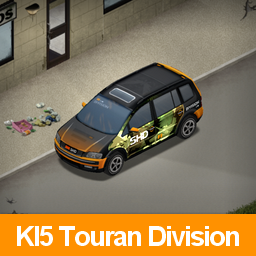
04vwTouran-Division
von 76561198259271956
This is an example mod with two worlds. You can use this as a template for your own map mods. This is a unique exterior design created for the KI5 - '04 Volkswagen Touran.If you like Division, this car should be suitable for you. B42 这是专为KI5系列 2004 大众途安 车型设计的独特外观。如果你喜欢“全境封锁系列”,那么这款车应该会很适合你。 The original MOD file must be downloaded in order for it to be effective. Please place the sorting order of this MOD below the original MOD. 必须先下载原始的 MOD 文件才有效。请将此模组的排序顺序置于原始模组下方。只适配B42 ------------------------------------------------------------------------------ All rights belong to the original authors of the KI5 series. 所有版权归 KI5 系列的原作者所有. ------------------------------------------------------------------------------ The performance of this car has a slight difference from the original 2004 Volkswagen Touran, but it remains within a manageable range. 这款汽车的性能与原版 2004 大众途安 相比略有不同,但仍在可接受的范围内。 It is easier to find it in police stations and military facilities. 在警察局和军事设施里更容易找到它 ------------------------------------------------------------------------------ Do not alter this mod, and treat it as a mod that is 'On Lockdown'. You are not allowed to repack this mod under any circumstances, ever. 请勿修改此模组,将其视为处于“封锁状态”的模组。在任何情况下,都不允许重新打包此模组,永远都不行。 ------------------------------------------------------------------------------ If the original author requests, I will hide this MOD. 如果原作者有要求,我会将这个MOD隐藏起来 Workshop ID: 3483715100 Mod ID: 04vwTouran-Division
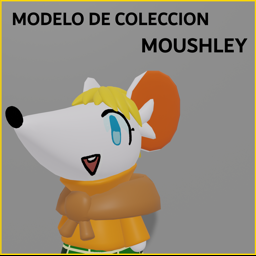
Collection Model: MOUSHLEY
von 76561198227594460
A Moushley Mouse figurine that can be found in dorms with a low spawn rate, That is simply a figure for collection and decoration :> Workshop ID: 2965458396 Mod ID: FigurineMOUSHLEY

Jimothy of Knox Country
von 76561197990050982
Jimothy of Knox Country Meet Jimothy: a perfectly healthy-looking raccoon with a very short spine, a compact body and a little stubby tail. This mod adds Jimothy as a rare, naturally spawning raccoon variant. He uses his own mesh and animations while otherwise behaving like a normal raccoon. Features - Jimothy can appear naturally among wild raccoons. - Default spawn chance: 1% per newly spawned adult male raccoon. - Spawn chance is configurable from 0–100% under Custom Sandbox > Jimothy Raccoon. - Set the chance to 0 to disable natural spawning. - Jimothy can also be manually spawned through the debug animal menu. - Naturally spawned variants are automatically named Jimothy. - Jimothy can be petted, picked up and cared for like an ordinary raccoon. - Jimothy can mate with ordinary raccoon sows. - His offspring are always normal vanilla raccoon kits, Jimothy’s condition is not inherited. Manual Debug Spawning Launch Project Zomboid with -debug, right-click the ground and select: Debug > Animals > Raccoon > Jimothy Compatibility The mod defines Jimothy as a separate animal type and does not replace the meshes or animations used by ordinary raccoons. It can be added to an existing save. Jimothy will begin appearing as new adult male raccoons are created or materialised by the game. Multiplayer Supported in single-player, hosted multiplayer and dedicated servers. The server performs the natural-spawn rolls using its configured sandbox setting. The same version of the mod should be installed and enabled on the server and every connecting client. Server admins can also manually spawn Jimothy through the animal debug menu while using the appropriate admin/debug permissions. Requirements - Project Zomboid Build 42.20 or newer - No additional mods required Removing the Mod Remove any existing `jimothyboar` animals from the world before disabling the mod. Saves containing an animal whose definition is no longer installed may encounter errors when that animal is loaded. Leave the sandbox setting at its default and wait for the world to bless you with an unusually compact little visitor, or open the debug menu and take matters into your own hands. Other Fencing Mods - Craftable Tall Wooden Fences - Craftable Security Fences - Craftable Military Fences Other Mods - Large Craftable Containers - Open Curtains From Outside Workshop ID: 3784191985 Mod ID: JimothyRaccoon

AllTheInfo
von 76561198874993716
AllTheInfo Project Zomboid keeps track of far more than it ever puts on screen. It works with exact figures for damage, durability, spoilage, protection, growth and skill progression, then shows you a bar, a vague word, or nothing at all. AllTheInfo shows you the numbers, across the whole game, from a single mod. Every figure on screen is one the game itself is using, read out of the B42.20 code rather than estimated. What it adds Items - Numbers on every bar vanilla draws without one: condition, damage, insulation, wind and water resistance, blood, dirt. - Melee: live crit chance and crit damage, sharpness and the ceiling a worn head puts on it, swing type, attack speed, reach, muscle strain, wear odds per part and the swings it has left. - Firearms: accuracy, range, jam chance, magazine, aiming and reload time in seconds. - Clothing: the discomfort value, which the base game never shows anywhere. - Food: hours until stale and rotten at the current rate, fridge, freezer and sandbox speed included. Frozen food says how long it lasts once thawed. - Cooking: how long anything still needs at the temperature its container really reaches: 200 C in an oven, 130 in a microwave, 80 on a campfire. Once cooked it counts down to burning. - Books: reading time with Fast Reader, Slow Reader and glasses applied. - Medicine: how long each pill lasts, how long it takes to start and what it does per minute. Antidepressants need two hours the first time. - Also: seeds, firewood, bed quality, gas mask filters, torch runtime and range, radio battery life, fishing gear, and which skill a tape or CD teaches and for how much XP. Compare against what you are using. A coloured difference next to each value. Weapons against what is in your hands; clothing against the piece in the same slot, following the game's own exclusive-slot rules. Crafting. Hover a recipe's result and get the full item block, comparison included, before you spend the materials. World - Generators: fuel hours left, noise radius, time until 20% condition and until it breaks, hourly odds of a backfire or fire. The powered area is outlined on the floor. - Structures: health as a number under your cursor, and what the build menu would give you with the skill at 10. - Gas pumps: the fuel left in the tank and whether the mains or your generator keeps it alive. The game only prints it as a debug option. - Crops: health out of 100, growth phase, hours to the next, water against what the plant needs, time since watering, pest levels. Vanilla hides most of it behind Farming levels. - Animals: butchering yield, blood in litres, feathers, old age and the weight ceiling, on no screen even in cheat mode, plus health, hunger, thirst, attitude, milk, wool and pregnancy. - Traps: which animals a trap can take and the chance of each per hour, their active hours, the bait and its freshness, the zone, and the odds of losing bait or trap. Plus what decides everything and is nowhere in the game: a trap catches nothing while you stand near it. - Fishing: the panel rates four things as "Normal" or "Good" and never says what they are worth. Every row carries its real multiplier, plus the two it never showed: your hook and the fish there. Bite chance, waiting time and trash odds too. Character - What each skill level is for: hover a level and see every recipe and build that requires it. Read live from the game's own recipe list, so recipes added by other mods show up too and nothing goes stale after a patch. - Skills: per-level figures on fifteen skills. A weapon skill multiplies damage by 0.3 + level x 0.1: x0.3 untrained, x1.3 at 10 with an axe and x1.2 with the rest. Strength, Fitness, Nimble, Running, Sneaking, Lightfooted, Aiming, Reloading and Maintenance each get their own table. - Traits and professions: starting skills with their true XP multiplier, traits granted, recipes taught by name, foraging bonuses per category. Plus written-out effects for the ones hardcoded in the game's Java that nothing can read at runtime: 79 traits and professions covered. - Moodles: all 26, every level, as a list of numbers: the exact threshold that triggers it and every effect it has. - Wounds and healing: hover a body part in the health panel for the time left on every wound, what your bandage and poultice have left, the odds of it turning infected, and whether the part is mending or getting worse. - XP boost fix: the game shows "+75%" for a level 1 boost. The real figure is x4, because a skill with no boost runs at a quarter rate. Why one mod instead of eight Several of these features already exist, each in its own mod. Getting the full picture today means installing eight of them and hoping they do not collide. - No conflicts. Those mods overlap. More than one wraps the same tooltip, the same generator window, the same XP screen, and whichever loads last wins while the rest quietly stop working. Here there is one implementation of each hook. - The parts talk to each other. One codebase, so comparisons, formatting, colours and options behave the same everywhere instead of looking like eight mods stapled together. - Built for B42.20. Every formula re-derived against the current build. Most of the mods this replaces were written for B41 and several of their numbers are simply wrong now. You choose what you see Every feature is a toggle in the mod's own All Info tab in the game options, not buried in the Mods list. Grouped by theme with a master switch per section, so you can turn off a whole area or one row inside it. Want the weapon numbers but not the food timers? The XP fix and nothing else? Two clicks. Every option says what it adds and where, and a disabled one is never even called. Compatibility - Build: 42.20 and up. - Multiplayer: client-side only. Nothing is sent to the server, so it works on any server without the server having it. - Saves: safe to add or remove at any time. Nothing is stored in your save. - Splitscreen: supported. - Languages: English, Simplified Chinese, Russian, Spanish, Brazilian Portuguese, German, Turkish, French, Japanese and Polish, the ten biggest on Steam. Not a partial job: all 522 strings in each. Most rows also reuse the game's own labels, which are already translated into all 29. AllTheInfo does the same job as these. Do not run them alongside it: More Item Information, Fix XP View, Generator Time Remaining, GeneratorRange, Show Wall Health, More Description for Traits, Clear description for Moodles, Descriptive Tooltips for Skill Levels, Detailed Skill Tooltips, Detailed Descriptions for Occupations and Traits, Moodle Effects Explained. Overlaps but does not break: Better Generator Info wraps the generator window properly, so both blocks render and you will just see some figures twice. Under the hood Each provider runs isolated: if one ever breaks on some odd item, that item loses its rows and everything else carries on. There is also a self-test in the options tab that checks over 100 assertions against the live game and says loudly if a patch moved something. Still a beta Feature-complete and tested in game, but young. Under active development: more detail, more derived values, and fixes for whatever you report. Bug reports in the comments are welcome. Tell me the item, the screen and what looked wrong. Translation corrections just as much: every language comes from one phrase table, so a single fix lands everywhere at once, and the numbers are never translated, they pass through untouched. Mod ID: AllInfo Workshop ID: 3781129962 Mod ID: AllInfo

Brita
von 76561198016129252
Brita Workshop ID: 2905127405 Mod ID: 2536998335
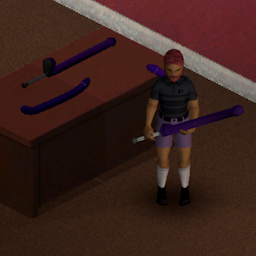
Dildo Weapons San Andreas B42
von 76561199793378347
Dildo Weapons San Andreas B42 Description Mod pour Project Zomboid Build 42.13, inspiré des armes iconiques en forme de batte de baseball de Grand Theft Auto: San Andreas. Ce mod ajoute deux armes de mêlée à deux mains, conçues pour offrir une expérience fun et décalée tout en restant équilibrée en jeu. Dildo Bat Long - Profil : Arme lourde et puissante - Dégâts : 1.0 – 2.2 (élevés) - Vitesse : Lente (0.8) Double Dildo Bat - Profil : Arme polyvalente et équilibrée - Dégâts : 1.0 – 2.0 (bons) - Vitesse : Standard (1.0) Version - Version actuelle : 1.0 - Build supportée : 42.13 Permissions d’utilisation Ce mod a été réalisé sur commande pour Anonymous59 : https://steamcommunity.com/profiles/76561199543497494/ - L’utilisation sur d’autres serveurs publics n’est pas autorisée. - Utilisation autorisée uniquement sur le serveur public Le Monde Perdu. Mods sur demande Si vous souhaitez un mod personnalisé, vous pouvez me contacter via les commentaires du Workshop, en message privé ou sur Discord (nmd0317). Je propose des développements sur mesure. Les délais, la faisabilité et le coût dépendent de la complexité du projet. Mise à jour de mods Je propose également la mise à jour de mods abandonnés de la Build 41 vers la Build 42, sous réserve de l’accord du créateur original. Workshop ID: 3633618344 Mod ID: DildoWeapons
![Zombie Climbs Wall [B41/42] – Project Zomboid Mod](https://images.steamusercontent.com/ugc/40067522406774948/D8115B609084CD610B755A95C1812B49A950AD2B/)
Zombie Climbs Wall [B41/42]
von 76561198086563458
just an updated version of my favorite mod. all credits belong SportXAI Original mod - https://steamcommunity.com/sharedfiles/filedetails/?id=2981296161 Workshop ID: 3393112269 Mod ID: Zombie Climbs Wall
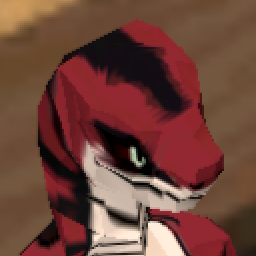
Sszadras the Ophidiomancer Skin (B42)
von 76561198190445150
WIP (This "species" is meant to be played as MALE, so playing as female might cause trouble, or maybe not) Sszadras the Ophidiomancer Skin makes his appearance in Project Zomboid too now! --->Sszadras Belongs to Me! <--- This adds Sszadras the Ophidiomancer, CrimSnek's sona! This mod couldn't have been possible without: - Anthro Survivors (the "Furry Mod") for the main mod. - Anthro Survivors - Scalies! (the "Scaly Mod") for the inspiration! so credit goes to them! BUT MOST IMPORTANTLY! This mod couldn't have been possible neither without: - Anthro Survivors - Cobra and Jackalope by CAESURA for the model! Let me know if Im forgetting anything! Workshop ID: 3170788881 Mod ID: Sszadras

Trailer House with Garage (Beta)
von 76561198383107606
Trailer House with a small Garage in rosewood construction site. Has 1 bedroom, bathroom with washing machine, small dining and kitchen, small garage. Kinda my first map mod. Edited tile 27x39, also made a few changes to the gates in the construction site. Maybe too OP? Workshop ID: 3039891309 Mod ID: Trailer House with Garage Upload Map Folder: tile_27_39
True Music Addon: Faraon Love Shady
von 76561198090116824
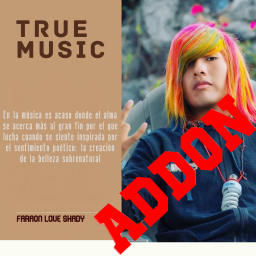
Faraón Love Shady es un artista musical, fenómeno y celebridad de Internet proveniente de Arequipa, Perú. Se dio a conocer en las redes sociales cumpliendo retos, creando vídeos e interactuando con su comunidad virtual. Workshop ID: 2745750589 Mod ID: faraon_love_shady_music_mod
SMB Tattoo
von 76561198005360199
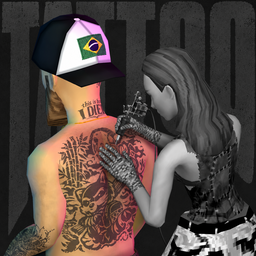
SMB TATTOO Give your survivor tattoos that actually belong to their body. Choose from 26 original tattoos directly in character creation. Combine several designs, place more than one tattoo on the same body region and see everything on your character before the game even begins. The tattoos stay beneath clothing, dirt, blood, wounds and bandages. They remain through save and reload, multiplayer, death and reanimation, and they are still there on the body left behind. This is not a temporary texture placed over the screen. The tattoo becomes part of that survivor. CHOOSE, COMBINE AND PREVIEW The tattoo selector is built into Project Zomboid's character creation screen. Browse by body region, wear several tattoos at once and use the live preview to build the exact look you want. Full-body view temporarily removes clothing, hair and beard so you can see the complete design, then restores every original choice. The included tattoos support Vanilla male and female bodies, with optional mappings for supported Tomb bodies. CREATE YOUR OWN TATTOOS SMB Tattoo also includes Tattoo Studio. Import a transparent PNG, position it directly on a 3D body and export a complete Project Zomboid Workshop mod. No coding. No folders to assemble. No metadata to understand. I built the Studio because a tattoo mod should not end with the tattoos I made. If you can create the artwork, you should be able to put it into Project Zomboid and share it with other players. Open: Options > SMB Tattoo Studio 1. START YOUR PACK Fill in the three required fields: - Tattoo name: the name players see in character creation. - Author: the creator shown beside the tattoo. - Addon name: the Workshop pack that can hold one or several tattoos. When all three fields are complete and the Studio is ready, IMPORT IMAGE turns green. 2. IMPORT AND PLACE THE ARTWORK Import a transparent PNG. Natural Ink can soften solid black into a more believable charcoal tone while colored artwork keeps its identity. This happens once during creation, not as a gameplay filter, so it adds no gameplay rendering cost. Controls - Left mouse button + drag: rotate the body. - Alt + left mouse button + drag: move the view up or down. - Right mouse button + drag over the body: move the selected tattoo across the skin. - Mouse wheel: zoom in or out. - Sliders: fine-tune Scale, Rotation, Width, Horizontal and Vertical placement. Ctrl is not used by the Studio. A tattoo can contain several image pieces, and the movement controls affect only the active piece while the others remain visible. 3. CONFIRM THE BODY PROFILES The Studio guides you through Vanilla male, Vanilla female, Tomb male and Tomb female. Each body keeps its own placement. Tomb is not required to create a pack. Those mappings are simply used when a supported Tomb body mod is present during gameplay. 4. ADD MORE OR EXPORT Choose CREATE ANOTHER TATTOO to add another design to the same pack. The completed tattoo stays safe while the Studio keeps the author and addon selected for you. You can also open a verified pack under My Packs and add more tattoos later without losing its Workshop ID or existing content. When you press EXPORT PACK, Tattoo Studio automatically creates: - A complete local Project Zomboid Workshop mod. - Full-resolution textures for every supported body. - The Workshop metadata and internal mod files. - The standard icon, poster and preview. - The correct body-region registration for every tattoo. - SMB Tattoo as the in-game dependency. When the export finishes, the mod is ready for you to review and publish. HOW TO PUBLISH YOUR TATTOO PACK The Studio saves the exported mod inside the active Project Zomboid Workshop folder. On the current Build 42.20 stable for Windows, the usual location is: C:\Users\<YOUR WINDOWS NAME>\Zomboid_B42_Unstable\Workshop\ Depending on the active game profile, it may instead be: C:\Users\<YOUR WINDOWS NAME>\Zomboid\Workshop\ Look for a folder beginning with: SMB_TattooPack_ Then open Project Zomboid's Workshop publisher from the main menu: - Select the tattoo pack created by the Studio. - Review its title, description, preview and visibility. - Choose whether to create a new Workshop item or update the verified pack. - Confirm the upload when everything looks right. FINAL STEAM STEP After the pack is published, open its Steam page and add SMB Tattoo under Required Items. SMB Tattoo already requires SMB Runtime, completing the dependency chain for subscribers. Tattoo Studio creates the mod, but it never uploads or publishes anything without your decision. INSTALLATION SMB Tattoo requires SMB Runtime. - Subscribe to SMB Runtime and SMB Tattoo. - Close Project Zomboid. - Complete the Runtime setup through mods/SMB_Runtime/Tools/INSTALL.html. - Enable both mods in the Mods menu. - Restart the game whenever you enable or change tattoo packs. Subscribing to SMB Runtime without completing its local setup is not enough. MULTIPLAYER AND COMPATIBILITY The server and players need compatible versions of the same Workshop items and collections. Every player completes the local Runtime setup; dedicated servers complete the server setup too. SMB Tattoo was built and audited for Project Zomboid Build 42.20. Build 41 is not supported. Players, creators and fully non-monetized community servers may use SMB Tattoo freely. If a server makes money in any way, contact me first and receive written permission before using it. The complete terms are included inside the package. RELEASE NOTES OPEN THE SMB TATTOO CHANGE NOTES Workshop ID: 3771292051 Mod ID: SMB_Tattoo
![[B42] Silly's Roleplay Actions – Project Zomboid Mod](https://images.steamusercontent.com/ugc/12209051574733012576/C2E7CE68572888923D055980F6AC8F6A32514CF9/)
[B42] Silly's Roleplay Actions
von 76561198070577841
At Long Last! Through what must have felt like far too long for the users of SRPA, dreams have finally become a reality as it finally makes its way to Build 42. There were some challenges, but that's all boring, and I know all you care about is the mod itself. So, without further ado, let's get into the meat and potatoes. What is Silly's Roleplay Actions? If this is your first time seeing SRPA, this mod is designed to let you express yourself through emotes/animations! I have put together a few of my own animations that I felt filled a niche in other posing mods like Fuu's Roleplay Poses, and TTRP Poses. If you've ever joined a server and wished "Oh man, I really wish I could lean up against this wall," this mod lets you do just that! How to use: - Hold Q to bring up the radial menu - Choose SRPA from the menu - Find a category that suits your needs - Choose an emote within that category - Profit! You're emoting! After I got into the Project Zomboid roleplay scene, I always felt that there were some animations in pose mods that just didn't do what I felt I needed to do to express myself. Yes, you can always type a "/me does a thing," but it never felt right to do that without being able to act it out with my own character. Build 42 Porting SRPA over to Build 42 comes with some caveats. There appear to be some limitations that neither myself, nor CrystalChris (TTRP Poses) have been able to overcome. Going Forward I obviously only mod for this game as a hobby. I don't earn an income by doing this, and I only work on mods for Project Zomboid in my spare time. That means that updates for SRPA are likely to be slow, as I have many things going on in the background of my life. From study to house-hunting, Project Zomboid modding takes a pretty substantial back seat on my priority list. That said, I do apologise for the long wait, and... I do intend to get my animation rig set back up again. Not least to keep trying to tackle some of the new limitations we're experiencing on the more dynamic poses (I know *so* many people will miss the hands in hoodie pockets emote). Gratitudes Once again, thank you SO MUCH to CrystalChris for helping me figure out the changes between game versions, and letting me pick apart and use your code. You're a gem to the modding community. I don't know where we'd be without you! And thank you for all the wonderful comments from everyone who's enjoyed using SRPA! I wouldn't have spent as much time on this mod as I did, or even at all, if the community feedback hadn't been as vocal as it was. From my friends who urged me on, to the strangers that kept prodding me for a Build 42 version - thank you! I'll do my best as a random internet user to keep the good times flowing into the future. FAQ Below are some definitely frequently asked questions: Is this compatible with Multiplayer? Yep! This mod was designed to be used on servers in roleplay settings! Are there any dependencies? Dependencies are listed when you click the subscribe button. In my testing, SRPA does not have any dependencies. Unlike the B41 version, the code for the radial menu has been included in the mod itself. Support This is by no means a necessity, but if you would like to help support me and my mod development toward the future, you can do so through my Ko-Fi link below. I hate asking for money and am more than happy to continue doing what I do for free. Don't feel obligated to send me anything at all! Workshop ID: 3781579266 Mod ID: SRPA42
![[B41] Sensible Balance: Item Weights and Miscellaneous Spawn Rates – Project Zomboid Mod](https://images.steamusercontent.com/ugc/2465242083819212378/43ACF0DCB6F7BE8963F1291BD6E873BC57B9659E/)
[B41] Sensible Balance: Item Weights and Miscellaneous Spawn Rates
von 76561198045742109
This is a Build 41 mod. For Build 42: The item weights are in my Quality of Life and Miscellaneous Tweaks mod. Miscellaneous spawn rates are adapted for Build 42 in my Realistic Distributions: Alcohol, Cigarettes, Clutter mod. Three optional mods: 1. Rebalances the weights of many miscellaneous and 'material' items to enhance the player immersion and experience. 2. Added probability of spawns for realistically common items including but not limited to: cutlery, dishes, clothing such as socks, underwear, t-shirts, common useful items like cigarettes, candles, jars and their lids, nails, household items such as soap, toilet paper, and so on... Going through the entire ProceduralDistributions file (determines item spawns for containers) by hand, spawns were only added where it makes sense to expect certain items. Does not conflict with any other mods, and is affected by your custom game spawn rates. For example, as cutlery items are "melee weapons" they are affected by that setting. 3. Adds a few miscellaneous recipes that I felt were missing: for now I have added the ability to craft a sack/sandbag from sheets and thread or twine - this is possible with a needle or a paperclip, and requires level 1 tailoring. You can also craft sheets from 6 ripped sheets, same as Common Sense, however this mod overrides the recipe and it now requires you to have the thread/twine, and needle/paperclip. Both recipes yield some tailoring experience and so this is a useful way to train your skills if you are not barricading your house or making sandbags for any other reason. Permissions: Please do not mod-pack or reupload this mod anywhere else, just share the link to this page. I hope you enjoy this mod. Permissions update: as I would not return to modding Build 41, you are welcome to update (for functionality, or e.g. to make compatible with Build 42), and adapt this particular mod and its assets for your own use and for upload to Steam Workshop. Consider giving credit and link to the original page. If my mod is deleted you are welcome to reupload to Steam Workshop only. Thanks. Workshop ID: 3289064141 Mod ID: sensiblebalanceitemsmiscrecipes Mod ID: sensiblebalanceitemsmiscspawns Mod ID: sensiblebalanceitemsweight
![zRe Navigation [RU] – Project Zomboid Mod](https://images.steamusercontent.com/ugc/2475368207902785971/5C3E55D620519140063B213F02FB3E73EB03ADDB/)
zRe Navigation [RU]
von 76561198034347328
Перевод мода NAVIGATION на русский язык. Голос by Лиза Birget, текст - kERHUS. ДЕРЖИТЕ ЭТОТ МОД В ПРИОРИТЕТЕ (НИЖЕ, ЧЕМ NAVIGATION В СПИСКЕ МОДОВ)! You can support me: 2202 2055 0691 1756 SBER (MIR) https://boosty.to/kerhus/single-payment/donation/493985 Workshop ID: 3244088076 Mod ID: zReNavigation RU

MoreBuilds_FOK
von 76561198859966056
Remove strong recipe for hardcore gaming DC: https://discord.gg/minidoracat Workshop ID: 2954993551 Mod ID: MoreBuilds_FOK
True Music Addon: Pre-July 9th 1993
von 76561198105432750
Only music released before July 9th, 1993 Tried to avoid duplicates included in base True Music mod (TCCache) The songs list has gotten too long to fit in the description, so please check the pinned discussions thread for the list! Workshop ID: 2834978761 Mod ID: true_music_the_basement
Craft Nails by Sawing Logs
von 76561198062695591
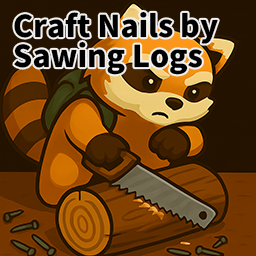
🔩 Craft Nails by Sawing Logs – Primitive Survival Nail Crafting Mod 🛠️ Overview This mod is a complete remake of the outdated *Make Nails from Wood* mod, designed for true wilderness survival. It allows players to craft nails and screw nails from logs and planks using basic tools, even in metal-scarce environments. 🪚 Core Crafting Recipes 🪵 Logs or Planks → Nails - Materials: Logs or Planks - Tools: Any type of saw - Required Skill: Carpentry Level 1 - Result: Box of Nails 🔪 Plank Carving → Nails - Materials: Plank - Tools: Any sharp knife - Required Skill: Carving Level 1 - Result: Box of Nails 🪛 Logs or Planks → Screws - Materials: Logs or Planks - Tools: Saw + Chisel - Required Skills: Carpentry Level 1 + Carving Level 1 - Result: Box of Screw - Feature: Stronger grip than regular nails; useful in advanced crafting 🌲 Survival Optimization - Perfect for long-term wilderness survival - Craft nails without any metal resources - Compatible with various tools and mods > “No metal? No problem. If you have wood, you have nails. > Real survival begins in the forest.” 🌐 Language Support - English (EN) - Korean (KO) 📢 Notes Subscribe now and start crafting like a true survivor. Feedback and suggestions are always welcome! Workshop ID: 3556823482 Mod ID: CraftNailsbySawingLogs
True Music Addon: Scatman
von 76561198851531175
Addon adds Scatman's World album (1995) (on cassettes) The addon contains the following tracks: Scatman John - Scatman's World Scatman John - Only You Scatman John - Quiet Desperation Scatman John - Scatman (ski-ba-bop-ba-dop-bop) Scatman John - Sing Now! Scatman John - Popstar Scatman John - Time (Take Your Time) Scatman John - Mambo Jambo Scatman John - Everything Changes Scatman John - Song of Scatland Scatman John - Hi, Louis Scatman John - Scatman (Game Over Jazz) Workshop ID: 3013056633 Mod ID: TMScatman

Profession Clothing
von 76561197989077251
This mod is a clothing only version of the Profession Items mod. Workshop ID: 2734961489 Mod ID: Profession Clothing

Agrotsar Farming Company (Português Brasileiro)
von 76561199131666750
Translation to Brazilian Portuguese the mod Agrotsar Farming Company. (This mod needs the original mod to work). Making it clear that I have no intention of stealing the original creator's credits is just a way I found to bring it to our language, that is, all rights go to the original creators of the mod: @NoctisFalco @Aragon @nesterovoa @iBrRus @Troy Mc'Clury @MrDanny Workshop ID: 3017242387 Mod ID: agrotsarPTBR
Cigarettes Expanded
von 76561198185125783
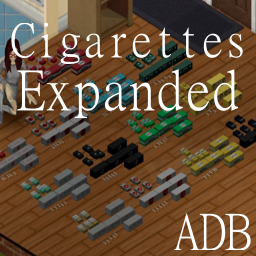
Welcome to Cigarettes Expanded This mod adds 4 new brands of cigarettes to your playthroughs. Duntio Cigarettes , Muldraugh Cigarettes , Canal Cigarettes , Lucky Hit Cigarettes . Each cigarette kind has ther own single cigarretes, cigarette pack and cigarette carton. Cartons can be packed and unpacked. Cigarette packs can also be packed and unpacked alongside the ability to smoke a cigarette directly from a pack of cigarettes. You can also combine partially empty packs to make full packs. Each cigarette kind also has there own spawn rates, locations , and indevidual effect, upsides and downsides. Cigarettes are rollable with Rolling Papers, Menthol , and tobacco . Currently Cigarette Rolling will need an update to accomidate all the new types, that will be happening next. Workshop ID: 3778010429 Mod ID: CigarettesExpanded
Simple Skill Books: Driving Skill Patch
von 76561198076948732
This patch was made to offer compatibility for Driving Skill mod when used in conjunction with my Simple Skill Books mod. Now, one can safely use thse two mods together, without the Driving Skill mod's books breaking the design behind Simple Skill Books. I made this patch on request. As such, this patch mod tweaks the Driving Skill books to fall in line with the vanilla books that Simple Skill Books already changes. Please note, like Simple Skill Books mod, the Driving Skill Patch is best added with a fresh game. It still can be added to an existing game, but be sure to burn any skill books that you found prior to adding the patch, as the fix is not retroactive. Workshop ID: 3422227581 Mod ID: DrivingSkillPatch
![Sapph's Cooking - Inventory Tetris Patch [B42] – Project Zomboid Mod](https://images.steamusercontent.com/ugc/34446555874751176/AD0E1E2147BDAF7B054B3D8638819FF91A7BA00A/)
Sapph's Cooking - Inventory Tetris Patch [B42]
von 76561198068286957
Patches Sapph's Cooking for Inventory Tetris ! All items, most notably anything prepared inside of kitchen pans should now take an appropriate amount of place. If you find any items that should be adjusted that I have forgotten, feel free to post them in the comments, I'll take care of them as quickly as I can ! Most of the asset will be pixelated as it is of a low resolution, I may try to fix it latter. Now with new cirpsy textures ! You will need to enable the mod in the main menu. This should be save compatible but you may have to reorganize items that were stored before the adjustment. All credits goes to Sapph for Sapph's Cooking and to Notloc for Inventory Tetris. Thanks for those incredible mods ! Only for Build 42 Thank you If you're enjoying this mod, please consider rating it and check out my other mods ! Right click to wear Workshop ID: 3455600695 Mod ID: DelranSapphCookingTetrisPatch
Project Zomboid Details →
Project Zomboid Guides
Project Zomboid Mods installieren - Workshop Guide
Installiere Project-Zomboid-Mods sauber per Steam Workshop: IDs eintragen, Reihenfolge prüfen, Server neu starten und typische Fehler beheben.
Project Zomboid Build 42 auf dem eigenen Server: Umstieg, Spielstände und Mods
Build 42 ist Stable: Spielstände aus Build 41 sind nicht kompatibel. Umstieg, legacy41-Zweig, neue Serveroptionen, Anti-Cheat und der Hotfix 42.20.1 gegen Serverlag.
Project Zomboid Server mieten – Multiplayer Guide
Project Zomboid Server einrichten: RAM, Sandbox-Einstellungen, Workshop-Mods, Admin-Rechte und typische Fehler sauber prüfen.
Project Zomboid Server mit Mod-Support
Kompatible, unterstützte Mods über das Server-Dashboard installieren.
Project Zomboid Server mieten