Project Zomboid Mods für Server
Für einen modifizierten Project-Zomboid-Server brauchst du pro Projekt die Steam-Workshop-ID und die interne Mod-ID. Prüfe zusätzlich Spiel-Build, Abhängigkeiten und Lade-Reihenfolge, bevor du deine Welt mit den Änderungen startest.
Project Zomboid Mods sicher installieren
Ein Workshop-Abo allein aktiviert eine Mod auf dem Dedicated Server nicht. Die Einträge in `WorkshopItems=` und `Mods=` müssen zusammenpassen; außerdem muss jede Mod den gewählten Build 41 oder Build 42 ausdrücklich unterstützen.
- 1. Build prüfen: Build-41- und Build-42-Mods nicht ungeprüft mischen.
- 2. Workshop-ID, Mod-ID, Abhängigkeiten und erforderliche Reihenfolge vollständig dokumentieren.
- 3. Welt und Konfiguration sichern, Server neu starten und Logs sowie den Beitritt mit einem Test-Client prüfen.
Die vollständige Schritt-für-Schritt-Anleitung findest du im Project-Zomboid-Mods-Guide. Oder starte direkt mit einem Project Zomboid Server mit Mod-Support.
Häufige Fragen zu Project Zomboid Mods
Was ist der Unterschied zwischen Workshop-ID und Mod-ID?
Die Workshop-ID bezeichnet das Steam-Workshop-Projekt und steuert den Download. Die Mod-ID aktiviert den enthaltenen Mod im Spiel. Auf dem Server müssen beide Listen vollständig und passend gepflegt sein.
Laufen Build-41-Mods automatisch mit Build 42?
Nein. Nutze eine Mod nur dann auf Build 42, wenn ihre Workshop-Seite diese Kompatibilität ausdrücklich bestätigt. Prüfe dabei auch alle Bibliotheken und weiteren Abhängigkeiten.
Wie teste ich ein Mod-Update ohne Risiko für die Welt?
Sichere zuerst Welt, Sandbox-Konfiguration und Server-INI. Aktualisiere danach die zusammengehörigen Mods, starte den Server neu und prüfe Logs, Kernfunktionen und einen vollständigen Client-Beitritt.

FichinScoreboard
von 76561198142117152
Ranking PVE/PVP para el servidor dedicado de Adictos al Fichin. Workshop ID: 3664016350 Mod ID: FichinScoreboard

W900 Semi-Truck (Brazilian Portuguese)
von 76561199131666750
Translation to Brazilian Portuguese the mod W900 Semi-Truck. (This mod needs the original mod to work). Making it clear that I have no intention of stealing the credits of the original creators is just a way I found to bring it to our language, that is, the rights go to all the original creators of the mod: @Lexx @Wipe Workshop ID: 3025980999 Mod ID: W900 Semi-Truck (Brazilian Portuguese)
MoodleSanity
von 76561198329871201
Shows sanity status with a moodle. Sanity related facts (B41.77) - Vanilla sanity exists but is not used. - This mod is made and tested for Danger Moodle Insanity. - This mod can be easily adapted to any sanity related mod by overiding MoodleSanity.setSanityThresholds(moodle). Credits - Initial idea and moodle picture by walter_hartwell_white. Ask for permission This mod can only be added to and extended with the express permission from the original creator. Having received permission, credit must be given to the original creator, both within the files of the mod and wherever the mod roams online. If no permission is received you may not alter the mod. You wanna support? A nice word is always welcome. Constructive feedback too. Else you can Workshop ID: 2874801834 Mod ID: MoodleSanity

Weaponized Knowledge
von 76561198043930701
It's true what they say, knowledge IS power! (Note: not a very effective weapon. It is a book after all) Workshop ID: 3180653142 Mod ID: getlearnedon
SideWinder's Zoom+
von 76561198361676704
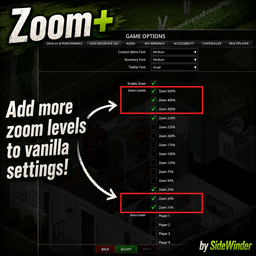
SideWinder's Zoom+ Add extra close-up and zoom-out levels directly to Project Zomboid's vanilla Options > User Interface > Camera > Zoom Levels list. I know other zoom mods already exist, but I wanted a clean extension of the vanilla settings: no separate menu, extra mechanics, hotkeys, or unrelated options. Select the additional percentages in the normal checklist, press Apply, and use the standard in-game zoom controls. Extra zoom levels - Close-up: 20% and 15% - Zoom-out: 300%, 400%, and 500% The screenshots compare 25%, 100%, 250%, 300%, 400%, 20%, and 15%. The mod also includes 500%; I simply forgot to capture that screenshot. The 20% and 15% views are useful for creators taking close-up screenshots or video, and for anyone placing world objects precisely. If you would prefer different zoom values, let me know in the comments. Performance warning Zooming farther out makes the game load and render more of the world and may reduce performance. Compared with the vanilla 250% maximum at the same screen shape: - 300% shows approximately 1.44 times the visible area - 400% shows approximately 2.56 times the visible area - 500% shows approximately 4 times the visible area At 500%, the view is twice as wide and twice as tall as at 250%, producing four times the visible surface area. The actual performance cost depends on your hardware, resolution, lighting, objects, zombies, and other mods. Extra levels stay disabled until you select them. How to enable - Subscribe to the mod. - Open Project Zomboid's Mods menu and enable SideWinder's Zoom+. - Restart the game so the main-menu Options screen is rebuilt. - Open Options > User Interface > Camera > Zoom Levels. - Tick the extra percentages you want and press Apply. Compatibility - Compatible with existing saves; no new world is required - Project Zomboid Build 42.20.4 or newer - Single-player and multiplayer - No dependencies - Does not replace or patch projectzomboid.jar Bug reports and feedback If something does not work, please include your Project Zomboid build, whether you are in single-player or multiplayer, the steps needed to reproduce the problem, and any relevant errors from console.txt Mention other camera or interface mods you have enabled, since they may modify the same settings screen. Suggestions for other useful zoom values are welcome in the comments. Mod ID: ZoomPlus Workshop ID: 3791720268 Created by SideWinder.

No Weight - Inventory Tetris
von 76561197985769322
Modified version of https://steamcommunity.com/sharedfiles/filedetails/?id=2606989930&searchtext=No+Weight to not give containers or players infinite inventory for use with Inventory Tetris mod. If the original owner would like me to remove this mod, just let me know. Removes the weight of practically all items (yes, even modded items.) (for some reason some items still have weight) This works on both multiplayer and singleplayer. Workshop ID: 3134330577 Mod ID: NoWeightInventoryTetris

Kino Music | Album: Чёрный альбом
von 76561199258285984
Kino Music | Album: Чёрный альбом Generated with New Music Builder Чёрный альбом Side A 01 Завтpа война 02 Звезда 03 Когда твоя девушка больна 04 Красно-жёлтые дни 05 Кукушка Чёрный альбом Side B 01 Лето 02 Муравейник 03 Нам с тобой 04 Следи за собой 05 Сосны на морском берегу Workshop ID: 3753833044 Mod ID: 8AlbumKino

ADDU Level Up Sound
von 76561198060540114
아뜨서버에서 사용하고 있는 레벨업 효과음 모드입니다. A Level up Sound Effect mod for private server. Workshop ID: 3211986988 Mod ID: Levelupsoundaddu

InfernoRPCrossbow
von 76561197995885151
DO NOT USE FOR TEST PORPOUSES Workshop ID: 2983884932 Mod ID: InfernoRPCrossbow

True Music Addon: Gilbert Kpop Playlist
von 76561198856611008
I put a lot of my personal Kpop playlist and I don't think I will update it (maybe). 169 songs included (IU, Girls Generation, NewJeans, Aespa, Twice, Red Velvet, etc). Hope you Enjoy it. Workshop ID: 2924645934 Mod ID: gilbert_kpop_playlist_true_music_addons

Atlas
von 76561198006135740
WORK IN PROGRESS Atlas is a sea themed map expansion next to kingsmouth. The idea was to give aquatsars boats more useability. In the mid/endgame the locations seen in the screenshots can be used as treasurehunt or if its your thing you can build your base there. There are a couple secrets so make sure to check every room twice. This map is compatible with all other known map expansions. ->make sure to have the dependencies downloaded. The map is 3x3 cells beginning at 13,15. Workshop ID: 2790250570 Mod ID: Atlas Map Folder: Atlas
![Skill Books Give XP [B42] – Project Zomboid Mod](https://images.steamusercontent.com/ugc/18326757459040550543/C4360E3AF11952E13F34511EC5EA8C21825B849E/)
Skill Books Give XP [B42]
von 76561198072641760
Skill Books Give XP Hello! As the number of skills continues to grow, so does the amount of time required to level them. Some new crafting recipes are locked behind high skill levels, and getting those levels through normal gameplay can sometimes become quite a grind. Skill Books Give XP aims to make reading a more rewarding use of your time. Instead of books only providing an XP multiplier, reading them will also directly award experience as you progress through their pages. The goal is simple: respect the player's time without making the vanilla skill-book system obsolete. How does it work? The mod calculates how much XP is required for the two skill levels covered by a book and distributes that XP across the book's pages. For example, a Volume 1 book covers levels 1 and 2: - Level 1: 75 XP - Level 2: 150 XP - Total: 225 XP If the book has 220 pages, the mod distributes those 225 XP across the pages. This means that finishing the entire book awards enough experience to progress through the two levels covered by that book, assuming you start from the beginning of the relevant level range. The XP is awarded as you read, rather than all at once when the book is completed. What about the vanilla multiplier? Skill Books will continue to provide their normal XP multiplier, so the original book mechanics remain intact. The experience awarded by this mod, however, is not affected by the book's multiplier. In other words, the book gives you its normal multiplier and the additional XP from this mod. Fast Reader and Slow Reader Because XP is awarded as you read each page, your reading speed naturally affects how quickly you receive the experience. - Fast Reader: You progress through the book faster, so you receive the XP faster. - Slow Reader: You progress through the book more slowly, so you receive the XP more slowly. The total XP awarded by the book does not change because of these traits; only the time required to obtain it changes. If you want to progress through books more quickly, you can also increase the reading speed through the vanilla Sandbox Settings. Custom Sandbox Settings The mod comes with a blacklist, preventing this skill books to award xp. Some books are blacklisted by default. Personally, I don't think it makes much sense to spend several days sitting in a tiny shack in the middle of the woods reading a book about Long Blades and emerge as a master swordsman. For that reason, combat-related books are excluded by default. However, you have complete control over the blacklist through the Sandbox Settings. You can: - Remove skills from the default blacklist. - Add additional skills to the blacklist. When adding multiple skills manually, separate their names using semicolons: SkillName1;SkillName2;SkillName3 I added a requested option to limit higher books awarding experience. The default is set to 5 (all book volumes will award XP) but you can lower it so the books over the limit will just add the multiplier but not XP. Multiplayer & Single Player The mod works on single player for sure For MP, if the server is not a Steam Coop it should work (Please let me know if it doesn't, I'll be testing this through the week as I have time. For Steam Coop hosting, right now you need to give the player permission to addXp through the roles, (admin or create a new role and add AddXP as capability). Host will always earn xp. Also, if the player logs out and in again, the role resets for some weird reason and you need to set their role again (it says the player has the role but they won't have the capabilities), although this is not the mod fault but how the steam coop works. I'm looking for a workaround. It is safe to add to an existing save. There is one important caveat: If you have already completely read a book before installing the mod, you cannot retroactively receive the XP from that book. You will have to progress through the skill normally until reaching the next book. Partially read books will award XP based on their remaining pages. Does it work with books from other mods? It depends on how the book mod is implemented. If a modded book uses the same underlying skill-book structure as vanilla books, it should work automatically. However, I cannot guarantee compatibility with every modded book, especially if it uses a custom implementation. If you find a modded book that works or doesn't work, feel free to let me know in the comments. Compatibility reports are very useful! Whether you're playing Multiplayer and want your reading time to feel a little more worthwhile, or you're playing Single Player and simply want to spend a cozy afternoon reading while a storm rolls through the neighborhood, I hope this makes books feel a little more rewarding without taking away from the vanilla experience. Have fun! Author: @MateCuantico Workshop ID: 3794829930 Mod ID: SkillBooksGiveXP
Z-llegro Trading (Economy Mod)
von 76561198178035806
Author's Notes This is my first mod, so it is not perfect. It worked when I tested it alone, but thanks to the community I keep finding exploits and rough edges. A huge thank you to everyone who has reported something -- you are helping me grow as a modder in this beautiful game. Z-LLEGRO A craftable delivery terminal & buy-back scanner for the apocalypse economy. Order what you need. Sell what you don't. No traders required -- only time is your enemy here! Craft a Mini Tablet to order supplies that arrive by courier drop, or a Scanner to sell loot back for cash. Identical in singleplayer and multiplayer, with a full in-game admin panel so server owners can shape the economy without ever opening a config file. ✔ Build 42+ ✔ Singleplayer & Multiplayer ✔ No other mods required 🆕 New in v1.1 The community-feedback update -- safe to add to an existing save. - Waiting deliveries are marked on your map, and the marker clears when you collect the crate. - Sell-only / Buy-only items -- give loot a cash value without putting it on the shelf. - Sell several stacks at once with Ctrl/Shift+click and checkboxes. - Big payouts arrive as money bundles, not a fistful of notes. - Type prices directly in the admin panel. Plus many fixes -- recipes now auto-learn correctly, any screwdriver works, the sell window resizes and keeps its place, sub-hour ETAs show minutes, and orders are validated server-side. Full list in the change notes. 🛠 How To Use It 1. Craft it. Both are in-hand recipes -- no workbench -- learned automatically at Electricity 3: - Mini Tablet -- 2x Battery, 2x Electronics Scrap, 1x Sheet Metal, 1x Screwdriver (kept) - Scanner -- 1x Battery, 1x Electronics Scrap, 1x Sheet Metal, 1x Screwdriver (kept) Any screwdriver counts -- Multitool, Handiknife, improvised/old, or modded. The Tablet buys, the Scanner sells. Craft both to do both. 2. Keep it on you -- in your inventory or a carried bag. Nothing to place or build, and it need not be in your hands. 3. ⚠ RIGHT-CLICK THE GROUND to open it. The step most people miss. Right-click any floor tile or object next to you: - Open Z-llegro Terminal -- browse and order (needs the Tablet) - Open Z-llegro Scanner (Sell Items) -- sell loot for cash (needs the Scanner) - Manage Z-llegro Catalog (Admin) -- admins/moderators only, needs the Tablet No hotkey, no placed object. If the options are missing, you are not carrying the Tablet or the Scanner. 4. Your order arrives as a crate where you stood when you pressed Buy, once the delivery time passes. Loot it like any container; right-click an empty one for Remove Empty Z-llegro Box (anyone can), or leave it and the mod clears it shortly after. 🛒 Ordering Supplies The Terminal has a category sidebar and Favorites tab (auto-updating for modded items), search, 5 sort modes, an adjustable grid, and a weekly stock rotation so the shelf actually changes over time. Check out with Express, Standard or Economy delivery -- each shows ETA, shipping and grand total up front. Bigger orders take longer to pack, bad weather adds delay, night orders cost more. My Deliveries Track every order and cancel your own pending ones (goods return to stock; cash is not auto-refunded). Anything still waiting out in the world is marked on your map, and the marker clears as soon as you collect the crate. If the courier arrives while you are away, the order is held and delivered when you return -- never lost. 💰 Selling Loot Back Carry the Scanner and open it from the ground menu. It lists every catalog item you carry (worn bags included) plus anything sellable in nearby containers. Pick a quantity, sell, get paid instantly. Only catalog items sell, so it is never a junk-dump exploit, and a configurable limit caps how many of one item a player can sell per in-game day (15 by default). Clearing a big haul is quick: tick the boxes, Ctrl+click to add or Shift+click for a range, then Sell All Selected. Payouts over $100 arrive partly as money bundles. ✨ Why It's Good For Your Game - Gives cash a purpose instead of letting it pile up in your pocket. - A safety net, not a shortcut -- nothing arrives instantly or for free. 🙂 - Duplicate loot becomes currency; almost everything sells back for a share of its value. - Early/Mid/Late tiers and weekly rotation -- worth checking, not memorising once. - Zero setup: craft it, use it. ⚙ For Server Admins All of this is a real sandbox setting or in-game tool -- no file editing, and every label has a tooltip. 202-item tiered starter catalog Tools & Building Materials, Survival, Clothing, Weapons, Ammo, Medical and Jewelry, split into Early, Mid and Late (scarce -- the full firearm lineup, a katana, a 4-step vest progression up to SWAT). Jewelry is graded silver/gold/gemstone/diamond, so pieces looted off zombies become real income. All re-priceable live from the admin panel. Sandbox Options (21 settings) - Delivery -- per-tier hours and price, rain delay, night surcharge, packing delay. - Shop -- daily buy limit, cart cap, restock timing, rotation count and length. - Trade-In -- sell-back %, daily sell limit, separate sell-only limit, stock-flood cap, "in-season items only" mode. Admin Catalog panel Browse every loaded item (vanilla or modded) by category, mod or search; add or remove with one click, modded categories tagged (Mod). Price, stock, restock timer and rotation weeks are all typed in directly. Mark an item Buy & Sell, Sell only or Buy only to give loot a cash value without putting it on the shelf. Bulk add/remove by category or mod, copy settings across a category, 5 sort modes. Orders & Deliveries panel Full order history and status. Cancel a pending order (stock returns, cash does not) or Freeze one to pause its timer and resume it later. 🧩 Companion Add-on & Future Plans Z-llegro Home Delivery (Z-Paczkomat) -- optional separate mod: craftable parcel lockers that receive your orders, can be shared, and auto-sell whatever is dropped in. Z-llegro works fully standalone with or without it. Z-otomoto -- a vehicle and parts marketplace on the same delivery backbone, planned next. ??? -- ?? ✅ Compatibility Not tested against every mod out there, so suggestions are very welcome. Works in singleplayer, on self-hosted servers, and on Nitrado and other dedicated hosts. Z-llegro reads every item loaded in the game, so any item-adding mod shows up automatically. Modded items are not in the store by default -- they appear in the Admin Panel, where an admin sets price and availability and posts them -- auto-sorted into their own category. 📜 Permissions Free to use on public or private servers. NOT permitted without asking first: reuploading this mod (modified or not), redistributing its files, or reusing its assets. Please contact me -- I am happy to talk. 🐞 Bugs & Suggestions Leave a comment or open a discussion -- feedback shapes what gets built next. Optional Ko-fi if you would like to support development: ko-fi.com/lsk911 Thanks for reading this far, and for downloading Z-llegro. ❤ Workshop ID: 3775338780 | Mod ID: Zllegro Workshop ID: 3775338780 Mod ID: Zllegro
![Boots Expanded [B42] - Русификация – Project Zomboid Mod](https://images.steamusercontent.com/ugc/11525315150407353869/48FE09F295F3ECC941BCFA34C872432D3A52DD67/)
Boots Expanded [B42] - Русификация
von 76561198414246143
Русификация Boots Expanded Мод добавляет 3D модели для всей ванильной обуви, а также множество новых моделей обуви в стиле 90-х годов. Что делает мод? • 3D модели обуви: Все ванильные туфли, ботинки и кроссовки с трехмерными моделями • Новая обувь 90-х: Периодно-точные модели обуви в стиле 1990-х годов • Редкие боевые ботинки: Особые ботинки с увеличенным уроном при топтании Ключевые особенности: Аутентичная одежда 90-х, полная 3D модель обуви, редкая тактическая экипировка. Dear foreign friends, this mod is only a localization of the main mod. If you came here because of the preview or text on it, you can safely go to the modification page itself. Хочу перевод Поддержать переводчика Workshop ID: 3605197402 Mod ID: BOOEXPRUS

Hydrocraft 樱花自用20230223(HydrocraftSakuraFixFor20230223)
von 76561198155246959
樱花自用 Hydrocraft,修改自 2023/02/23 更新的版本。无其他模组依赖,可单独使用。 对 Hydrocraft 模组在 2023/02/23 更新后存在的问题进行修改以便于自用。 已添加 Hydrocraft 本体 2023/05/07 的更新内容。 已完成: - 修复褶式风箱无法合成的 bug - 修复种植、养蚕、动物会凭空多物品的 bug - 修复“马铃薯盆栽(可收获)”和“萝卜盆栽(可收获)”放置一段时间后消失的 bug - 修复部分盆栽物品无图标的 bug(实际上修复后的图标都是错的,但看起来不会太难受QwQ) - 右键菜单汉化 - 修复专业实验室不能锚定的问题 - 合并 Hydrocraft v1.11,即 2023/05/07 的更新内容,及稍后的一个 Bug fix 未完成: - 太阳能发电机 bug 修复(水平有限,可能修不了=-=) 备注: 已在单机档测试过,联机应该也没问题 本模组汉化还是不全的,所以还是需要配合其他汉化模组食用www比如 Hydrocraft CN、个人mod汉化、狐狸合集MOD汉化这类 mod 大概率不会随着 Hydrocraft 本体模组更新,如果 Hydrocraft 在 2023/02/23 后推出了新的更新,那时候推荐新档使用官方模组而不是本模组 已添加 Hydrocraft 本体 2023/05/07 的更新内容,Hydrocraft b41 Continued 工坊地址 大概率不会随着 Hydrocraft 本体模组更新,如果 Hydrocraft 在 2023/05/07 后推出了新的更新,那时候推荐新档使用官方模组而不是本模组 Workshop ID: 2964978049 Mod ID: HydrocraftSakuraFixFor20230223

人形達ノ記憶(NieR Music Pack)
von 76561198286009367
这是来自尼尔游戏的原声音乐,大约有40首歌,好好享受吧! Workshop ID: 2943429879 Mod ID: 2441865

Honu's Find That Item
von 76561198076757733
Tired of losing track of loot? Honu's Find That Item helps you locate nearby items, bags, containers, generators, and vehicles—with visual vectors, detailed tooltips, and intelligent filtering. 🧩 Features 🔍 Live item scanner - Tracks nearby items, containers, vehicles, and generators - Automatically updates as you move 🗂️ Filterable interface - Rarity-based color coding (Epic, Rare, Common, Unknown) - Search box with text matching 📍 Directional arrows - Colored vector lines show direction and distance to each item - Highlights hovered or selected items with thicker arrows and labels 🎯 Inventory insight - Recursively scans inside crates, car trunks, and other similar containers. - Shows the container path and distance for each item 🧠 Smart grouping - Stack identical items with "xN" notation. - Group by location 🖼️ Detailed tooltips - Auto-aligned labels and values - Tooltip tracks the mouse and renders above the item list. 🧭 HUD toggle - Enable/disable the item tracking UI using the icon beside the Investigate Area button. 🛠️ Mod Options - Custom scan radius - Custom nested container level - Change the hotkey to toggle the HUD - Filter settings persist between sessions - Multiplayer options (not tested) 💡 How It Works - Press the HUD icon next to Investigate Area to open the tracker window. - Items within your scan radius are tracked and color-coded for easy identification. - Use the text box or rarity filters to narrow your results. - Hover over entries to see details and highlight vectors. - Click on an item to issue a pathfinding walk-to order. ⚠️ Caveats 📍 Pathfinding may fail if: - The item is behind walls, on another floor, or in an unloaded chunk. - In such cases, the game will display a note indicating why the walk-to was aborted. - Only nearby items (within a configurable radius) are detected. To find distant loot, you must walk closer. 🎨 Credits - HUD icons from Location icons created by Freepik - Flaticon 🔧 Compatibility - Please let me know if you have any issues or questions. 🧪 Tips - Hovering over an entry shows its exact container path, location, and rarity, depending on its procedural distribution listing. - Clicking on an item initiates a walk-to action—make sure it’s reachable! - Keys can be found under the common category. - Modded items are usually found under the unknown category. Workshop ID: 3527778645 Mod ID: FindThatItem
Nuka Cola Quantum
von 76561198125763020
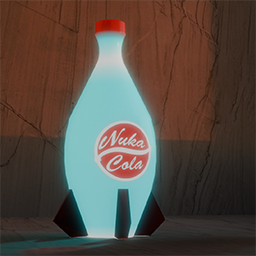
Adds Nuka Cola Quantum to the game. Nuka Cola Quantum has unusual weight properties and was designed to sustain astronauts in space for long periods of time. Hunger will not be a problem after consuming Nuka Cola Quantum. Workshop ID: 3084292878 Mod ID: NUQ

Fallout 4 Death Sound
von 76561198077638109
Replaces the death music with the ominous Fallout 4 death sound effect. Workshop ID: 2924180726 Mod ID: FO4DeathMusic

elysium spawn
von 76561198400472992
elysium island spawn INSTRUCTIONS FOR DEDICATED SERVERS: COPY spawnpoints.lua to your server folder with the spawns. then rename it to spawnpoints_elysium.lua and add that specific lua identifier into the pzserver_spawnpoints.lua file. Workshop ID: 2916197119 Mod ID: ELYSIUMSPAWN Map Folder: Elysium
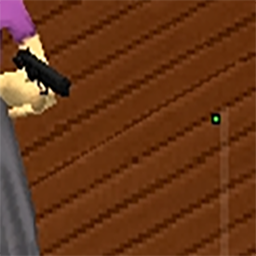
Small Dot Cursor
von 76561198032145554
Updated for Build 41.54! Attention This mod does nothing! You will need to manually move the file to your Project Zomboid Directory. Features This mod changes the default mouse cursor in game. I have included a Green, Red and Blue mouse cursor. Simply choose which one you want, rename the file and overwrite the original. Note The pictures above do not fully show the proper color of the mod. Must be my screen capture software. The True colors are: Green 0, 255 ,0 Red 255, 0, 0 and Blue 0, 0, 255. Also you may have some trouble with losing the location of the cursor in the video. While playing I did not have that problem. How to install: Step 1 Subscribe then navigate to the mod install directory \Steam\steamapps\workshop\content\108600\2413030042 be sure to include the hard drive location ie; C: "108600" is Project Zomboid's App ID "2413030042" is this mod's ID The files are located in the \media\ui folder. Step 2 Select what color you like and rename that file the following: cursor_white.png Step 3 Navigate to the Project Zomboid Directory and drop the file into \media\ui \Steam\steamapps\common\ProjectZomboid\media\ui Step 4 Select yes to overwrite. To uninstall grab the backup copy I have included in the mod. The file name is "cursor_whiteBACKUP.png" simply rename it "cursor_white.png" and drag it into the \media\ui folder in the Project Zomboid Directory. I have also included a how to install video in the gallery view. Check out my other mods Mod Info Workshop ID: 2413030042 Mod ID: PZ_Cursor

VGR Config for Brita's Weapon Pack
von 76561198062723944
Config de Britas para VinculoGamer(VGR) Workshop ID: 2896208323 Mod ID: VGRConfigforBritasWeaponPack
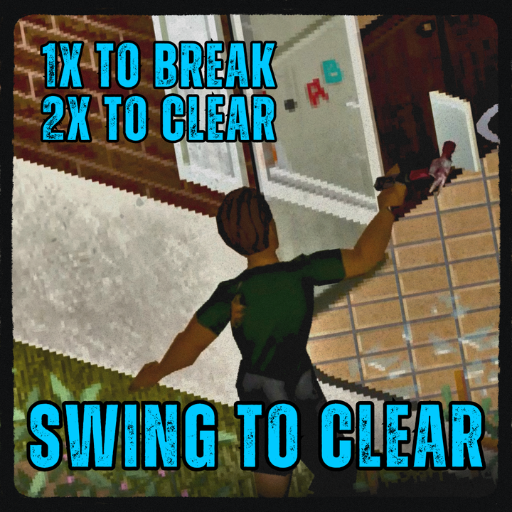
Swing To Clear Windows
von 76561199697612096
After you shatter a window, broken glass shards are left in it, making it hazardous to jump through. Right-clicking often takes too long when you're in a dangerous situation so this mod makes it so that you can clear away the broken shards by simply swinging at the window a second time. The first swing breaks the window open. The second clears the broken shards away. Very simple. Compatibility B42 Stable Workshop ID: 3789584940 Mod ID: SwingToClear
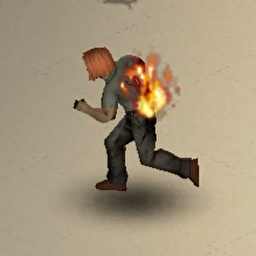
Flaming Sprinters
von 76561198026325628
Burn the zombies, but they fight back. Does the life of a fire-wielding survivor lack challenge? No more - Give zeds a chance to turn into sprinters when set ablaze! Features This mod adds a chance to make zombies start sprinting when they are on fire. Compatibility Should be compatible with all mods and ongoing saves. As always, please backup your world before using any new mod. Specific Mod Compatibility - Zambies - Action Playback Bug reporting Please report bugs under the Bugs (or similar) thread. Like what I do? If you enjoy what I do, consider supporting me on Ko-fi! A little support goes long way! Workshop ID: 3455397831 Mod ID: ZombieFireRun
Project Zomboid Details →
Project Zomboid Guides
Project Zomboid Mods installieren - Workshop Guide
Installiere Project-Zomboid-Mods sauber per Steam Workshop: IDs eintragen, Reihenfolge prüfen, Server neu starten und typische Fehler beheben.
Project Zomboid Build 42 auf dem eigenen Server: Umstieg, Spielstände und Mods
Build 42 ist Stable: Spielstände aus Build 41 sind nicht kompatibel. Umstieg, legacy41-Zweig, neue Serveroptionen, Anti-Cheat und der Hotfix 42.20.1 gegen Serverlag.
Project Zomboid Server mieten – Multiplayer Guide
Project Zomboid Server einrichten: RAM, Sandbox-Einstellungen, Workshop-Mods, Admin-Rechte und typische Fehler sauber prüfen.
Project Zomboid Server mit Mod-Support
Kompatible, unterstützte Mods über das Server-Dashboard installieren.
Project Zomboid Server mieten