Project Zomboid Mods für Server
Für einen modifizierten Project-Zomboid-Server brauchst du pro Projekt die Steam-Workshop-ID und die interne Mod-ID. Prüfe zusätzlich Spiel-Build, Abhängigkeiten und Lade-Reihenfolge, bevor du deine Welt mit den Änderungen startest.
Project Zomboid Mods sicher installieren
Ein Workshop-Abo allein aktiviert eine Mod auf dem Dedicated Server nicht. Die Einträge in `WorkshopItems=` und `Mods=` müssen zusammenpassen; außerdem muss jede Mod den gewählten Build 41 oder Build 42 ausdrücklich unterstützen.
- 1. Build prüfen: Build-41- und Build-42-Mods nicht ungeprüft mischen.
- 2. Workshop-ID, Mod-ID, Abhängigkeiten und erforderliche Reihenfolge vollständig dokumentieren.
- 3. Welt und Konfiguration sichern, Server neu starten und Logs sowie den Beitritt mit einem Test-Client prüfen.
Die vollständige Schritt-für-Schritt-Anleitung findest du im Project-Zomboid-Mods-Guide. Oder starte direkt mit einem Project Zomboid Server mit Mod-Support.
Häufige Fragen zu Project Zomboid Mods
Was ist der Unterschied zwischen Workshop-ID und Mod-ID?
Die Workshop-ID bezeichnet das Steam-Workshop-Projekt und steuert den Download. Die Mod-ID aktiviert den enthaltenen Mod im Spiel. Auf dem Server müssen beide Listen vollständig und passend gepflegt sein.
Laufen Build-41-Mods automatisch mit Build 42?
Nein. Nutze eine Mod nur dann auf Build 42, wenn ihre Workshop-Seite diese Kompatibilität ausdrücklich bestätigt. Prüfe dabei auch alle Bibliotheken und weiteren Abhängigkeiten.
Wie teste ich ein Mod-Update ohne Risiko für die Welt?
Sichere zuerst Welt, Sandbox-Konfiguration und Server-INI. Aktualisiere danach die zusammengehörigen Mods, starte den Server neu und prüfe Logs, Kernfunktionen und einen vollständigen Client-Beitritt.

角色卡
von 76561198415614675
自做的角色卡 最后一次更新 b42正式版出来就重新做了 Workshop ID: 3022466257 Mod ID: ka

HypothermiaKills (b42.8+)
von 76561198779105368
Simulates hypothermia damage Workshop ID: 3593202187 Mod ID: HypothermiaKills
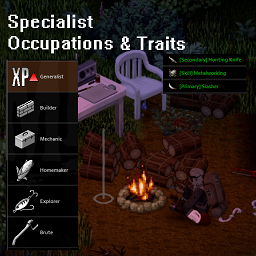
Specialist Occupations and Traits
von 76561198384157927
This is my first mod, made for personal use. It is balanced around 10 years later, where characters are expected to have some useful skills. Replaces the vanilla occupations with 6 new occupations. New Occupations: Generalist, Builder, Mechanic, Homemaker, Explorer and Brute Starting weapon, skill, and recipe traits. Check Out My Other Mods! Blackouts Bitten Trait Mod Immunity Mod Workshop ID: 2908173425 Mod ID: TomaroSpecialists
![Time Period Accurate Posters [B42+] – Project Zomboid Mod](https://images.steamusercontent.com/ugc/14801034609901476299/D85B0868AEA395F4D83B9C384A742AAD2B680D2B/)
Time Period Accurate Posters [B42+]
von 76561198045761534
This is a B42-compatible version of the original mod made by MarianaS2601 . I am not the original creator of the mod or its assets. Movie posters! Vidya posters! Band posters! Anime posters?! Even ads for some reason! Inspired by the Time-Period Accurate True Music add-on and Aza's Posters mod, this mod adds 120+ posters from before 1993, mainly from the 80's and early 90's. You can find them in some crates, lockers and wardrobes, or craft them if you think your character is good enough at drawing. Here's the list of posters Workshop ID: 3784146539 Mod ID: PeriodAccuratePostersB42Ported

PhobosLib -- Shared Utility Library
von 76561197992621994
PhobosLib -- Shared Utility Library Version: 1.30.0 | Requires: Project Zomboid Build 42.14.0+ A shared utility library for Project Zomboid mods (Build 42 focused). PhobosLib provides stable, reusable helpers so mod authors can focus on gameplay features instead of reimplementing safe wrappers, API probing, and boilerplate Lua glue. Used by: Phobos' Industrial Pathways: Biomass — 301-recipe industrial chemistry and biomass processing suite Modules (27 total) Shared Modules (16) - Util — Safe method calling, API probing, keyword-based item search, modData helpers, player speech bubbles - Fluid — Build 42 FluidContainer helpers with multi-strategy API fallbacks - World — Tile iteration, object keyword search, generator/vehicle detection, area safety check, grid square access - Sandbox — Safe sandbox variable access, runtime mod detection, yield multiplier scaling, persistent one-shot flag consumption - Quality — Generic quality/purity tracking (0-100), multiplicative V2 formula, tier lookup, equipment factors, skill multiplier, variance, yield calculation - Hazard — PPE detection, respiratory protection assessment, EHR disease dispatch with vanilla stat fallback - Skill — Perk queries, safe XP awards, persistent cross-skill XP mirroring - Reset — Deep inventory traversal, modData stripping, recipe removal, XP reset, world modData utilities - Validate — Startup dependency validation for items, fluids, and perks - Trading — Dynamic Trading mod wrapper for custom tags, archetypes, and item registration - Migrate — Versioned save migration framework with incompatible version handling - Debug — Centralised debug logging controlled per-mod via sandbox option - Fermentation — Fermentation registry, progress tracking, date stamping for items using ReplaceOnRotten as positive curing - Vehicle — Multi-vehicle scanning, battery charge/drain, template part verification - Corpse — Dead body utilities: corpse age, per-square and radius scanning - WorldContainer — World container iteration for save migration systems (fridges, crates, vehicle storage) Client/Server Modules (11) - RecipeFilter — Crafting menu recipe visibility filter (vanilla + Neat Crafting compatible) - Tooltip — Custom item tooltip lines via full ISToolTipInv.render() replacement - LazyStamp — Condition stamping on container open for items using condition as metadata - VesselReplace — Two-phase FluidContainer lifecycle: condition reset (removes "(Worn)" on empty purity-stamped items) + vessel replacement with vanilla vessels (MP-synced) - FarmingSpray — Custom crop cure spray registration via ISFarmingMenu monkey-patch - Power — Powered workstation support: grid/generator detection, CraftBench UI gating, time-based fuel drain - Popup — Welcome guide and changelog popup system: first-time tutorials, version-based "What's New" popups - WorkstationLabel — Workstation label filter: removes untranslated tags from crafting "Requires: ..." text - WorldAction — Generic world object context menu system with requirement checks and red unavailable-action feedback - EntityRebind — Server-side entity rebinding for pre-existing world objects after mod updates - Moodle — Moodle Framework soft dependency wrapper for custom moodle registration (no-op when Moodle Framework not installed) For Players PhobosLib is a required dependency for Phobos' Industrial Pathways: Biomass. Subscribe to both mods, enable both in the mod manager, and load PhobosLib first. PhobosLib has no user-facing content — no recipes, items, or sandbox options. For Modders Add PhobosLib as a dependency in your mod.info: require=\PhobosLib Then in your Lua: require "PhobosLib" local item = PhobosLib.findItemByKeywords(player:getInventory(), {"charcoal"}) local sandboxVal = PhobosLib.getSandboxVar("MyMod", "Option", default) Full API reference: Module Overview & API Reference Soft Dependencies - EHR (Extensive Health Rework) — Hazard module dispatches EHR diseases when available - Dynamic Trading — Trading module wraps DT API for item/archetype registration - Neat Crafting — RecipeFilter module hooks NC_FilterBar for recipe visibility - Moodle Framework — Moodle module wraps MF API for custom moodle registration Links - GitHub Repository - Changelog Workshop ID: 3668598865 Mod ID: PhobosLib
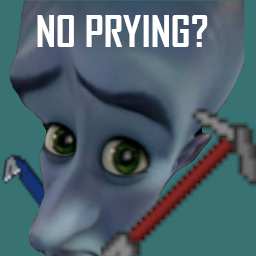
Common Sense - Tools of the Trade Patch
von 76561198110686111
Allows the Halligan Tool and Utility Bar from Tools of the Trade to utilize Common Sense's crowbar prying mechanic. Workshop ID: 3474139256 Mod ID: CommonSenseTOTT

True Music Addon: Weezer
von 76561199229797753
it's weezer and it's weezy MORE COMING SOON!! Workshop ID: 2930055738 Mod ID: weezer_music_mod

Gas Can retexture
von 76561197988897814
⚠️Since I don't play Zomboid anymore: if you want to update any of my mods, feel free to do that. Just give the proper credits and you're good. Peace.⚠️ A simple Gas Can retexture. My other mods: https://steamcommunity.com/id/1654894654/myworkshopfiles/ Enjoy. Workshop ID: 2852773910 Mod ID: GasCanRetexture
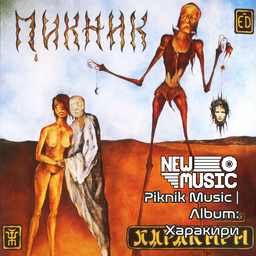
Piknik Music | Album: Харакири
von 76561199258285984
Piknik Music | Album: Харакири Generated with New Music Builder Харакири Side A 01 Настоящие дни 02 Мы, как трепетные птицы 03 Я - пущенная стрела 04 Там, на самом краю земли Харакири Side B 01 Течёт большая река 02 С тех пор, как сгорели дома 03 Это река Ганг 04 Новая азбука Workshop ID: 3755497192 Mod ID: 5PiknikAlbum
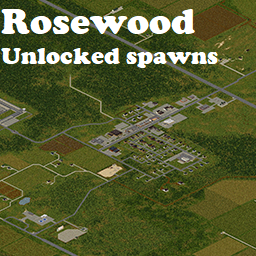
Rosewood unlocked vanilla spawns.
von 76561197992866806
I suggest to leave this at B42.19 as B42.20 vanilla has a decent spawn list now. Fair WARNING: I will most likely take this down / retire it in the near future. Am leaving it for now so B42.19 players can still use it. Workshop ID: 3575355280 Mod ID: MoreSpawnsRosewoodUnlocked Map Folder: Rosewood, KY

Forage for iron/copper ore!
von 76561198217437073
You can now forage for iron ore without having to hope for a 1/4000 chance, and copper ore is now obtainable without cheats! Adds iron/copper ore to foraging in the Stone category. Requires foraging level 7. Workshop ID: 3524770179 Mod ID: OreForaging

No Zombies
von 76561199105300502
No more Zombies, at all. This mod remove every zombies. The "No Zombies" mod contains only a script that removes zombies in the player's active chunk (similar to the "Remove Zombies" command from the Debug mod) at every tick. This means you won’t encounter any zombies regardless of your game settings, as they will be removed around you. It can be added to a new game or to an ongoing survival, but be aware: the removed zombies will not respawn. You can remove this mod at any time, but all the visited areas will be emptied of their zombies. This mod can be useful for those who want to perform tests and/or who are not familiar with the Debug mod or are too lazy to switch to Debug mode. Will be updated upon the release of multiplayer to work in MP. Plus aucun zombies du tout. Ce mod supprime tous les zombies. Le mod No Zombies contient uniquement un script qui supprime les zombies dans la chunk active du joueur (à la manière de la comande "Remove Zombies" du Debug mod) à chaque tick. Ca signifie que vous ne rencontrerez aucun zombie peu importe les réglages de votre partie puisqu'ils seront supprimés autour de vous. Il peut être ajouté sur une nouvelle partie, tout comme sur une survie en cours mais attention : les zombies supprimés ne réapparaitront pas : vous pouvez retirer ce mod à tout moment mais toutes les zones visitées seront vidées de leurs zombies. Ce mod peut se révéler intéressant pour les personnes souhaitant effectuer des tests et/ou qui ne maitrisent pas le debug mod ou ont la flemme de passer en debug mod. Sera mis à jour lors de la sortie du multijoueur pour fonctionner en multi Made for B42 and B41 Check out my others mods Workshop ID: 3443189838 Mod ID: NoZombies
SVP More Builds Remix (SV)
von 76561198058070220
More Builds tweaked for SVP -No Survival Items (well, generator etc..) -No Garage Doors (some broken) -No Tall Metal Fences -Increased Skill Requirements Material / Skill Requirements to be further tweaked~! Workshop ID: 2968108974 Mod ID: SVPbuild
Carnets Server
von 76561198387867714
Mod for Solsticio pz Servers. Workshop ID: 3738597045 Mod ID: CarnetsServer
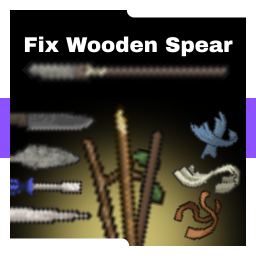
Fix Wooden Spear and Its Bindings
von 76561198376741826
Read This mod adds new crafting options for spears and rebalances their stats Main Features • Craft wooden Spears from planks • Use torn rags and ripped jeans in spear crafting • All spears can be crafted using the crafted spear • Long sticks can be crafted from planks Rebalance • All spears have been rebalanced - All spears: Critical Chance 20% → 25% and Crit Damage Multiplier 5 → 8 - Crafted Spear: Weight 2 → 1.8 - Long Spear: Max Damage 1.7 → 1.8 Other Mod that allows using only torn rags and ripped jeans to craft spears Fix Bind Spear . This is one of my first mods, so there may be some issues. Please like and share! Workshop ID: 3648263696 Mod ID: FixWoodenSpear
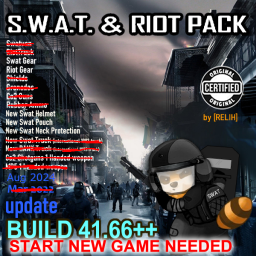
Swat Armor: Revamped
von 76561198412158797
!!! В ПОРЯДКЕ ЗАГРУЗКИ МОДОВ СПУСТИТЕ ЭТОТ МОД В САМЫЙ НИЗ !!! !!! BRING THIS MOD IN THE BOTTOM OF MOD LOADING ORDER !!! Ru: Оригинальный мод: https://steamcommunity.com/sharedfiles/filedetails/?id=2091564445 Добавляет 3 набора одежды: Штурмовой (Riot), Спецназовский (SWAT) и Набор сапера (Sapper Antibomb), а так же 2 рюкзака - полицейский и штурмовой. Их можно найти в мире, или снять с очень хорошо экипированных зомби, которые пытались сдерживать первые волны зараженных... Спецназовцы и штурмовики очень редко появляются в полицейских участках, а штурмовики дополнительно в тюрьмах. Сапер - самый редкий вид, появляется только в больших полицейских участках. Этот мод был изначально был взят отсюда: https://steamcommunity.com/sharedfiles/filedetails/?id=2992305910, и был отредактирован и отбалансирован под нужды моего сервера с друзьями. En: Original mod: https://steamcommunity.com/sharedfiles/filedetails/?id=2091564445 Adds 3 sets of clothing: Riot, SWAT and Sapper Antibomb, as well as 2 backpacks - police and Riot. They can be found in the world, or taken from very well equipped zombies who tried to contain the first waves of infected... SWAT and Riots very rarely show up in police stations, and Riots additionally in prisons. The sapper is the rarest kind, appearing only in large police stations. This mod was originally taken from here: https://steamcommunity.com/sharedfiles/filedetails/?id=2992305910, and was edited and balanced for the needs of my server with friends. Have a good game! Workshop ID: 3320810982 Mod ID: SwatArmorRevamped
![Buffed And Capacity-Pilled Sewing Kit [B42.13+] – Project Zomboid Mod](https://images.steamusercontent.com/ugc/17801802672057776325/4B1D852AC4C8FCACDB197BDBF298CA20A515DBFD/)
Buffed And Capacity-Pilled Sewing Kit [B42.13+]
von 76561198106295572
Simple little mod that increases the sewing kit capacity from 2 to 6. Nothing crazy. The 3D model in the mod image is made by Dante271. o7 I'm always tailoring in this game, Can't stop me from tailoring. I like to carry sewing materials and a needle on me for emergency mending and such. Carrying my sewing stuff in a fanny pack never made enough room for pens or stuff like that so I thought: how cool would it be to carry the sewing kit on me? not as a wearable, mind you, I'm not a wizard. But I never carried the sewing kit on me because its stats were cheeks. That is, until this mod B) Check out my website if you like weird music, digital art, or just wanna follow my work! Workshop ID: 3652045383 Mod ID: bigsewingkit

Bag of Holding
von 76561198009933096
A blatant cheat version of a mod by " ArpyClarkson ". Makes the Satchel bag have 100% weight reduction and a 1000 unit capacity, but sets its weight to 5 units. Moves this satchel to the "Fanny Pack, Back" slot, so it can be worn along side 1 fanny pack (front) and 1 other backpack in case you want seperate bags for gear and loot. Workshop ID: 2852807314 Mod ID: BAGOFHOLDING

Zombie Drop Cloth Lag Fix For Dufa Server
von 76561198419120643
좀비가 옷을 벗고 나온 채로 나오는 확률을 52퍼센트로 조정합니다. 좀비가 옷을 입고 나와 텍스쳐와 아이템 렌더링으로 생기는 이슈를 줄여줍니다. Vegetation Zeds mod 모드 + Zombie no cloth 모드에서 영감을 받아 50%로 줄이는 모드로 서버에 사용하기 위해 깔짝거린 모드입니다. 원본 : Vegetation Zeds https://steamcommunity.com/sharedfiles/filedetails/?id=3207511784 Zombie no cloth https://steamcommunity.com/sharedfiles/filedetails/?id=3281144566&searchtext=zombie+no+cloth 본인은 해당 모드에 대한 원본 모더레이터가 아니며 원본 모드가 수정이 가능한 모드여서 50%로 사용하기 위해 올린 것일 뿐 두 모드의 모더레이터가 모드를 내리기를 원하면 즉시 내리도록 하겠습니다 Workshop ID: 3306105221 Mod ID: ZombieDropClothSettingForDufa

Valhalla_Addons
von 76561198298093682
Mods do servidor Project Zomboid Valhalla Workshop ID: 2978336120 Mod ID: AuthenticZBackpacks+ Mod ID: Authentic Z - Current Mod ID: BCGRareWeapons Mod ID: BCGTools Mod ID: BioChemistryLife Mod ID: BB_Auto_Engineering Mod ID: BB_Utils Mod ID: craftingEnhancedCore Mod ID: DIY_EngineParts Mod ID: firearmmod Mod ID: firearmmodbspatch Mod ID: FH Mod ID: fol_Take_A_Bath Mod ID: FRUsedCars Mod ID: FRUsedCarsFT Mod ID: FRUsedCarsNLF Mod ID: FRUsedCarsNRN Mod ID: iMeds Mod ID: Lifestyle Mod ID: LootBox Mod ID: MoreBuilds Mod ID: MoreLootSettings Mod ID: noirrsling Mod ID: MilPoncho Mod ID: PyramidHead Mod ID: RE NPC Mod ID: RV_Interior_MP Mod ID: sapphcooking Mod ID: SawSword Mod ID: SimplePlayablePianos4150 Mod ID: SpnHair Mod ID: TKS Mod ID: TMA_SA_Radio_Mixtapes Mod ID: TMC_TrueActions Mod ID: TrueActionsDancing Mod ID: truemusic Mod ID: TsarcraftCache2 Mod ID: tsarslib Mod ID: VehicleRepairOverhaul Mod ID: WaterDispenser Mod ID: WaterDispenserDisabler Mod ID: XnerTree Mod ID: YakiMC Mod ID: YakiMCTattered Mod ID: YakiMCARMOR Mod ID: YakiMCMEDIEVAL Mod ID: YakiMCPRIMITIVE Mod ID: YakiMCROMAN Map Folder: AZSpawn Map Folder: vehicle_interior

Guima's K153
von 76561198014747517
Inspired and based on Brita's K153 mod, this mod brings a re-balance to military vehicles to improve game experience. Intended to be used on my private server to play with friends. Workshop ID: 3006109361 Mod ID: Guima_K153

Reglas(VGR)
von 76561198062723944
Reglas para VinculoGamer. Basado en Rules Workshop ID: 2889538723 Mod ID: Rules(VGR)
![[B42] PZ Mobile Reader – Project Zomboid Mod](https://images.steamusercontent.com/ugc/15860464130826392933/71934B91AA9027FC2FAEDE4C58B62CDA7A215CCA/)
[B42] PZ Mobile Reader
von 76561198091538582
PZ Mobile Reader B42.20 (Before) Mobile Reader (EN) Read while you are walking, because you should be able to do that! Post-apocalyptic reading warrants frantic pacing. (ES) Lee mientras caminas, porque puedes hacerlo! La lectura postapocal�ptica exige un ritmo fren�tico. El autor original dej� el mod pero ha dejado dicho que cualquiera puede retomarlo. A mi me resulta �til, eficiente y realista. Por ello he decidido mantenerlo con vida haciendo los cambios pertinentes para que funcione en la B42. Si tienes alg�n bug o entra en conflicto con otro mod, no dudes en escribirme e intentar� resolverlo. You can support my work here: Xolo Studios. Workshop ID: 3469471070 Mod ID: PZMobileReader

Modix: Game Panel
von 76561198347530219
🧩 Modix Game Panel Open-Source, Browser Based Game Server Manager for Project Zomboid Tech Stack: Frontend: React (CRA), Tailwind CSS, React Icons Backend: FastAPI (Uvicorn), Python 3, SSE, Systemd Database/Storage: JSON Config, SQLite Hosting: Windows (fully supported), Linux (experimental) Developed By: Ov3rlord & GameSmithOnline 🔗 Quick Links - 🌐 Modix Website: https://modix.store - 🛠️ Download from GitHub: https://github.com/DaleMarkie/Modix-Windows- - 💬 Join the Community: https://discord.gg/EwWZUSR9tM - ☕ Support Development: https://ko-fi.com/modixgamepanel - PZWiki: https://pzwiki.net/wiki/Modix 🚀 Overview Modix Game Panel is a next generation, open source server control panel built specifically for Project Zomboid. It lets you manage, configure, and update your game server faster, easier, and more powerfully than ever before. Forget outdated tools. Modix is built from the ground up for modern servers, with a sleek web dashboard, mod automation, and real time controls, all completely open and free for the community. Full Control. Fully open-source, giving you complete visibility and control Designed for Windows hosts (production-ready) Linux support is experimental, perfect for testing and VPS setups 🧪 Real-Time Logs & Terminal Live terminal output via Server-Sent Events (SSE) Monitor system usage: CPU, RAM, disk, and network Execute cute commands directly from the panel ⚙️ Full Settings Editor Edit server.ini and SandboxVars.lua directly from the panel Supports multiple server profiles for testing, PvE, Hardcore, or Vanilla+ 🧱 Mod & Workshop Manager Enable, disable, uninstall, or update Steam Workshop mods Tag-based search, auto thumbnail detection, and modlist management Build custom modlists and export mod IDs for server configuration 🔄 ModUpdater Automatically detects Steam Workshop mod updates Tracks changes and timestamps for live update notifications Backup your mods before applying updates to avoid data loss 🌐 Workshop Integration Search mods by name, keywords, or Steam Collection IDs View full metadata: name, description, author, update date, and popularity Favorite mods and color code them for easy organization Manage, create, rename, or delete custom modlists 🧍 Player Manager View all players with detailed info: Steam ID, country, VAC status, VPN detection Search, filter, and sort players by online status, name, or playtime Ban/unban players and add personal notes for each 🔔 Webhooks Send fully customized Discord embeds directly from the panel Live preview before sending Use for server alerts, updates, or mod notifications 🧰 File Manager Browse, upload, and edit files in a clean, intuitive interface Works seamlessly with server directories and mod folders ################################ ⚡ Getting Started / Local Installation 💾 1. Download the Project Download the repository: Modix-Windows--main Place the folder anywhere on your PC ✏️ 2. Rename the Folder (Optional) Rename it (e.g., Modix-Local) — won’t affect functionality 📦 3. Install Dependencies Open Command Prompt or PowerShell inside the folder: npm install → installs all required dependencies npm run dev → launches the Modix panel 🌐 4. Access the Panel Open your browser and visit: http://localhost:3000 You’re ready to start managing your server! 💖 Support & Donations All donations go directly toward maintaining and improving Modix: https://ko-fi.com/modixgamepanel ⚖️ License & Terms of Use Modix Game Panel Non-Commercial License (NC) – Version 1.4 You may: Use Modix locally for personal or educational projects Modify and contribute non-commercially Share improvements or extensions for community benefit You may NOT: Copy or re-upload Modix elsewhere Sell, rent, or license the software Use it for cheating, exploiting, or illegal activity Remove attribution or claim ownership Add-ons & Extensions: Only verified add-ons approved by the Dev Team may be sold Unauthorized sales are strictly prohibited Other Terms: License updates may occur; users must comply Violations terminate usage rights Governed by the laws of the United Kingdom ✅ Why Modix? Modix Game Panel is not just a tool — it’s a complete platform for managing your Project Zomboid server: Open-Source & Transparent: Inspect, modify, and contribute freely Powerful Yet Intuitive: Real-time logs, mod automation, and player management Flexible & Modern: Designed for Windows hosts, experimental Linux support Community-Focused: Built for modders, server admins, and dedicated players Take control of your server — simplify management, automate updates, and focus on gameplay instead of setup.
Project Zomboid Details →
Project Zomboid Guides
Project Zomboid Mods installieren - Workshop Guide
Installiere Project-Zomboid-Mods sauber per Steam Workshop: IDs eintragen, Reihenfolge prüfen, Server neu starten und typische Fehler beheben.
Project Zomboid Sandbox-Einstellungen: alle 62 Panel-Werte
Project Zomboid SandboxVars.lua im Panel konfigurieren: alle 62 Werte, Build-41/42-Unterschiede, Grenzen und sichere Empfehlungen.
Project Zomboid Build 42 auf dem eigenen Server: Umstieg, Spielstände und Mods
The Indie Stone veröffentlichte am 26. August 2026 Sicherheitskorrekturen für 42.20.4 Stable, 42.19.2 Unstable und 41.78.21 Legacy. Wähle den Patch für…
Project Zomboid Server mit Mod-Support
Kompatible, unterstützte Mods über das Server-Dashboard installieren.
Project Zomboid Server mieten