Configure Minecraft plugins in the GSH panel with the matching wizard or the file editor. First check the server platform, plugin version and the path that is actually written. Role, protection and port templates then need a test of their concrete effect; a successful save does not confirm that yet.
If you first need compatible server software, use Rent a Minecraft Server and then check the switching of version and loader.
Plugin Browser and Requirements
Open your Minecraft server and go to Content → Plugins. The browser shows installable and existing plugins. Before installing or updating, check that the Minecraft version, server software and plugin version fit together. Vanilla does not support Bukkit plugins; Paper, Purpur or compatible server software is a requirement for many wizards.
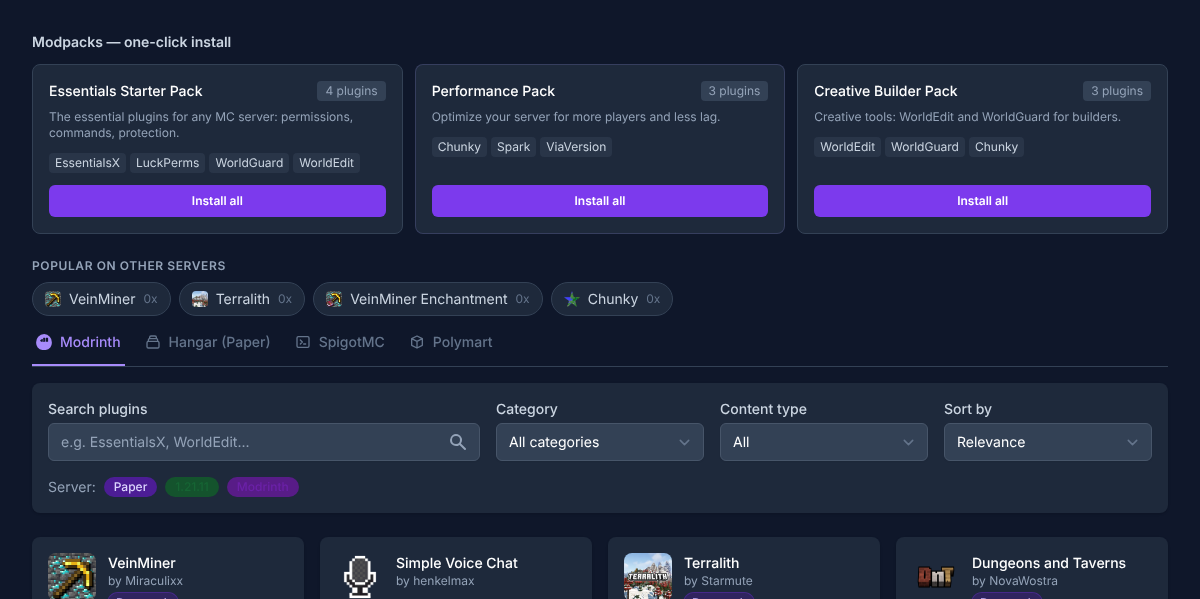
Create a backup before making changes. For installation, update or rollback, the panel shows the planned file operation and detected dependencies. Confirm warnings only once you have checked the way back.
The installation and removal of individual extensions is explained in the guide Installing and Managing Minecraft Plugins. The server's basic values are covered separately in the guide on server.properties.
Generic Plugin and Mod Configuration Editor
The editor supports the following combinations:
| Stack | Formats | Typical locations |
|---|---|---|
| Minecraft/Paper | YAML, YML, JSON | plugins/<Plugin>/… |
| Forge | TOML, JSON | config/…, world/serverconfig/… |
| Fabric | JSON, TOML | config/… |
| Rust | JSON | oxide/config/… |
A file may be at most 256 KiB in size. Directories are searched only one level deep. The editor changes scalar values: text, number, boolean, null as well as lists of scalar values. Nested objects remain visible but are not arbitrarily restructured.
Known secrets such as password, token, secret, API key or webhook are masked. The panel only writes if the file hash is unchanged; if the file was changed between loading and saving, you must reload it. Paths with traversal, symlinks outside the permitted area, executable files and extensions that are not approved are rejected.
Simple Voice Chat: Values and Port
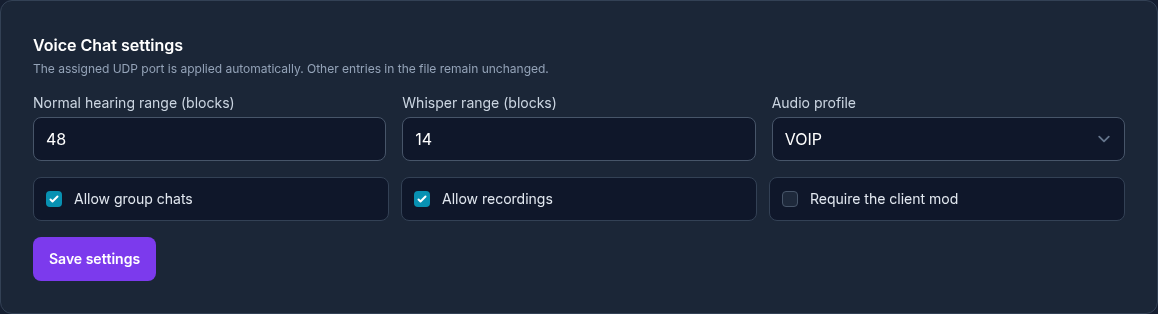
| Value | Range / Default | Effect |
|---|---|---|
| Port | automatically assigned UDP port | Written exactly into the plugin configuration; no free port choice. |
max_voice_distance |
1–512 / 48 | Normal maximum hearing range. |
whisper_distance |
1 to hearing range / 24 | Range when whispering. |
codec |
VOIP, AUDIO, RESTRICTED_LOWDELAY / VOIP |
Codec profile for voice data. |
enable_groups |
true |
Enables voice groups. |
allow_recording |
true |
Allows recording features. |
force_voice_chat |
false |
Determines whether the client mod is enforced. |
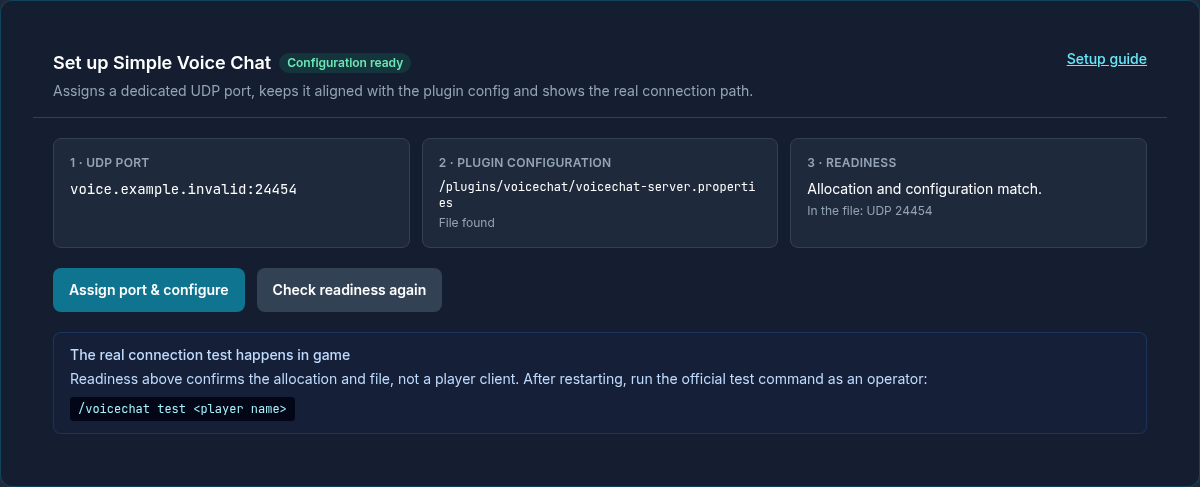
The “ready” status confirms the plugin, UDP assignment and the matching port in the file. It does not test a microphone. To check the connection, use /voicechat test <player name>; general TCP port scanners are not a reliable test for this UDP service. The full setup is explained in the Simple Voice Chat guide.
LuckPerms, EssentialsX, WorldEdit and WorldGuard
Starter roles: The template requires LuckPerms and EssentialsX. default receives spawn, home, sethome, TPA, messages, rules, MOTD, player list and help. moderator inherits default and adds kick, mute, ban, tempban, broadcast, invsee and SocialSpy.
Builder role: The template additionally requires WorldEdit and WorldGuard. builder inherits default, receives WorldEdit selection and wand as well as its own WorldGuard regions and member management.
LuckPerms web editor: The wizard starts lp editor groups. Open the generated editing link, make your changes and then run the command output there on your server.
The templates are starting points. Check every permission against your server concept and test roles with an account that does not have OP rights.
TAB, TabTPS and SkinsRestorer
The TAB wizard sets tabprefix and tagprefix for known groups:
| Group | Prefix |
|---|---|
default |
&7 |
vip |
&6[VIP] &r |
moderator |
&2[Mod] &r |
admin |
&c[Admin] &r |
Custom group names may contain 1 to 32 characters: lowercase letters, numbers, _ and -. After the change, the panel reloads TAB.
TabTPS grants tabtps.defaultdisplay to default and reloads the plugin. SkinsRestorer grants skinsrestorer.player; for a valid Minecraft name, the wizard can set a skin, remove it and query the status.
WorldGuard Protection and WorldEdit Access
In the global region __global__, the protection wizard manages these flags: pvp, mob-spawning, mob-damage, tnt, creeper-explosion, fire-spread and fall-damage.
Each flag can be set to allow, deny or default. default removes the explicit global setting so that the normal WorldGuard or game rule applies again. WorldEdit access is set per valid LuckPerms group via worldedit.* = true or false. Grant this broad permission only to trusted builders.
VeinMiner and Chunky
VeinMiner 1.x is detected as a datapack; the wizard only points read-only to /function veinminer:_config. For VeinMiner 2.x, two templates are available:
| Value | Balanced | Performance |
|---|---|---|
| Sneaking required | yes | yes |
| Cooldown | 20 | 40 |
| Delay | 1 | 2 |
| Maximum chain | 64 | 32 |
| Correct tool | yes | yes |
| Search radius | 1 | 1 |
| Permission restriction | off | off |
| Merge drops | off | on |
| Auto-update | off | off |
Chunky starts exactly one background pre-generation. The states are idle, queued, running, paused, completed, completed_partial and failed. The default world is world, the default radius currently 1,000 blocks. The rough storage estimate is 800 MB × (radius / 1000)²; it is a planning aid, not a guarantee. The panel shows progress, rate and ETA.
Network Services and Written Ports
The network wizard uses a fixed allowlist, assigns an additional port and writes only the cataloged key into known paths. Before writing, it checks the file hash and the actual state.
The following numbers are plugin defaults, not a hosting assignment. The wizard writes the actually assigned additional port into the matching configuration.
| Service | Plugin default / Protocol | Key | Configuration path |
|---|---|---|---|
| Plasmo Voice | automatic / UDP | host.port |
plugins/PlasmoVoice/config.toml or config/plasmovoice/config.toml |
| squaremap | 8080 / TCP | settings.internal-webserver.port |
plugins/squaremap/config.yml or config/squaremap/config.yml |
| BlueMap | 8100 / TCP | port |
plugins/BlueMap/webserver.conf or config/bluemap/webserver.conf |
| Dynmap | 8123 / TCP | webserver-port |
plugins/dynmap/configuration.txt |
| Plan Player Analytics | 8804 / TCP | Webserver.Port |
plugins/Plan/config.yml or config/Plan/config.yml |
| Votifier | 8192 / TCP | port |
plugins/Votifier/config.yml, plugins/NuVotifier/config.yml or plugins/VotifierPlus/config.yml |
Web maps and Plan share the exclusive group customer_http; competing services are displayed as a conflict. BlueMap additionally requires the deliberate consent accept-download: true. Plan login requires HTTPS and an enabled, verified gateway publication.
Passive Analysis and Minecraft Client Package
The plugin analysis works purely read-only over 1, 6 or 24 hours. It shows up to twelve plugin names, the exact total count, a detected spark installation, CPU/RAM peak and P95 as well as curated error signals. It does not attribute invented resource values to any individual plugin.
The Minecraft client package generates a Packwiz package for active mods. For each mod it knows automatic, required, optional and server_only. Before the build, it shows incompatible or non-distributable client dependencies and manages time-limited download tokens.
Verifying Safely
After every change, first test the server start. Then check the concrete function and finally the permissions with an unprivileged test account. For network services, additionally check the protocol, assigned port and the endpoint shown by the panel. Do not change the same file in parallel outside the wizard.
FAQ
Which files can the generic editor edit?
Depending on the stack, YAML/YML, JSON or TOML in the approved plugin and configuration folders. The file may be at most 256 KiB in size and must pass the path and security check.
Does the editor overwrite simultaneous changes?
No. The file hash is checked again before saving. If there is a mismatch, you must reload and merge your change with the current state.
Can I publish several web maps at the same time?
The supported web maps and Plan compete for the group customer_http. The panel shows the conflict instead of blindly placing several services on the same publication path.
Are the role templates immediately safe for a public server?
They are a comprehensible starting point. Check the permissions included, remove unnecessary permissions and test every group without OP rights.
Sources and Verification Status
Verification status: September 8, 2026. Supported formats, wizards, values and limits come from the current panel implementation. Plugin-specific procedures were compared against the official project documentation:
- Simple Voice Chat – Server Setup
- LuckPerms – Configuration
- WorldGuard – Configuration
- TAB – official wiki
Confirm a Wizard Change on the Target Plugin
Before the change, note the plugin version and configuration path. Afterwards, check which values the wizard wrote and whether the plugin starts without loading errors after the intended restart. Test permissions with a normal role and protection rules inside and outside the region. For network services, check the assigned endpoint separately from plugin readiness. Do not edit the same file manually and in the wizard at the same time. If an outdated file state is reported, reload it and transfer only the intended values. Keep the previous version as a targeted way back.