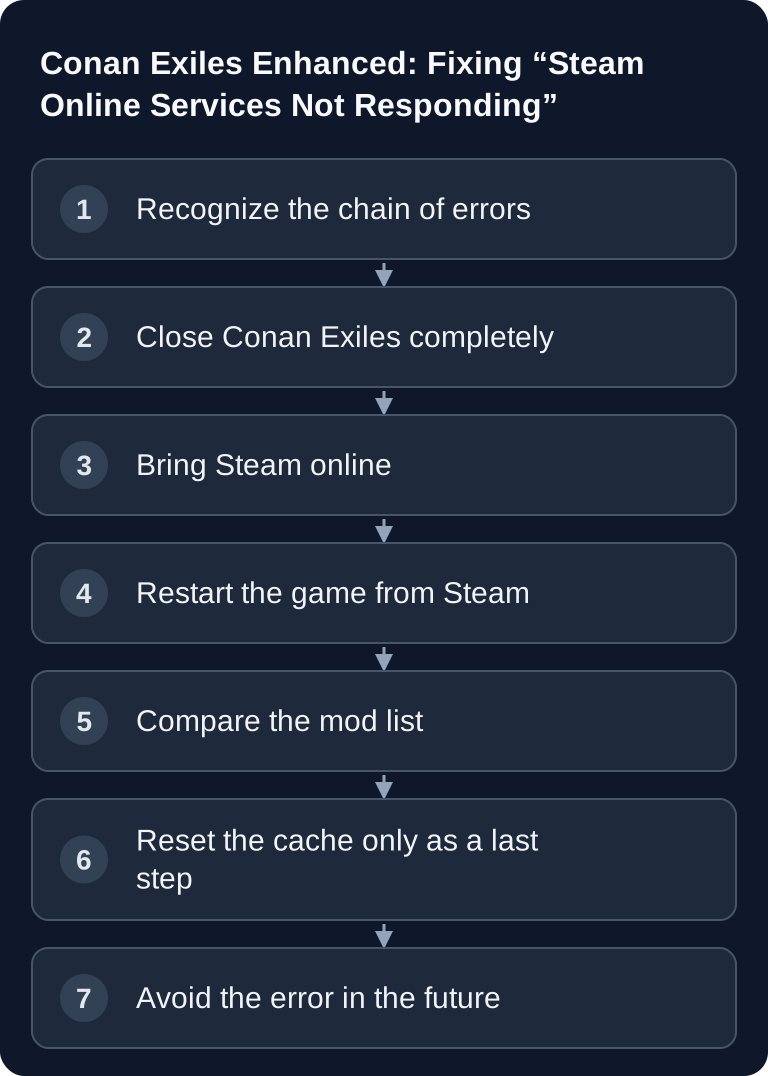
In Conan Exiles Enhanced, the quick restart after “Connect on Mod Mismatch” can prevent login to the Live Services. Funcom names a complete restart of the game as a workaround. Check this connection against the sequence of events; the same message can also have other login or network causes.
Is It Really a Bug?
In the official Known Issues, Funcom describes exactly this sequence: after “Connect on Mod Mismatch”, Conan Exiles Enhanced can restart so quickly that the login to the Live Services fails. As a workaround, Funcom names another restart of the game. This officially confirms the specific chain of errors.
That does not mean, however, that every identical message has the same cause. If Steam is actually offline, the internet connection is disrupted or there is a general service outage, the login can fail as well. The connection is especially strong if this sequence occurs:
- The server requires a different or differently sorted mod list.
- Conan Exiles offers to restart with the server mods.
- Right after this automatic restart, “Login failed! Steam online services not responding.” appears.
- In the Mods menu, the game then reports a temporary mod list.
In an anonymized live check on August 11, 2026, it was also possible to demonstrate: the affected Conan server ran stably and accepted the client connection. Only the pre-login was rejected because of the required server mods. After that, the client showed the Steam/Live Services message described by Funcom. In this sequence, that speaks against a crashed game server.
How to Fix “Steam Online Services Not Responding”
1. Close Conan Exiles Completely
Close the game instead of using the automatic mod restart again. In the Windows Task Manager, check that no Conan Exiles process is running anymore. Wait a few seconds so the current session can end cleanly.
2. Check That Steam Is Online
Steam must be online. In Steam offline mode, online-dependent features are not available; game and client updates are not downloaded there either. If Steam itself shows connection problems, close Steam completely and restart the client. Log in again if necessary.
3. Launch Conan Exiles From the Steam Library
Start the game fresh via Steam and wait briefly in the main menu until the online services are connected. Then connect to the server again. This is the core workaround documented by Funcom.
4. If Mod Mismatch Appears Again, Check the List
If a mod mismatch comes up again, compare client and server. The following must match:
- the number of mods,
- every Steam Workshop ID,
- the installed version of every mod,
- the load order.
Even one additional local mod or a different order can prevent the pre-login. The mod names listed in a PreLogin failure line in the server log are generally the list expected by the server. They do not prove which mods were actually active on the client.
5. Reset the Temporary Mod List Only for a Stubborn State
The message about a temporary mod list is, after a server-driven mod selection, initially not proof of a server error. Normally the state disappears after a complete restart.
If it persists even after several clean restarts, there is a community workaround: close Conan Exiles and Steam, back up the file
ConanSandbox\Saved\ModControllerCache.json
and rename it, for example, to ModControllerCache.json.bak. Then start Steam and the game again. Conan creates the cache anew. This step comes from the Funcom community and is not documented as an official fix by Funcom. Do not delete the file without a backup.
Avoiding the Error Entirely (Preload)
After the first successful connection, you can avoid the error permanently. During the mod comparison, the client itself saves the server's mod list as a file — and you can adopt exactly this file as your local mod list. After that, Conan Exiles loads the server mods already at game start: no automatic restart, no error dialog.
- Connect to the server once as normal and let the mod comparison run through completely (the sequence described above, including the second attempt).
- Open the file
<Steam>\steamapps\common\<Conan-Exiles-Installation>\ConanSandbox\servermodlist.txtand copy its entire contents. - In the same
ConanSandboxfolder, open the subfolderMods\(create it if it doesn't exist). In it, create the filemodlist.txtor open it, and replace its contents with the copied text — do not append. - Restart the game. The mods now load already at game start — no auto-restart, no Steam error dialog.
About the format: The file contains one line per mod, each beginning with *; the line order is the load order and must match the server order exactly. Therefore do not type the lines by hand — the client already writes them to servermodlist.txt with the correct local paths.
Maintenance: If the server's mod list changes (new mod, removed mod, different order), copy the contents of servermodlist.txt into Mods\modlist.txt again after your next connection.
Workshop subscriptions: Not strictly necessary — the server delivers the mod files via direct download. The subscriptions are still recommended, because Steam then keeps the mods up to date automatically.
For game-serverhosting customers: You can find the current mod list of your own server, including Workshop links and a ready-made text to pass on to your players, in the server panel under the “Mods” tab.
Why Does Singleplayer Still Work?
A local game can start without any problem even though joining the server fails. In singleplayer, Conan Exiles uses your locally selected mod configuration and does not have to pass a server-side pre-login with an exact mod list. A successful local start therefore only proves that the client is fundamentally functional – not that its mods match the target server.
Does the Game Server Need to Be Restarted?
For the error described by Funcom, normally not. The faulty state arises from the too-quick client restart and the subsequent login to the Live Services. A server restart does not repair this client session.
Intervening on the server only makes sense if the logs show other symptoms, for example:
- the server process is unreachable or restarts repeatedly,
- mods could not be loaded at server start,
- server and client builds differ,
- the configured server mod list is incomplete or incorrectly sorted.
Diagnosis for Server Operators
A few log characteristics help narrow down the cause:
| Observation | Likely classification |
|---|---|
| No incoming connection in the server log | Check client, Steam, network or wrong target |
Connection arrives, then PreLogin failure with mods |
Compare client and server mod lists exactly |
| Server runs stably, client shows the error only after the mod restart | Check the client restart bug documented by Funcom |
| Several players report Steam problems at the same time | Additionally check for a broader Steam outage |
In a support request, note the time of the attempt, the client build, the server build and a screenshot of the message. This makes it possible to find the matching connection attempt in the server log without hastily reinstalling the server.
What Is Known About a Permanent Fix?
Funcom listed the problem in the official Known Issues for Conan Exiles Enhanced. In the patch notes for 1.2.0, 1.3.0 and 2.0.0 that we checked up to August 11, 2026, we found no explicit indication that exactly this mod restart/Live Services error was fixed. That is not proof that every current login error remains unfixed. Together with a recent occurrence on build 370197, however, it shows that this guide is still relevant.
FAQ
Is the Conan Exiles server broken?
Not necessarily. If the server accepts the connection and only rejects it at PreLogin because of mods, it is running. The Steam/Live Services message after the automatic restart then concerns the client path.
Is it enough to click “Confirm” in the notice window?
For the known bug, not always. Funcom recommends another restart. Close Conan Exiles completely and start it fresh from Steam.
Why do I see a temporary mod list afterwards?
Conan Exiles loaded a server-specific mod configuration for the connection attempt. As long as this temporary state is active, the Mods menu requires a restart before you can manage your normal list.
Do I have to download all mods again?
Not as a first step. First check the clean restart and then compare IDs, versions and order. A complete re-download costs time and doesn't help if only an additional mod or the order is wrong.
When should I contact support?
If the message returns after a complete Steam and game restart or the server keeps reporting PreLogin failure. Send the time, a screenshot and, if possible, your active mod list. game-serverhosting customers can then have the connection attempt checked specifically in the server log.
Planning your own modded server? On the Rent a Conan Exiles Server page, you will find suitable plans and the most important server features.
Sources and Verification Status
- Official Funcom confirmation: Conan Exiles Enhanced – Patch Notes and Known Issues. Funcom names the too-quick restart after “Connect on Mod Mismatch,” the subsequent Live Services login error and restarting the game as a workaround.
- Official Steam help: Offline mode. Steam explains that online-dependent features and updates are not available in offline mode.
- Later official Funcom patch notes: Version 1.2.0, Version 1.3.0 and Version 2.0.0. As of the verification date, no explicit fix for exactly this chain of errors was found there.
- Additional community reports in the official Funcom forum: Dedicated server connection mess. Several players describe the same sequence; the posts are user reports, not an official root cause analysis.
- Community workaround for a stuck mod cache: Unable to edit modlist from menu. Renaming
ModControllerCache.jsonis not confirmed as an official Funcom fix. - Community guide for the preload workaround: Skip Game Restart when Joining Modded Servers in Conan Exiles Enhanced. Describes the servermodlist.txt method documented here. It is a community guide, not an official Funcom guide.
Verification status: August 13, 2026. Product and patch states may change; if Funcom releases a later update, the status should be checked again.
Recording a Mod Mismatch as Its Own Chain of Errors
First note whether the error appears before or after the automatic mod restart. Then check the Steam online status and a complete restart of the game. If the message persists, compare the mod list that is actually active with the server list, including order. A working singleplayer game confirms the local content, but not a successful Live Services login. Therefore, first change the client start and the mod assignment, without reinstalling the running community server. For a follow-up inquiry, keep the error message, time and the last steps; account tokens and credentials stay confidential.