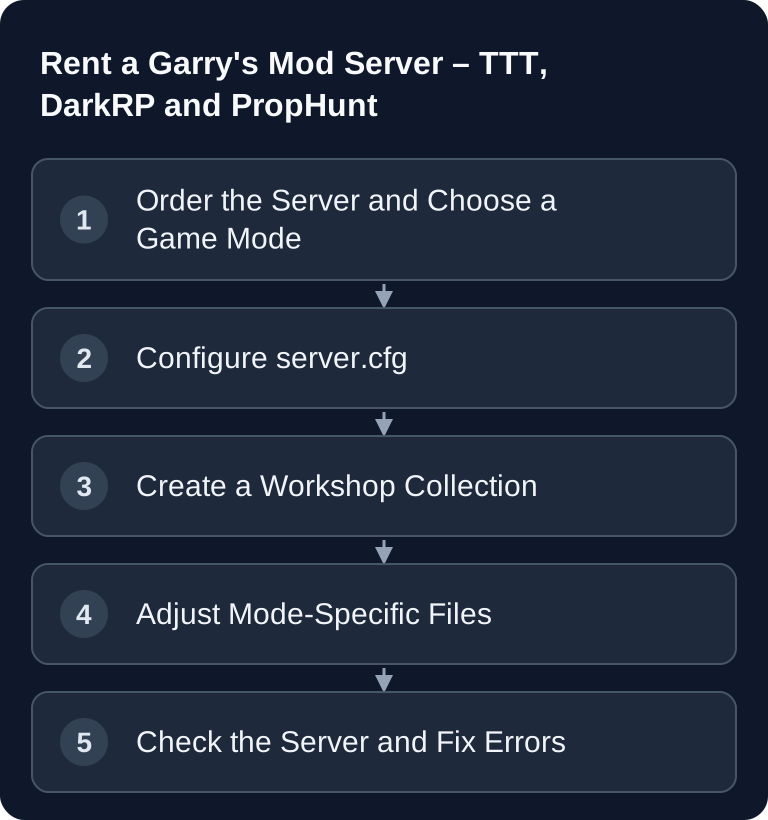
You start a Garry's Mod server with a suitable map, the installed gamemode and the slots you want. Choose the gamemode via the supported startup configuration. The GSH setup sets +maxplayers from the booked slots; name and password belong in garrysmod/cfg/server.cfg. You then check the Workshop collection, missing game content and gamemode files separately. For TTT, there is a dedicated setup guide.
Requirements
For your Garry's Mod server, choose a currently bookable slot tier and check the resources it includes. Small groups and light addon sets cause a different load than large roleplay worlds; DarkRP servers with many jobs, maps, vehicles or extensive Workshop content need more reserves depending on the setup. Also decide in advance which mode you want to run. A server that is prepared for TTT, DarkRP and PropHunt at the same time quickly becomes confusing.
You need access to the server files, the server.cfg, the startup parameters and the server console. For addons, you use the official Steam Workshop for Garry's Mod. This source is the primary place for Workshop content, collections and addon IDs. Always check there whether an addon is currently maintained and which dependencies the author lists.
If you also plan voice communication for your team, a dedicated TeamSpeak 3 server for administration and co-op coordination fits well with GMod sessions. For other co-op servers, you'll also find the guide on Terraria multiplayer servers.
Order the Server and Set the Basics
- Go to game-serverhosting
- Choose a currently bookable slot tier and check the resources and addon requirements.
- Choose the game mode when ordering
At game-serverhosting, paid operation is the focus: you rent a server, manage configuration and addons in a targeted way, and can use support and transparent operating procedures instead of hosting locally. Enter a unique server name early on, decide on a password, and start with a small number of players at first. For public servers, an empty password is common; for test phases or private sessions, set a password until addons, maps and permissions work cleanly.
Popular Game Modes
| Mode | Description | Players |
|---|---|---|
| TTT | Trouble in Terrorist Town | 8-24 |
| DarkRP | Roleplay | 20-64 |
| PropHunt | Hide as a prop | 8-24 |
| Sandbox | Free building | 4-20 |
| Murder | Find the murderer | 8-16 |
These player counts are practical guideline values, not a performance guarantee. Map size, tick rate, addons, Lua scripts, entity count and player behavior are what matter. Start conservatively, watch the server console and player feedback, and only increase slots once the server stays stable.
Set Up server.cfg
In garrysmod/cfg/server.cfg you set the server name and password. The gamemode needs matching installed files and a startup value such as +gamemode terrortown. +maxplayers 24 explains the developer syntax for a self-managed start; with GSH, this value comes from the booked slots. A different slot tier requires the offered package change. Facepunch shows the startup parameters in the official server guide.
hostname "My GMod Server"
sv_password ""
Developer startup example: +maxplayers 24 +gamemode terrortown +map <installed_ttt_map>. In the GSH setup, the managed +maxplayers value remains tied to the booked slots.
After every change, you should restart the server and check in the console whether the mode was loaded. If the server starts in the wrong mode, the cause is usually a second active gamemode line, a faulty startup parameter or a missing gamemode folder.
Set Up a Workshop Collection
Workshop collections are the cleanest way to provide addons to players automatically. Only include content that is really needed: gamemode, maps, models, sounds, weapons, HUDs and required dependencies. The larger the collection, the longer the first join takes and the higher the risk of conflicts.
- Create a Steam Workshop collection
- Add all the addons you want
- Add the collection ID to the startup line:
+host_workshop_collection <collection_id>
You can find the collection ID in the URL of your Steam collection. After entering it, restart the server and connect with a client that doesn't have the addons installed locally yet. This way you check whether the download path works and whether missing content shows up as error models or pink-and-black textures.
Set Up DarkRP
DarkRP thrives on well-maintained jobs, rules and economy values. Don't change everything at once; test jobs and entities step by step.
- The DarkRP gamemode is often preinstalled
- Define jobs in
darkrp_customthings/jobs.lua - Define entities in
darkrp_customthings/entities.lua - Test the F4 menu for switching jobs
After every change, check the server console for Lua errors. If the F4 menu doesn't open or jobs are missing, it's often due to syntax errors, missing commas or addons that override DarkRP functions. Keep a working version of your configuration ready before adding larger job packs.
Set Up TTT
TTT needs clear round lengths, sensible traitor and detective ratios, and maps that fit the player count. These example values are a solid starting point for small to medium groups:
ttt_round_limit 6
ttt_time_limit_minutes 15
ttt_traitor_pct 0.25
ttt_detective_pct 0.13
ttt_haste 1
ttt_haste_starting_minutes 5
Then test at least one complete round with several players. Pay attention to whether roles are assigned correctly, whether rounds end cleanly and whether map changes work. With very small groups, the detective ratio may feel inappropriate; with larger groups, you should judge the balance in real play sessions.
Check PropHunt and Sandbox
For PropHunt, map selection is particularly important. Not every map offers enough props, hiding spots or fair search routes. Therefore, test each map with both teams. Sandbox, on the other hand, needs clear permission management because players can spawn many objects. Restrict problematic tools if the server is publicly accessible.
Verify the Result
After setup, the server should appear in the server list with the correct name, load the chosen gamemode and offer the Workshop content when joining. Connect at least once as a regular player, not only as an admin. Check the password, slots, map, addons, console errors, download time and a map change. Only then should you share the address with your community.
Troubleshooting
If addons are missing, first check the collection ID and whether the collection is publicly visible. If the server doesn't start, remove new addons as a test and start with a minimal server.cfg. For Lua errors, the first error message in the console is usually more important than all the follow-up errors. If players get stuck when joining, reduce large content packs and test a smaller Workshop collection.
FAQ
How much RAM do I need for a Garry's Mod server?
Choose the currently offered slot tier and its associated resources. DarkRP, large maps and many Workshop addons can increase the additional requirements. It's better to plan step by step and observe the server under real load.
Which game mode is suitable for getting started?
TTT and PropHunt are usually quicker to set up because they have clear round structures. DarkRP offers more depth, but requires considerably more upkeep for jobs, rules, addons and moderation.
Do I have to use a Steam Workshop collection?
For addon servers, it is strongly recommended. Without a collection, players have to install content manually or will see missing models, sounds and textures. Use the official Steam Workshop page as the source for collections and addons.
Why does my server start in the wrong gamemode?
Check the server.cfg, startup parameters and installed gamemode files. In particular, check the +gamemode value passed at process start and whether the corresponding gamemode is installed. A change to the server.cfg alone doesn't replace this selection.
How do I properly test DarkRP after changes?
Restart the server, open the F4 menu, switch between several jobs and spawn defined entities. Then read the server console. Small syntax errors in jobs.lua or entities.lua can hide entire areas.