Security Update: Check Your Version Branch
The security fixes for Project Zomboid must match your existing Stable, Unstable or Legacy branch. Back up your world and mod set, and update within that branch first. A security update is not a green light to carry a Build 41 world over into Build 42. As of October 7, 2026, The Indie Stone lists 42.21 as Stable. The official 42.21 release notes report, among other things, that loadstring and loadstream are enabled again; the August fix below should therefore be read as historical.
In 42.20.4, loadstring and loadstream were disabled for security reasons. With 42.21, both were re-enabled after further investigation. Judge mod errors by the build that is actually installed; a successful start alone still does not confirm that all mod functions work.
- Note down your branch, server version and mod list; back up your world and configuration while the server is stopped.
- Update within the same branch and bring the clients in line.
- Check joining, saving and the mod functions you actually use. Attribute Lua errors to the specific build; the restriction from 42.20.4 does not apply unchanged to 42.21.
- If problems occur, test a separate fresh world without mods. Do not overwrite your community save for this.
- Re-enable an affected mod only after it has been adjusted. Rolling back to a state from before the security fix is not a suitable permanent way back.
Source: The Indie Stone: Security hotfixes from August 26.
Build 42 Is Stable — and Breaks Your Old Saves
Since July 29, 2026, Build 42 of Project Zomboid has officially been Stable. After roughly 19 months of development, it is the biggest shake-up since Build 41 — and for server operators it is above all a compatibility question: Build 41 saves do not run under Build 42. If you upgrade, you start the world over. If you don't want that, you can deliberately keep your server on Build 41.
This guide shows both paths, lists the changes relevant to servers, and covers the later security fix from August 26.
The Compatibility Situation at a Glance
| Starting point | Runs under 42.20? | What to do |
|---|---|---|
| Build 41 save | No | Restart the world or stay on legacy41 |
| Unstable 42.19 save | No | Restart the world or stay on beta 42.19 |
| New world under 42.20 | Yes | — |
| 42.20.0 → Hotfix 42.20.1 | Yes | According to the developers, the hotfix does not break saves |
The reason 42.19 worlds are not carried over either is the extensive new map areas in 42.20 — the world data simply no longer fits together.
Path 1: Stay on Build 41
If your community is in the middle of a long run, staying is the lowest-risk option. The Indie Stone keeps Build 41 available as its own beta branch:
- Right-click Project Zomboid in your Steam library
- Open Properties
- Under Game Versions & Betas, select the
legacy41branch
Important: All players on your server must choose the same branch. A client on Build 42 will not connect to a Build 41 server. Announce the switch before you make it.
For runs on Unstable 42.19, there is a similar beta branch, 42.19.
Path 2: Upgrading to Build 42
Upgrading means a world restart. A sensible order:
- Create a backup of the current world. In the game-serverhosting panel, you back up your server before you change anything — so the old run is preserved in case you want to go back.
- Agree on a date with the community. A wipe without warning costs you players.
- Check your mods (see below) — Build 42 is a breaking change, and many mods need an update.
- Update the server to the supported Build 42 version you chose and create a separate new world. On October 7, 2026, 42.21 is the released Stable build; check the release notes before switching.
- Set your sandbox settings again — some options have changed.
Don't have a server of your own yet? Rent a Project Zomboid Server
What Concretely Changes for Multiplayer Servers
Build 42.20 brings several new features that affect servers exclusively:
- Anti-cheat reworked and active again. The check now runs server-side; the former setting
antiCheatItemis gone because it became redundant. Logging has been improved. According to the developers, two sub-areas (NoClip, PacketException) are still in progress. - New server option “Show coordinates”. It lets you show or hide the coordinate line for all connected clients — useful for roleplay servers that want to enforce navigation by map.
- Per-player ping values now appear in the “Players” and “Users List” tabs. This finally lets you tell whether a player has a connection problem or the server itself is hanging.
- Zombie limit raised significantly. The sandbox option “Zombie count before deletion” now goes up to 5000 instead of 500. For densely populated servers with heavy traffic, that is a noticeable degree of freedom — but also a lever that costs performance.
- Shorter loading times between “Click to Start” and spawning.
- Stackable items are transferred faster.
- Network behavior during vehicle collisions with zombies has been improved.
Your Old Sandbox File: What Build 42 Quietly Does Differently
It is well known that saves don't carry over. Less well known — and more annoying in everyday use — is the second part: the settings file SandboxVars.lua can be taken along without any trouble. It just no longer means the same thing under Build 42. There is no error message and no hint in the log. The server starts, but plays differently.
We run servers under both builds and have to read both formats in parallel. The following differences therefore don't come from a wiki, but from comparing real server files.
Eight Options Now Have Different Names
| Setting | Build 41 | Build 42 |
|---|---|---|
| Food | FoodLoot |
FoodLootNew |
| Medicine | MedicalLoot |
MedicalLootNew |
| Survival gear | SurvivalGearsLoot |
SurvivalGearsLootNew |
| Melee weapons | WeaponLoot |
WeaponLootNew |
| Ranged weapons | RangedWeaponLoot |
RangedWeaponLootNew |
| Ammunition | AmmoLoot |
AmmoLootNew |
| Experience multiplier | XpMultiplier |
MultiplierConfig.Global |
| Loot respawn | LootRespawn |
HoursForLootRespawn |
If you carry over the old file, Build 42 ignores the old keys and uses the default value for the new ones. Your painstakingly configured loot rarity is gone — without anyone telling you.
Two of the renamings are more than that: XpMultiplier is no longer a standalone value, but has moved into the MultiplierConfig container. And the tiered selection LootRespawn became HoursForLootRespawn, a value in hours — a 4 used to mean a tier, now it means four hours.
DayLength: The Same Number, a Different Day
This is the least conspicuous and at the same time the most impactful change. The value list was renumbered:
| Value | Build 41 | Build 42 |
|---|---|---|
4 |
2 hours | 1.5 hours |
5 |
3 hours | 2 hours |
6 |
4 hours | 3 hours |
7 |
5 hours | 4 hours |
| … | … | … |
26 |
– | 23 hours (new) |
27 |
– | Real time (new) |
Anyone who played Build 41 with DayLength = 4 had two-hour days. The same file results in days of an hour and a half under Build 42 — noticeably shorter, without anything looking broken. If your server feels more hectic after the upgrade, this is usually the reason.
What Build 42 Newly Allows
Some of this wasn't configurable at all before:
- Turn zombies off completely (
Zombies = 6) — for building and roleplay servers - Random values for speed, strength and toughness (
ZombieLore.Speed,.Strength,.Toughness) - Disable infection (
Transmission = 4) and never die from infection (Mortality = 7) - Keep power and water on permanently — or shut them off only after 6 to 12 months
- No spoilage in the fridge (
FridgeFactor = 6) - Very high and very slow as new tiers for temperature, erosion, nature growth, food decay and vehicle spawn rate
How to Set This Up With Us
With us, you don't have to edit a file for this. In the server panel, under Sandbox, there is a guided form that reads your world's settings directly from the file — it automatically shows the value list of your build, so under Build 42 that includes the new tiers. The game's presets (Apocalypse, Survivor, Outbreak, Rising, Six Months Later) can be applied with one click.
Two things are important here. Saving only works while the server is stopped — Project Zomboid rewrites the file on shutdown and would otherwise overwrite your changes. And if you need the complete file, you can reach .cache/Server/<Servername>_SandboxVars.lua through the file manager.
Looking Back: Performance Fixes in 42.20.1
The hotfix from August 5 fixes exactly the problems that show up on busy servers as “the server is lagging”:
- Chunk unloading fixed. A bug caused significant performance problems when unloading world areas. According to the developers, the fix resolves most of the server lag players experienced on servers with high player counts — the most important point of the patch.
- Memory leak closed. A memory leak led to declining performance over uptime and eventually to crashes. Exactly the pattern that shows up as “the server has to be restarted after a few days”.
- Memory usage improved by reusing discarded world data.
- Broken B41 worlds could mistakenly be hosted on B42 servers — this is now prevented.
- Vanishing vehicles after a fellow player disconnects fixed.
- Lua checksum validation for the anti-cheat improved.
42.20.1 was an early performance hotfix, 42.20.4 a later security fix. The now-released 42.21 contains further changes, including the re-enabling of the two Lua functions. Do not use these historical patch numbers uncritically as your current update target.
Mods: Expect Breakage
Build 42 is a version leap that hits mods. In addition, The Indie Stone points out that a security patch released together with 42.20 (the underlying vulnerability was responsibly reported by Jorge Escabias) can in individual cases also affect mods.
In practice, that means:
- Check before upgrading whether your Workshop mods have a Build 42 version.
- Test on a new world without mods before you report bugs — the developers explicitly recommend this.
- Relevant for mod authors: mods may now write
.jsonfiles, and translation files need%%to display a percent sign.
How to install mods on your server and keep them up to date is explained here:
FAQ
Can I somehow save my Build 41 save?
Not on Build 42. The world data is not compatible. You can, however, keep playing the run indefinitely on the legacy41 branch — still create a backup beforehand.
Do my players have to do anything?
Yes. Server and client must run on the same version. If you stay on Build 41, everyone has to choose the legacy41 branch; if you upgrade, everyone has to be on the default version.
Is Build 42 stable enough for a community server?
The “Unstable” notice has been removed from the main menu, and 42.20.1 fixed the two most serious server problems (chunk unloading, memory leak). Much more speaks in favor of upgrading than at the end of July.
Is a higher zombie limit worth it?
It is available, but expensive. More active zombies mean more computing load per tick. Approach it step by step and watch the server load in the panel.
Where can I find the complete list of new features?
The developers provide a feature overview for Build 42. It is explicitly a selection, not a complete changelog.
Sources: official Steam announcements “Build 42.20.0 Stable Released” (July 29, 2026), “B42 CHECKLIST” (July 28, 2026) and “42.20.1 STABLE Hotfix Released” (August 5, 2026).
Separating the Version Switch From Mod Diagnosis
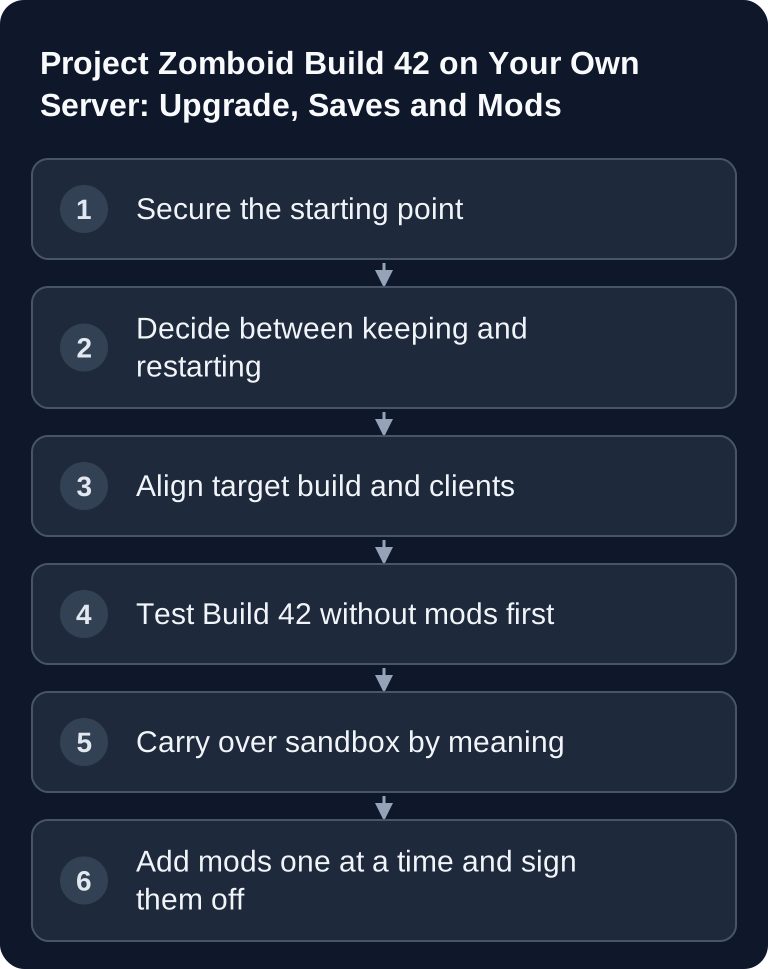
Before upgrading, note your server branch, client branch and the active Workshop IDs. Test Build 42 first with a separate fresh world and without mods. If joining works there, add your desired extensions one at a time in the documented load order. A mod that works under Build 41 needs an explicit Build 42 version or approval. Carry over sandbox settings by their meaning, not just by the same number. Keep the Build 41 world, with the matching software and mod set, as its own backup. Repeated starts with alternating builds are not a safe conversion path.