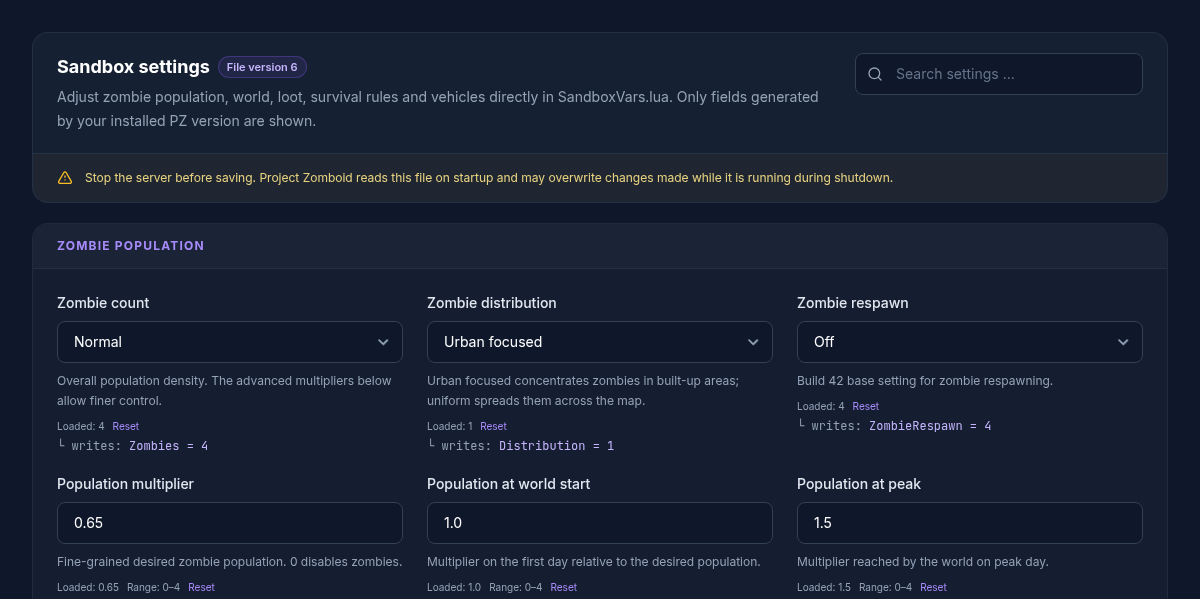
Project Zomboid's SandboxVars.lua defines the world rules. The GSH editor shows the values that match the existing file and game version; the 62-value table is an overview, not a guarantee of 62 visible fields on every server. After making changes, check the saved configuration and its effect separately.
For a new server, Set Up a Project Zomboid Server walks you through the basic configuration first. You can find the plan overview under Rent a Project Zomboid Server.
Why the Visible Fields Differ by Build
The editor checks your server's actual SandboxVars.lua and only shows keys that exist there. This way, no Build 42 value is blindly written into a Build 41 file. Option labels and available presets are also read from the installed game version. The full table below is therefore a superset; your server may show fewer fields.
Stop the Server and Create a Backup
Stop the server before saving. A running instance can write its loaded configuration back on shutdown and overwrite your change. Back up at least the world and the associated files in the server profile. The specific sandbox path ends in {SERVER_NAME}_SandboxVars.lua.
Setting Zombie Population in a Understandable Way
The coarse zombies setting and the advanced multipliers work together. population_multiplier describes the target amount, population_start_multiplier the world start and population_peak_multiplier the later peak. population_peak_day determines when this peak is reached.
For respawn, respawn_hours, respawn_unseen_hours and respawn_multiplier belong together. A value of 0 for respawn_hours disables respawn. Change this group together and observe several in-game days before adjusting further.
Difficulty, Perception and Daily Cycle
Speed, strength, toughness, memory, sight and hearing shape encounters more than a single population value. Random options deliberately produce inconsistent zombies. day_length describes the real-time duration of a full in-game day; longer days indirectly change progression, consumption and the perception of time-based events.
In an existing world, changes can behave differently than in a newly generated world. Therefore, try a backed-up copy first or change only a few related values.
When switching between the major versions, also consult the Project Zomboid Build 42 migration. Mods can add their own sandbox values; the Project Zomboid mod guide explains how to install them.
All 62 Curated Values
The reference is collapsed by default. For each value, it lists the path in SandboxVars.lua, valid options or limits, and the concrete effect. A dash under default means the editor takes the value from your current file instead of forcing a universal value.
All 62 Curated Sandbox Values
- File:
.cache/Server/{SERVER_NAME}_SandboxVars.lua
| Key | Panel display | Type and allowed values | Default | Effect / note | UI restart status |
|---|---|---|---|---|---|
zombies |
Zombie count | Choice · 1 = Insane, 2 = Very high, 3 = High, 4 = Normal, 5 = Low, 6 = None | — |
Coarse population density. The advanced multipliers below allow finer tuning. File path per build: Zombies. |
Restart required |
distribution |
Zombie distribution | Choice · 1 = Urban-focused, 2 = Uniform | — |
Urban-focused concentrates zombies in built-up areas; uniform spreads them across the map. File path per build: Distribution. |
Restart required |
zombie_respawn_mode |
Zombie respawn | Choice · 1 = High, 2 = Normal, 3 = Low, 4 = Off | — |
Build 42 basic setting for zombies reappearing. File path per build: ZombieRespawn. |
Restart required |
population_multiplier |
Population multiplier | Number · 0 to 4 · step 0.05 | — |
Fine value for the targeted zombie count. 0 disables zombies. File path per build: ZombieConfig.PopulationMultiplier. |
Restart required |
population_start_multiplier |
Population at world start | Number · 0 to 4 · step 0.05 | — |
Multiplier on the first day relative to the target population. File path per build: ZombieConfig.PopulationStartMultiplier. |
Restart required |
population_peak_multiplier |
Population at peak | Number · 0 to 4 · step 0.05 | — |
Multiplier the world reaches at its peak. File path per build: ZombieConfig.PopulationPeakMultiplier. |
Restart required |
population_peak_day |
Peak day | Integer · 1 to 365 | — |
In-game day on which the maximum population is reached. File path per build: ZombieConfig.PopulationPeakDay. |
Restart required |
respawn_hours |
Respawn interval (hours) | Number · 0 to 8760 · step 1 | — |
0 disables respawn. Otherwise, the time between respawn runs. File path per build: ZombieConfig.RespawnHours. |
Restart required |
respawn_unseen_hours |
Unseen before respawn (hours) | Number · 0 to 8760 · step 1 | — |
A region must stay unseen for this long before zombies respawn there. File path per build: ZombieConfig.RespawnUnseenHours. |
Restart required |
respawn_multiplier |
Respawn share | Number · 0 to 1 · step 0.01 | — |
Share of the target population per respawn run, e.g. 0.1 = 10 %. File path per build: ZombieConfig.RespawnMultiplier. |
Restart required |
redistribute_hours |
Migration (hours) | Number · 0 to 8760 · step 1 | — |
Time until zombies move into empty areas of the same cell. 0 disables migration. File path per build: ZombieConfig.RedistributeHours. |
Restart required |
rally_group_size |
Group size | Integer · 0 to 1000 | — |
0 prevents the formation of idle zombie groups. File path per build: ZombieConfig.RallyGroupSize. |
Restart required |
zombie_speed |
Speed | Choice · 1 = Sprinters, 2 = Fast shamblers, 3 = Shamblers, 4 = Random | — |
Movement pace of the zombies. File path per build: ZombieLore.Speed. |
Restart required |
zombie_strength |
Strength | Choice · 1 = Superhuman, 2 = Normal, 3 = Weak, 4 = Random | — |
Damage per zombie attack. File path per build: ZombieLore.Strength. |
Restart required |
zombie_toughness |
Toughness | Choice · 1 = Tough, 2 = Normal, 3 = Fragile, 4 = Random | — |
How hard zombies are to kill. File path per build: ZombieLore.Toughness. |
Restart required |
transmission |
Virus transmission | Choice · 1 = Blood + saliva, 2 = Saliva only, 3 = Everyone infected, 4 = None | — |
How the Knox virus spreads. File path per build: ZombieLore.Transmission. |
Restart required |
mortality |
Infection course | Choice · 1 = Instant, 2 = 0–30 seconds, 3 = 0–1 minute, 4 = 0–12 hours, 5 = 2–3 days, 6 = 1–2 weeks, 7 = Never | — |
How quickly an infection becomes fatal. File path per build: ZombieLore.Mortality. |
Restart required |
cognition |
Intelligence | Choice · 1 = Navigation + doors, 2 = Navigation, 3 = Basic navigation, 4 = Random | — |
Navigation and door abilities of the zombies. File path per build: ZombieLore.Cognition. |
Restart required |
memory |
Memory | Choice · 1 = Long, 2 = Normal, 3 = Short, 4 = None, 5 = Random, 6 = Random: normal to none | — |
How long zombies chase players after sight or hearing contact. File path per build: ZombieLore.Memory. |
Restart required |
sight |
Sight | Choice · 1 = Eagle-eyed, 2 = Normal, 3 = Poor, 4 = Random, 5 = Random: normal to poor | — |
Sight radius of the zombies. File path per build: ZombieLore.Sight. |
Restart required |
hearing |
Hearing | Choice · 1 = Pinpoint, 2 = Normal, 3 = Poor, 4 = Random, 5 = Random: normal to poor | — |
Hearing radius of the zombies. File path per build: ZombieLore.Hearing. |
Restart required |
active_only |
Active time of day | Choice · 1 = Day and night, 2 = Night, 3 = Day | — |
Inactive zombies are slower and chase less aggressively. File path per build: ZombieLore.ActiveOnly. |
Restart required |
thump_on_construction |
Attack player constructions | Toggle (true/false) | — |
Zombies may destroy defenses built by players. File path per build: ZombieLore.ThumpOnConstruction. |
Restart required |
drag_down |
Drag down | Toggle (true/false) | — |
Multiple zombies can drag a player to the ground. File path per build: ZombieLore.ZombiesDragDown. |
Restart required |
fence_lunge |
Lunge after crossing a fence | Toggle (true/false) | — |
Zombies can reach for nearby players over a fence or through a window. File path per build: ZombieLore.ZombiesFenceLunge. |
Restart required |
day_length |
Day length | Choice · 1 = 15 minutes, 2 = 30 minutes, 3 = 1 hour, 4 = 1.5 hours, 5 = 2 hours, 6 = 3 hours, 7 = 4 hours, 8 = 5 hours, 9 = 6 hours, 10 = 7 hours, 11 = 8 hours, 12 = 9 hours, 13 = 10 hours, 14 = 11 hours, 15 = 12 hours, 16 = 13 hours, 17 = 14 hours, 18 = 15 hours, 19 = 16 hours, 20 = 17 hours, 21 = 18 hours, 22 = 19 hours, 23 = 20 hours, 24 = 21 hours, 25 = 22 hours, 26 = 23 hours, 27 = Real time | — |
Real-time duration of a full in-game day. File path per build: DayLength. |
Restart required |
water_shut |
Water shutoff | Choice · 1 = Instant, 2 = 0–30 days, 3 = 0–2 months, 4 = 0–6 months, 5 = 0–1 year, 6 = 0–5 years, 7 = 2–6 months, 8 = 6–12 months, 9 = Disabled | — |
Time window after which tap water runs dry. File path per build: WaterShut. |
Restart required |
electricity_shut |
Power shutoff | Choice · 1 = Instant, 2 = 0–30 days, 3 = 0–2 months, 4 = 0–6 months, 5 = 0–1 year, 6 = 0–5 years, 7 = 2–6 months, 8 = 6–12 months, 9 = Disabled | — |
Time window after which the power grid fails. File path per build: ElecShut. |
Restart required |
temperature |
Temperature | Choice · 1 = Very low, 2 = Low, 3 = Normal, 4 = High, 5 = Very high | — |
Global temperature of the world. File path per build: Temperature. |
Restart required |
rain |
Rain | Choice · 1 = Very dry, 2 = Dry, 3 = Normal, 4 = Rainy, 5 = Very rainy | — |
How often it rains. File path per build: Rain. |
Restart required |
erosion_speed |
Erosion speed | Choice · 1 = Very fast, 2 = Fast, 3 = Normal, 4 = Slow, 5 = Very slow | — |
How quickly grass, vines and new trees reclaim the world. File path per build: ErosionSpeed. |
Restart required |
nature_abundance |
Nature abundance | Choice · 1 = Very low, 2 = Low, 3 = Normal, 4 = High, 5 = Very high | — |
Abundance of fish and foraging resources. File path per build: NatureAbundance. |
Restart required |
food_rot_speed |
Food spoilage | Choice · 1 = Very fast, 2 = Fast, 3 = Normal, 4 = Slow, 5 = Very slow | — |
How quickly food spoils. File path per build: FoodRotSpeed. |
Restart required |
fridge_factor |
Refrigerator effect | Choice · 1 = Very low, 2 = Low, 3 = Normal, 4 = High, 5 = Very high, 6 = No spoilage | — |
How effectively refrigeration slows spoilage. File path per build: FridgeFactor. |
Restart required |
helicopter |
Helicopter event | Choice · 1 = Never, 2 = Once, 3 = Sometimes, 4 = Often | — |
How regularly the helicopter attracts zombies. File path per build: Helicopter. |
Restart required |
meta_event |
Meta events | Choice · 1 = Never, 2 = Sometimes, 3 = Often | — |
Frequency of distant gunshots and other zombie-attracting sounds. File path per build: MetaEvent. |
Restart required |
food_loot |
Perishable food | FoodLootNew: Number · 0 to 4 · step 0.1 · FoodLoot: Choice · 1 = Extremely rare, 2 = Rare, 3 = Normal, 4 = Common |
— |
Frequency of perishable food. File path per build: FoodLootNew or FoodLoot. |
Restart required |
medical_loot |
Medicine | MedicalLootNew: Number · 0 to 4 · step 0.1 · MedicalLoot: Choice · 1 = Extremely rare, 2 = Rare, 3 = Normal, 4 = Common |
— |
Frequency of medication and first aid supplies. File path per build: MedicalLootNew or MedicalLoot. |
Restart required |
survival_loot |
Survival gear | SurvivalGearsLootNew: Number · 0 to 4 · step 0.1 · SurvivalGearsLoot: Choice · 1 = Extremely rare, 2 = Rare, 3 = Normal, 4 = Common |
— |
Frequency of tools, tents, fishing rods and similar gear. File path per build: SurvivalGearsLootNew or SurvivalGearsLoot. |
Restart required |
weapon_loot |
Melee weapons | WeaponLootNew: Number · 0 to 4 · step 0.1 · WeaponLoot: Choice · 1 = Extremely rare, 2 = Rare, 3 = Normal, 4 = Common |
— |
Frequency of melee weapons. File path per build: WeaponLootNew or WeaponLoot. |
Restart required |
ranged_weapon_loot |
Ranged weapons | RangedWeaponLootNew: Number · 0 to 4 · step 0.1 · RangedWeaponLoot: Choice · 1 = Extremely rare, 2 = Rare, 3 = Normal, 4 = Common |
— |
Frequency of firearms and attachments. File path per build: RangedWeaponLootNew or RangedWeaponLoot. |
Restart required |
ammo_loot |
Ammunition | AmmoLootNew: Number · 0 to 4 · step 0.1 · AmmoLoot: Choice · 1 = Extremely rare, 2 = Rare, 3 = Normal, 4 = Common |
— |
Frequency of loose ammunition, magazines and ammo boxes. File path per build: AmmoLootNew or AmmoLoot. |
Restart required |
xp_multiplier |
Global XP multiplier | MultiplierConfig.Global: Number · 0 to 1000 · step 0.1 · XpMultiplier: Number · 0 to 1000 · step 0.1 |
— |
Multiplier for experience gain. Build 42 uses MultiplierConfig.Global for this. File path per build: MultiplierConfig.Global or XpMultiplier. |
Restart required |
loot_respawn |
Loot respawn | HoursForLootRespawn: Integer · 0 to 2147483647 · LootRespawn: Choice · 1 = Never, 2 = Daily, 3 = Weekly, 4 = Monthly, 5 = Every 2 months |
— |
Build 42 uses hours; 0 disables loot respawn. File path per build: HoursForLootRespawn or LootRespawn. |
Restart required |
construction_prevents_loot_respawn |
No loot respawn in player constructions | Toggle (true/false) | — |
Prevents new loot in barricaded or player-built buildings. File path per build: ConstructionPreventsLootRespawn. |
Restart required |
starter_kit |
Starter kit | Toggle (true/false) | — |
New characters start with basic equipment. File path per build: StarterKit. |
Restart required |
character_free_points |
Free character points | Integer · -100 to 100 | — |
Additional points during character creation. File path per build: CharacterFreePoints. |
Restart required |
nutrition |
Nutrition system | Toggle (true/false) | — |
Nutritional values affect the character's weight and condition. File path per build: Nutrition. |
Restart required |
multi_hit |
Multi-hit | Toggle (true/false) | — |
Suitable melee weapons can hit multiple zombies with one swing. File path per build: MultiHitZombies. |
Restart required |
rear_vulnerability |
Vulnerability from behind | Choice · 1 = Low, 2 = Medium, 3 = High | — |
Bite risk when attacked from behind. File path per build: RearVulnerability. |
Restart required |
injury_severity |
Injury severity | Choice · 1 = Low, 2 = Normal, 3 = High | — |
Impact and healing time of injuries. File path per build: InjurySeverity. |
Restart required |
bone_fracture |
Bone fractures | Toggle (true/false) | — |
Falls, accidents and zombie attacks can break limbs. File path per build: BoneFracture. |
Restart required |
fire_spread |
Fire spread | Toggle (true/false) | — |
Ignited fires can spread to adjacent areas. File path per build: FireSpread. |
Restart required |
generator_fuel_consumption |
Generator consumption per hour | Number · 0 to 100 · step 0.05 | — |
Fuel consumption of a generator per in-game hour. File path per build: GeneratorFuelConsumption. |
Restart required |
allow_exterior_generator |
Outdoor generators | Toggle (true/false) | — |
Allows generators outdoors, for example to power gas pumps. File path per build: AllowExteriorGenerator. |
Restart required |
enable_vehicles |
Enable vehicles | Toggle (true/false) | — |
Vehicles can appear in the world. File path per build: EnableVehicles. |
Restart required |
car_spawn_rate |
Vehicle frequency | Choice · 1 = Very low, 2 = Low, 3 = Normal, 4 = High, 5 = Very high | — |
How often vehicles are found. File path per build: CarSpawnRate. |
Restart required |
vehicle_easy_use |
Easy vehicle use | Toggle (true/false) | — |
Vehicles require no keys and are easier to use. File path per build: VehicleEasyUse. |
Restart required |
initial_gas |
Fuel level of found vehicles | Choice · 1 = Very low, 2 = Low, 3 = Normal, 4 = High, 5 = Very high, 6 = Full | — |
How full the tanks of found vehicles typically are. File path per build: InitialGas. |
Restart required |
allow_mini_map |
Allow minimap | Toggle (true/false) | — |
Players can use the minimap. File path per build: Map.AllowMiniMap. |
Restart required |
allow_world_map |
Allow world map | Toggle (true/false) | — |
Players can open the large world map. File path per build: Map.AllowWorldMap. |
Restart required |
map_all_known |
Reveal entire map | Toggle (true/false) | — |
The world map is already fully visible for new characters. File path per build: Map.MapAllKnown. |
Restart required |
Check After the Restart
First check the server log for Lua or parse errors. Then connect with the same build version and check exactly the area you changed. Population and loot changes are not always immediately visible in a single location; document the starting value and evaluate them over a suitable period.
FAQ
Why don't I see all 62 values?
The catalog covers Build 41 and 42 together. On your server, the panel only shows paths that exist in the active file.
Can I completely turn off zombie respawn?
Yes. In the advanced respawn configuration, respawn_hours=0 means that no regular respawn run takes place. Also check the coarse Build 42 setting if it is displayed.
Which value makes more zombies?
population_multiplier is the central fine-tuning value. The start and peak multipliers as well as the peak day determine the progression over time. The coarse zombie count also remains part of the overall configuration.
Does the server really have to be stopped?
Yes. The editor requires a safely stopped server for saving, so that the running instance does not overwrite the file.
Sources and Verification Status
Verification status: 08.09.2026. The fields come from the current panel schema and are checked against the server file at runtime. The English in-game texts for the installed builds come from The Indie Stone's official translation repository:
Telling Respawn Apart from Existing Zombies
Note the previous population and respawn values and change only the related group while the server is stopped. Disabling respawn does not remove zombies that already exist. After the restart, therefore, check not just the visible amount but the progression over time in the same areas. Different build options or mod overrides can have an additional effect. If the editor does not show a key, do not blindly add it from another build's table. First check the active server profile file and game version. Keep the previous sandbox file next to the world backup as a targeted way back.