Rent a Palworld server

Configure server

Palworld · Starter: 6 GB RAM from €6.78/month

Our commitments to you

Cancel monthly – right in your account

The monthly plan has no minimum term. Use “Cancel contracts” at the bottom of every page and, once logged in, you are done in three clicks. Longer discounted terms are optional.

Support at no extra cost

No chatbot brushing you off and no paid express ticket: every reply to your ticket is reviewed and sent by our team.

Price before you pay

You see the final price, RAM and term in the configurator before you pay.

Claude Code · Codex

Tell your game server what you have in mind.

Connect Claude Code or Codex to your server. Ask your assistant to install plugins, adjust settings or investigate startup issues. You choose which servers it can access.

Check my server status. Do not change anything yet.
See examples

Integration included at no extra charge. You need a compatible AI assistant; its provider may charge separately.

How much does a Palworld server cost and what is included?

Servers for Palworld: from €6.78 per month (from 6 GB RAM), located in Germany or France, set up in about 8 minutes.

Palworld dedicated server from €6.78/month: crossplay for Steam, Xbox, PS5 and Mac, all 32 slots included, cancel monthly. Set up automatically and online within minutes.

Price: From 6.78 EUR per month, up to 36.38 EUR per month. Resources: 6 to 32 GB RAM selectable. Provisioning: Typical initial setup: about 8 minutes. Queues or large installations can take longer.

Measured: In our daily provisioning test a Palworld server most recently took a median of 7.6 minutes from creation to a running, verified server (14 passed runs in 60 days, as of ).

Prices as of , live from the price list

Facts about Palworld servers

Price
From 6.78 EUR per month, up to 36.38 EUR per month
Pricing model
RAM-based — the configurator shows the price before checkout
Resources
6 to 32 GB RAM selectable
Example plans
6 GB RAM with 18 GB NVMe for 6.78 EUR per month · 12 GB RAM with 36 GB NVMe for 13.83 EUR per month
CPU limit (vCPU)
vCPU grows with RAM (up to 4 vCPU)
Extra core (+1 vCPU)
Extra cores (+1 vCPU each) can be added later in the panel for 2.99 €/month each
Billing
Monthly subscription with no minimum term; automatic renewal is enabled by default and can be disabled
Provisioning
Typical initial setup: about 8 minutes. Queues or large installations can take longer.
Location
Germany, France — selectable when ordering, subject to free capacity
Processor
Germany: Desktop CPUs with at least 4.4 GHz boost (AMD Ryzen 5000 / Intel 12th Gen) · France: AMD Ryzen 9 9950X (Zen 5, up to 5.7 GHz)
DDoS protection
Included at every location: automatic network-level DDoS protection from the data center. Servers on OVH game hardware also run behind the OVH game firewall.
Storage
NVMe SSD, 18 to 96 GB depending on the RAM tier
Backups
Manual backups and configurable backup schedules in the panel
Free subdomain
Included, e.g. myserver.gs.game-serverhosting.com
Control panel
Console, file manager, and settings in your browser

When does an extra core help?

Every plan includes a CPU limit in vCPU that scales with RAM. An extra core raises it by 1 vCPU – that is 100% additional compute time of one logical processor core. The hardware is shared; it is not an exclusively reserved core.

Helps if …

  • your server is being throttled by its CPU limit – we measure this for your server in the panel,
  • work is running on additional threads alongside the game: pre-generating the world (e.g. Chunky), rendering maps (e.g. BlueMap, Dynmap), loading and generating chunks, garbage collection,
  • mods or plugins use their own threads, or you run Folia, which distributes the world across multiple cores.

Does not help if …

  • the game's main thread is maxed out: Minecraft calculates ticks, mobs, redstone and farms on a single thread – more cores will not make it faster,
  • your server never reaches its CPU limit – in that case it is not lacking compute time,
  • the bottleneck is memory, the connection, or a single plugin or mod.

Try these for free first

  • Limit the number of players and the number of simultaneously active Pals at bases – fewer bases and fewer Pals per base take load off the server.

Available for Minecraft Java (including Paper, Fabric, Forge, NeoForge and modpacks), Folia and Palworld – not for Minecraft Bedrock.

2.99 € per extra core per month, charged pro rata until the end of the current billing period, cancellable at the end of the period.

All prices are calculated live from the configurator; the figures shown always reflect the moment of your page visit.

Palworld server RAM recommendations

In Palworld, the CPU limit mainly decides how many players can play smoothly at the same time. RAM carries the world: bases, Pals and uptime until the next restart. On our running customer servers with up to 4 concurrently active players, memory use stayed below 6 GB with a daily restart (14-day measurement, October 2026). We have no measurements of our own for larger groups; Pocketpair lists 16 GB RAM and four CPU cores as the operating requirement. The player limit can be set freely up to 32 on every tier and is not a performance guarantee.

Use case RAM CPU limit Price/month
Guide value: about 4 concurrently active players6 GB2 vCPU€6.78
More RAM for large, long-running worlds8 GB2 vCPU€9.32
Higher CPU limit for more concurrently active players12 GB3 vCPU€13.83
Operating requirement stated by Pocketpair for the dedicated server16 GB4 vCPU€18.34

CONTROL IN YOUR PANEL

Your settings. Right in your browser.

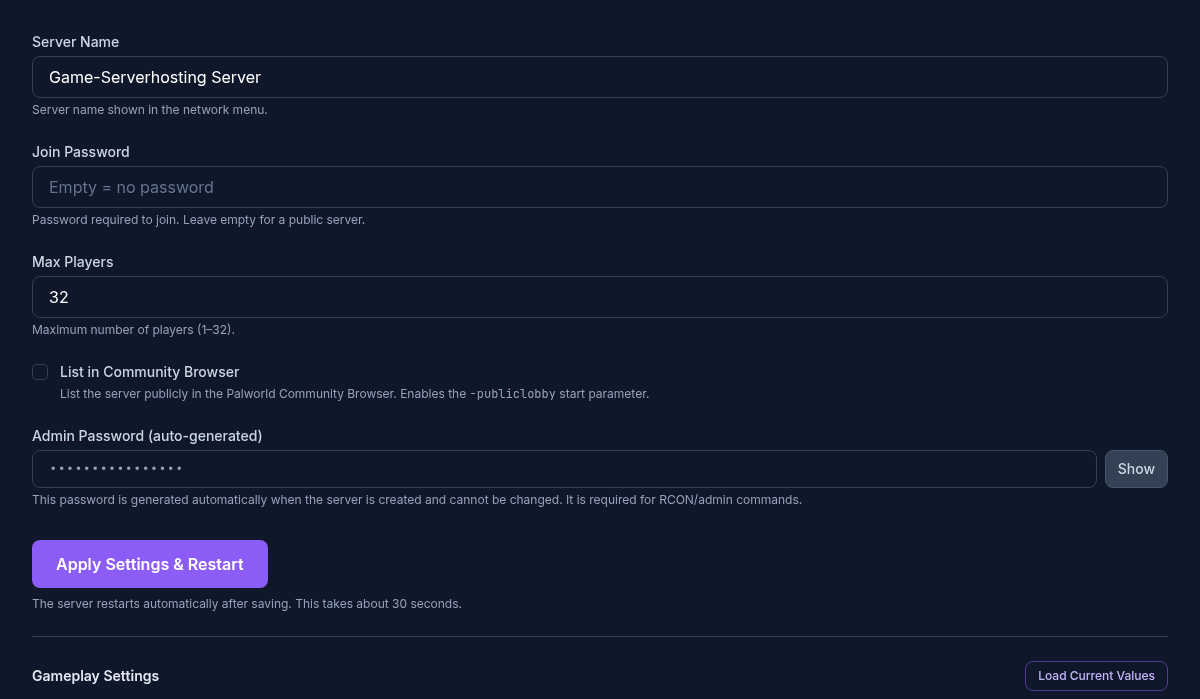
Server name, password, player limit and community listing in one place. The image shows the existing Palworld settings panel.

Open Palworld guides →
Palworld customer panel with server name, password, player limit and community listing
Example settings view. The interface may evolve.

Different platforms. One shared world.

Crossplay connects Steam, Xbox, PS5 and Mac. Here is how to find your server:

  1. Choose a server

    Select resources and location. See the final price before ordering.

  2. Set up your world

    Set your server name, password and player limit in the panel.

  3. Bring your friends

    Consoles find the server in the community list. PC players can also connect directly.

Room for your world to grow.

01

Bring your save

File access and uploads are available. Moving a local save or switching platforms may require additional conversion steps. Back up the original files first.

02

Schedule backups

Create manual backups or set a schedule. Restoring a backup returns the world to the state recorded in that backup.

03

Adjust resources later

As your world grows, change the RAM tier in the panel; the CPU limit follows the tier. Price and limits follow the new configuration.

How much performance does your world need?

How many players can play smoothly at the same time mainly depends on the CPU limit of the package. RAM carries the world: bases, working Pals and uptime until the next restart. Pocketpair lists 16 GB RAM as an operating requirement and warns of a higher risk of memory crashes at 8 GB. On our running customer servers with up to 4 concurrently active players, memory use stayed below 6 GB with a daily restart and without a single out-of-memory kill (14-day measurement, October 2026). We have no measurements of our own for larger groups. Smaller packages do not promise capacity for 32 active players.

Scheduled restarts limit long runtimes, but do not fix software bugs or guarantee crash-free operation.

How RAM tier and price fit together is on the Palworld server pricing page; the Nitrado alternative comparison puts plan and term side by side.

Official system requirements ↗

Before ordering: agree on platforms and mods

Playing on Xbox or PS5?

Pocketpair’s server documentation for version 1.0.4 lists Steam, Xbox, Mac and PS5. Xbox and PS5 require a community server; a direct IP address alone is not enough for those consoles.

Pocketpair: server types and platforms ↗

Workshop mods have separate requirements

Pocketpair documents server-side Workshop mods for the Windows edition of the dedicated server. A Workshop listing therefore does not promise that a mod will run on this hosting. Check the server operating system, mod support and your players’ devices before choosing it.

Pocketpair: server mod requirements ↗

Ready for your next shared world?

Configure your Palworld server ↗

Frequently asked questions

How much does a Palworld server cost?
A Palworld server costs from €6.78 per month with us (from 6 GB RAM), up to €36.38 for the largest tier. The configurator shows the exact monthly price before you pay; the subscription can be cancelled monthly. Examples: 6 GB RAM with 18 GB NVMe for €6.78; 12 GB RAM with 36 GB NVMe for €13.83.
Can I rent a Palworld server for free?
There is no free Palworld server at game-serverhosting: every server runs on fixed, booked resources. The entry tier costs €6.78 per month with no minimum term, and automatic renewal can be switched off.
Where are your Palworld servers located?
You choose the location when ordering: Germany, France, depending on free capacity. All locations are in the EU; the configurator shows which one is available before you buy.
Can Steam, Xbox, PS5 and Mac play together?
Crossplay is supported. For consoles, the server must be visible in the community list. Use compatible game versions. We do not currently offer mod installation for Palworld.
Does every package support 32 players?
The player limit can be set up to 32 independently of the price. Suitable concurrent player counts depend on your resources and world. The smallest package does not promise performance for a full server.
Can I add more RAM later?
You can adjust resources in the panel. Price, CPU and storage limits follow the new configuration. Back up your save before major changes.
How do backups and save imports work?
Manual backups and schedules are available in the panel. Existing saves may require conversion depending on their origin. Keep a copy of your original world.
How quickly does setup complete?
Automatic setup begins after successful payment and typically takes about 8 minutes. Downloads and queues can make it take longer.
How does billing work?
Package prices are per month. Automatic renewal can be disabled. Checkout shows the selected term and total price before purchase.
What does an extra core do?
An extra core raises your server's CPU limit by 1 vCPU for 2.99 € per month. It helps when your server is being throttled by its CPU limit or when work runs on additional threads alongside the game, such as world pre-generation, map renderers, or mods and plugins with their own threads. It does not help if the game's main thread is maxed out or if your server never reaches its CPU limit. We show you in the panel whether your server is being throttled. Available for Minecraft Java (including Paper, Fabric, Forge, NeoForge and modpacks), Folia and Palworld – not for Minecraft Bedrock.
Jump to configurator