You set up an RLCraft server with the matching 2.9.3 server pack and Forge for Minecraft 1.12.2. On the first start, pay special attention to level-name=World and the correct client pack version. The documented startup and idle values are measurements from this test server, not a promise regarding timing or player counts.
Status of this guide: September 24, 2026. The pack data comes from our catalog and the server pack. The times, RAM and settings come from our own test server from the same day and from our nightly test runs; the images are our own screenshots.
What is RLCraft, and is a dedicated server worth it for you?
RLCraft turns Minecraft into a hard survival game. You get thirsty and freeze or sweat depending on the biome. Injuries hit individual body parts, you can't chop down trees by hand at the start, and the world is full of dragons, sea serpents and boss monsters that are far stronger than you for a long time. Progress comes through skill levels and better gear, not through quick diamonds.
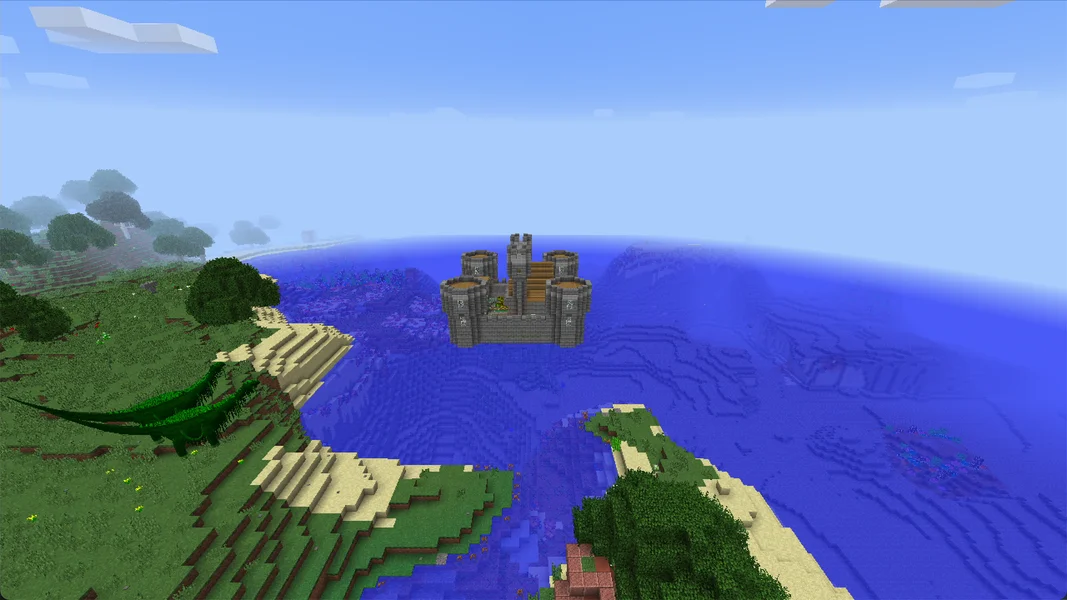
On your own server, none of this difficulty changes. It still gets easier because you play together: you share a base, supplies and gear, and you don't have to head out alone for a boss. You need your own server if your world should keep running even when the host is offline. For a short solo game, a singleplayer world is enough.
These mods make up a large part of the pack's feel. All of them are included in the server pack we install:
| Area | Mod in the pack (version) |
|---|---|
| Creatures and bosses | Lycanites Mobs 2.0.8.9, Ice and Fire 1.7.1 (dragons, sea serpents), Scape and Run: Parasites 1.9.11 |
| Thirst and temperature | Simple Difficulty 0.3.9 |
| Injuries | First Aid 1.6.22 |
| Progression | Level Up! 2 1.1.23, Reskillable 1.13.0 |
| Combat and weapons | RLCombat 2.0.8, Spartan Weaponry 1.5.3, Spartan Shields 1.5.5 |
| Start without shortcuts | No Tree Punching 2.0.21 |
| World and structures | Battle Towers, Recurrent Complex 1.4.8.4, Roguelike Dungeons, Doomlike Dungeons, Lost Cities 2.0.22 |
| Getting around | Waystones 4.1.0, Wearable Backpacks |
| Diagnostics | spark (profiler, see section 4) |
Which version, which loader, which Java version?
| Property | Value |
|---|---|
| Pack version | RLCraft 2.9.3 |
| Minecraft | 1.12.2 |
| Loader | Forge 14.23.5.2860 |
| Java on the server | Java 8 (OpenJDK 1.8.0_312) |
| Mods on the server | 178 |
| RAM with us | 6 GB |
Why 1.12.2? RLCraft is built and maintained by its author for Minecraft 1.12.2. There is no RLCraft version for newer Minecraft versions, and that's the case with every provider. You don't have to set the matching Java version yourself: the server automatically gets Java 8 for this pack.
How much RAM does RLCraft need? Our measurement
We offer RLCraft with 6 GB RAM. Our test server from September 24, 2026 had exactly this allocation (Java heap 6,144 MB) and showed the following values:
| Measurement | Value |
|---|---|
| Idle RAM, 5 minutes after a restart | 3,017 MiB (about 2.9 GiB), CPU 0.5% |
| Peak RAM during the restart | 3,015 MiB |
| Peak RAM after the first start | 3,118 MiB |
| Disk space after the first start | 451 MB |
This is the server without players. Every player who explores new terrain makes the server generate chunks, place structures and spawn creatures, and that's exactly what the gap between roughly 3 GB and 6 GB is for. We haven't measured how much RAM a full server needs. That's why we don't promise a player count.
Why not 4 GB? On August 23, 2026, we installed RLCraft five times with 4 GB. Three times the installation aborted after the first start, and the two successful runs each took more than 75 minutes. With 6 GB, all nightly runs since August 24 passed, most recently on September 21, 2026.
The pack ships with the profiler spark. With /spark tps you can see in-game or in the console whether the server is running at 20 ticks per second. The panel shows memory in the resource display. If the TPS drops permanently, first use spark to check what is eating the time before you increase RAM.
Ordering the server and the first start
- Open the RLCraft page and click “Configure Server Now”.
- In the configurator, the game, loader and the tested package are preselected, and RAM is set to 6 GB. You see the price there before you pay.
- After the order, the system creates the server and installs the pack. You don't have to upload anything; the server pack comes directly from CurseForge.
- Wait until the console shows the line
Done (…)! For help, type "help". On our test server, that was 5 minutes and 7 seconds after creation. In our last three nightly runs with 6 GB (August 24, September 8 and 21, 2026), the whole test from creation to a successful join took 7 to 12 minutes. - A later restart on the test server took 90 seconds from the container start to
Done. The number in parentheses afterDoneis shorter because Minecraft only measures the world loading there.
Don't be alarmed at the first look at the console: On the first start, our test server wrote 12 lines with ERROR and over 1,100 lines with WARN to the log, for example Invalid fingerprint detected for RebornCore! or stack traces about seaSerpentScales from Ice and Fire. The server still ran normally. Messages like these are part of the startup for RLCraft and are no reason for a reinstall.
Which settings does RLCraft come with?
For RLCraft, the server.properties comes from the pack, not from us. The pack includes a file FOR SERVERS ONLY - SET THESE IN SERVER.PROPERTIES.txt that explains each value. You can find the most important ones in the panel's file manager:
| Setting | Value in the pack | Why |
|---|---|---|
allow-flight |
true |
Without this value, the server kicks players on flying mounts and in the fairy ring for “flying”. |
difficulty |
3 (hard) |
The pack is tuned for this level. |
max-tick-time |
-1 |
The watchdog is off. Otherwise, large structures would be counted as a crash and shut the server down. |
enable-command-block |
true |
According to the pack, required so that villagers appear correctly in generated structures. |
view-distance |
10 |
Recommended value. Under load it may go down to 8 or 6, but according to the pack not lower. |
level-name |
World |
The world is named World with a capital W. |
About the world folder: On our test server there were afterwards two folders, world and World. The small world comes from the first start before the pack installation and is not used. The real RLCraft world is World. If you upload your own world or restore a backup, it belongs in World, or you set level-name to the name of your folder.
The mod settings under config/ contain further tuning options. On our test server, these values were set:
| File | Setting | Value in the pack | Effect |
|---|---|---|---|
config/ice_and_fire.cfg |
Dangerous World Gen Distance From Spawn |
200 |
Dragons and other dangerous structures only generate from 200 blocks away from spawn. |
config/ice_and_fire.cfg |
Generate Dragon Cave Chance / Generate Dragon Roost Chance |
400 / 400 |
Dragon caves and roosts are rarer than the mod default (180 and 360 respectively). |
config/ice_and_fire.cfg |
Dragons Despawn |
false |
Dragons don't disappear on their own. The mod warns that true here can cause heavy lag. |
config/bloodmoon.cfg |
Chance |
0.01 |
In 1% of nights, a blood moon appears with significantly more monsters. |
config/firstaid.cfg |
scaleMaxHealth |
true |
The health points of the body parts grow with your hearts. |
Change values like these only with the server stopped and after a backup. The values are in simple text files. A change takes effect after the next restart, and for world generation only in new chunks.
What awaits you in the world
The most dangerous opponents in RLCraft are the bosses from Lycanites Mobs and the dragons from Ice and Fire. For the images, we placed two Lycanites bosses in a creative world via command and disabled their AI. In the real game, you summon or find them, and they attack.
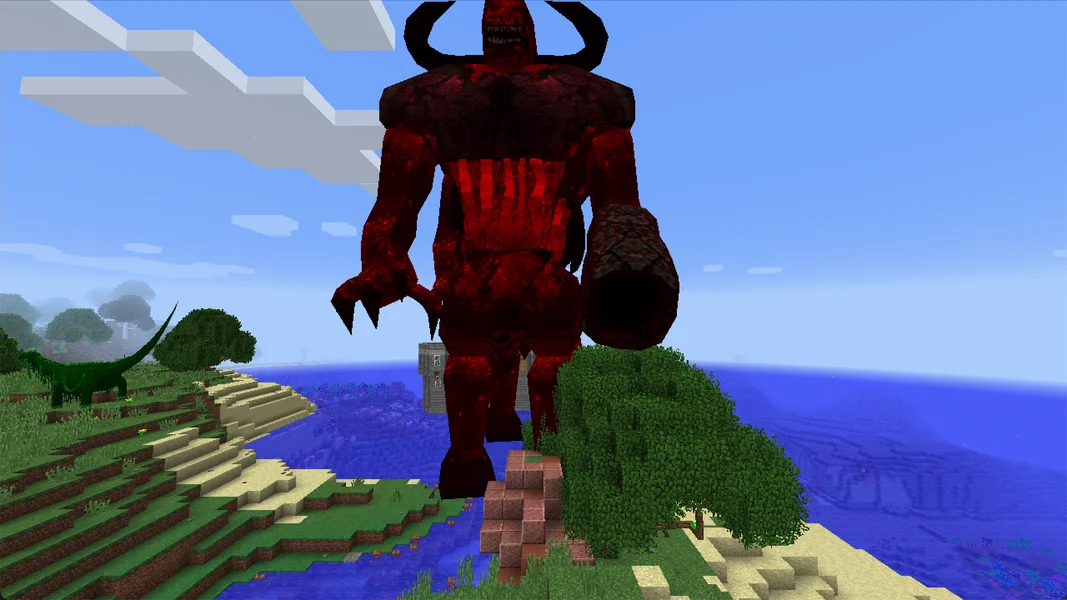
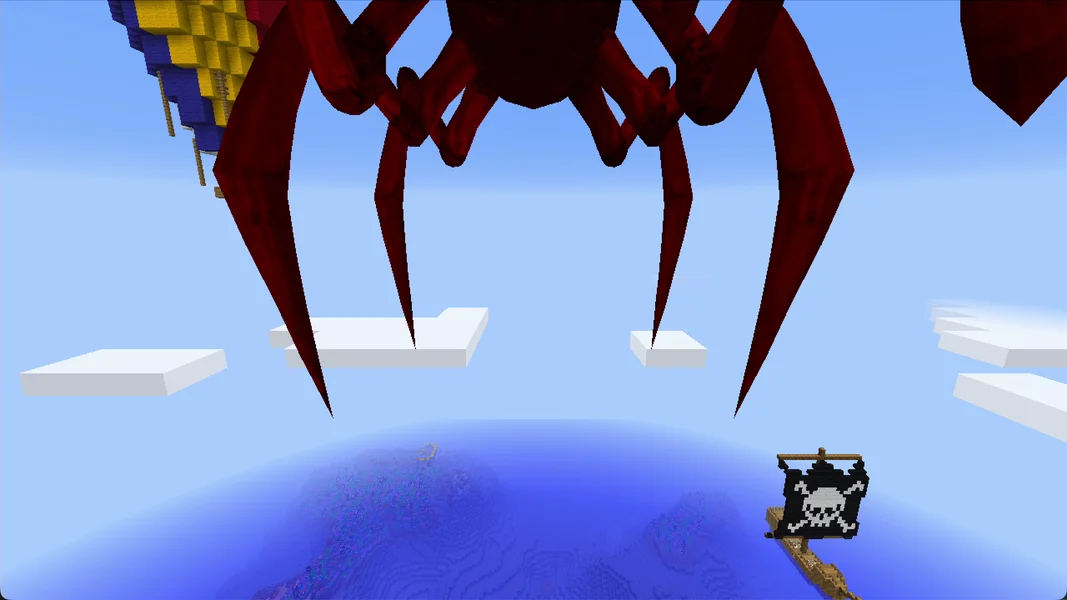
For the server, this means: boss fights and dragon attacks produce many particles, creatures and block damage all at once. If several players are traveling in different places in the world at the same time, the server works on several such spots simultaneously. Back up the world before a big fight, so a destroyed camp is only a setback of a few minutes. How to do that in the panel is described in the guide Create a Minecraft Server Backup.
Common problems and their causes
| Problem | Cause | Solution |
|---|---|---|
| Players get kicked for “flying” | allow-flight was set to false |
Set the value in server.properties back to true, restart the server |
| Joining fails with a message about missing or wrong mods | A fellow player has a different RLCraft version | Install exactly RLCraft 2.9.3, see the next section |
| Installation aborts or takes over an hour | Too little RAM, 4 GB in our tests | Use 6 GB |
| After uploading a world, progress is missing | World is in world instead of World |
Rename the folder to World or adjust level-name |
Many ERROR and WARN lines in the log |
Specific pack or mod messages | Check the first relevant message; Done and a join alone don't rule out functional errors |
| Server shuts down on large structures | Watchdog time limit or a specific tick block | Compare the pack default with the last working state and check the cause in the log; don't disable the watchdog across the board as a lag fix |
Connecting fellow players
Every fellow player needs RLCraft 2.9.3 on their own PC. The easiest way is via the CurseForge app: search for RLCraft, select version 2.9.3, install and launch. The launcher brings the Java for Minecraft 1.12.2 with it. In the game, they enter the server address from your panel under “Multiplayer”. If the versions don't match, the server rejects the join. The detailed guide covering all launchers is in Joining a Minecraft Modpack Server.
Bedrock players, meaning console and mobile, cannot join an RLCraft server. The pack requires the Java Edition with the installed mods on every device.
FAQ
Can I play RLCraft on a newer Minecraft version? No. RLCraft only exists for Minecraft 1.12.2. The server sets the matching version automatically.
Can I lower the difficulty?
Technically yes, via difficulty in the server.properties. However, the pack is tuned for 3, and many mechanics such as thirst or injuries remain even on a lower level.
Is 6 GB enough for my group?
Without players, our test server used about 3 GB. How much is added with several players depends on how far apart you spread. We haven't measured that. Watch the first evenings with /spark tps and the RAM display in the panel before you increase RAM.
Do I need to pregenerate the world? No, that's not a requirement. The world is generated as you explore. Dangerous structures such as dragon caves only appear from 200 blocks away from spawn anyway.
How long does a restart take?
On our test server, 90 seconds from the start to Done.
Why are there so many errors in the log?
The pack consists of 178 mods, some of which are intended for the client. RLCraft writes such messages on every start. What matters is that Done appears at the end.
Sources and test status
Test status: All measurements come from our own test server on September 24, 2026 and from our automated nightly runs; the pack data from our catalog and the server pack. In detail:
- Pack: RLCraft on CurseForge, version 2.9.3, server pack file 4612990, Forge 14.23.5.2860, 178 mods (catalog status September 24, 2026).
- Test server: September 24, 2026, 6 GB RAM, Java 8. Measurements for times and RAM from the container, settings read from the server's files. Server deleted afterwards.
- Nightly runs: automated installation and join tests with 6 GB on August 24, September 8 and 21, 2026, all passed; five runs with 4 GB on August 23, 2026, three of them aborted.
- Not measured: RAM and TPS with real players, player capacity.
- Images: our own screenshots from an RLCraft 2.9.3 creative world. The bosses are placed via command, their AI is disabled.
Telling a missing world apart from pack behavior
If progress is missing, first check level-name and the exact capitalization of the world folder. In the documented installation, World is active; a neighboring world folder can come from the base start. Compare known builds before you rename any files. If the start aborts, note the first relevant error message and a crash report. Many warning lines alone prove neither a defect nor an all-clear. Don't adopt observed pack values as a general lag fix: a disabled watchdog prevents its shutdown, but doesn't speed up slow world generation.