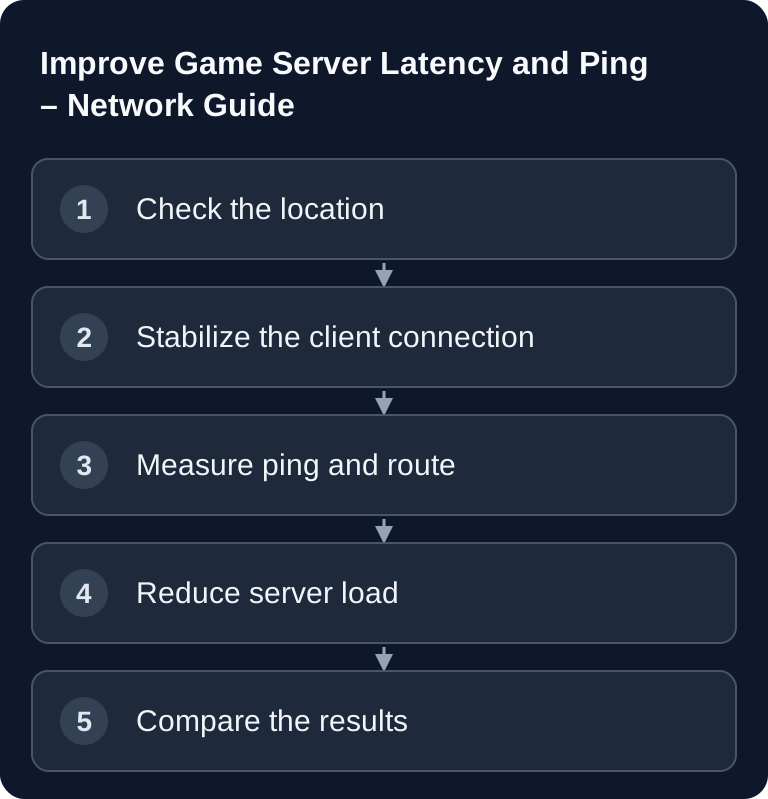
Low ping doesn't come from a single switch, but from short paths, stable connections and a server that handles requests without load spikes. If you want to improve your game server's latency, first check the location, client connection and routing, then server performance, plugins, mods and monitoring.
What Really Affects Ping and Latency
In simple terms, ping is the time a data packet needs to travel from the client to the destination and back. For games, though, the average value isn't the only thing that matters. What you really notice are packet loss, jitter and short latency spikes, because they make movement, hit registration or positions feel uneven.
| Factor | Impact | Controllable? |
|---|---|---|
| Server location | Very high | Yes |
| Internet provider | High | Partly |
| Routing | Medium | No |
| Wi-Fi vs. cable | High | Yes |
| Background downloads | Medium | Yes |
| Server performance | Medium | Yes |
The order matters: first you measure, then you change one variable, then you measure again. Otherwise you won't know whether the improvement came from the location, router, client, provider or server load.
Choosing a Server Location
The location is the strongest lever, because physical distance and routing paths set the lower limit of latency. Choose the server as close as possible to the group of players who are regularly online. For mixed groups from Germany, Austria and Switzerland, a location in Germany is usually the obvious choice.
A city alone doesn't give you a reliable ping value. Before ordering, compare measurements from the actual networks of your player group. For an existing instance, start with repeated tests over LAN and compare several providers; keep the time of day and target address constant.
game-serverhosting operates servers in Germany and France. Check the currently offered region during the order step. The latency you can actually achieve additionally depends on provider peering, time of day and each player's local network.
If you first want to get a general idea of which factors matter when running a server, the internal introduction in the Game Server Beginner's Guide is a good fit. For CPU, RAM and tick rate topics, the Game Server Performance Guide complements the network perspective.
Client-Side Optimizations
Many ping problems don't originate in the data center, but between the player's PC and the router. You should check these points before making any server changes:
- LAN as a comparison test: Measure the same connection over cable and Wi-Fi; compare fluctuations and packet loss.
- Pause uploads and downloads: Test whether saturated lines trigger the latency spikes; QoS can help in that case.
- Disable VPN for testing: Compare the same server directly and through the tunnel.
- Only check DNS for name errors: A different resolver may fix resolution problems, but it doesn't automatically shorten the path of running game packets.
Wi-Fi can work with a good signal, but it is more susceptible to interference from distance, walls, neighboring networks and changing channel usage. What counts is your own comparison under the same conditions.
DNS mainly affects name resolution, not every game packet path on a permanent basis. Even so, a reliable resolver can simplify connecting and troubleshooting. If you use your own domain for your server, the internal DNS Guide for Game Server Domains helps you make sure the address and records are set correctly.
Measuring Ping and Analyzing Routing
On Windows, you can check reachability and response time with ping. Microsoft officially documents the command at Documentation at learn.microsoft.com. For the route, you use tracert on Windows, officially described at Documentation at learn.microsoft.com.
# Windows
ping server.gs.game-serverhosting.com

# Traceroute (analyze routing)
tracert server.gs.game-serverhosting.com
Don't test just once. Several measurements at different times of day make sense, especially if players only report problems in the evening. Watch for three patterns: constantly high ping, strongly fluctuating ping and packet loss. Constantly high values point more toward location or routing. Fluctuations often indicate Wi-Fi, congestion, the provider or server load. Packet loss is especially critical and should be investigated first.
Server-Side Optimizations
If the client and route look plausible, check the server load. Low network latency doesn't help much if the game process can't respond in time because of mods, plugins or an excessive tick rate.
- Measure tick time: A higher tick rate increases CPU and network demand; it is not a general fix for high ping.
- Profile plugins: Check which extension actually consumes processing time under load.
- Check memory pressure: More RAM helps with a proven memory bottleneck, not with long network paths.
- Evaluate restarts: If the load only drops temporarily, look for the cause. A restart does not permanently fix a memory leak.
You need to evaluate these points depending on the game. A higher tick rate can improve the game feel, but it increases CPU and network demand. Many plugins aren't automatically bad, but every additional script can require processing time. RAM upgrades mainly help when memory pressure or swapping actually occurs. Regular restarts are a pragmatic operational building block, but they don't replace a root cause analysis when load keeps rising.
Ping Guidelines by Game
| Game | Acceptable | Good | Ideal |
|---|---|---|---|
| CS2 | <50ms | <30ms | <15ms |
| Minecraft | <100ms | <50ms | <30ms |
| Rust | <80ms | <40ms | <20ms |
| FiveM | <60ms | <30ms | <15ms |
| Valheim | <100ms | <60ms | <30ms |
Use this table as a guide, not as a hard limit. A stable 35 ms ping can feel better than 20 ms with packet loss. Especially in survival and co-op games, dropouts are often more annoying than a slightly higher average.
Verifying the Result
After every change, you should repeat the same test sequence: measure ping, check the route, join the game, recreate a typical gameplay situation and collect feedback from several players. Note the time of day, player location, provider and server setting involved. That way you can tell whether a problem only affects individual players or the entire server.
Troubleshooting
If only one player has problems, the cause is often Wi-Fi, local downloads, VPN, router or provider. If all players report lag at the same time, check server load, logs, plugins and scheduled tasks. If the ping only rises in the evening, provider congestion or routing may play a role. If ping looks good but the game stutters, investigate CPU, RAM, tick rate and mod load instead of just the network.
Sources and Basis for Verification
The linked subpages back up the technical basis explained immediately before or after them. Product prices and account features are additionally checked against the currently visible order or dashboard path.
Limits and Rollback
A single ping value doesn't prove a server cause. Wi-Fi, routing, time of day, location and load all influence the result. Compare several measurements against the same endpoint with the time of day documented. Before making changes, back up the affected files or the world. Afterwards, verify the result with the same version and the same test procedure; if errors occur, restore the backup.
FAQ
Why is my ping high despite a German server?
A German location reduces the distance, but doesn't guarantee perfect routing. Your provider may route data through unfavorable intermediate hops. Compare in-game measurements with pathping to the destination. A single intermediate router may rate-limit ICMP replies even though it forwards game packets normally. Loss at that hop alone therefore doesn't prove loss all the way to the server; Microsoft explains this difference in the pathping documentation.
Does changing DNS really help against high ping?
Usually only to a limited extent. DNS helps with resolving the server address, but normally doesn't permanently change the path of game packets. A reliable DNS resolver can reduce connection problems, but it doesn't replace a routing or Wi-Fi analysis.
Should I always increase the tick rate?
No. A higher tick rate can improve the game feel, but it increases load on the CPU and network. Only raise it if your game, hardware and player count have the headroom for it, and check stability afterwards.
Why does low ping still feel laggy?
Then jitter, packet loss or server load are probably involved. An average ping hides short spikes. Therefore, check several measurements, watch for in-game lag and monitor CPU, RAM and plugin load in parallel.
What is the best first step?
Start with LAN instead of Wi-Fi, closed downloads and a ping and traceroute measurement. These steps cost nothing, create a clean basis for comparison and keep you from changing server settings when the problem actually originates locally.