
The server.properties file controls the basic rules of a Minecraft Java server. In the game-serverhosting panel, you can edit 36 selected settings through validated fields and use four presets as a starting point. This guide explains the safe workflow, the key relationships between settings, and every setting available in the current interface.
Customize your MOTD and prepare a seed
In the MOTD field, you can expand the editor directly, choose colors and formatting, and preview the message. Example: §aOur World §r colors the name green and resets the formatting. Apply to field changes the form draft; only Save writes the settings. The public MOTD generator offers the full palette and both copy formats.
For level-seed, open the seed map. It currently calculates Java 26.2 worlds, not arbitrary Java or Bedrock versions. Changing a seed does not rebuild an existing world: plan a new world under Game Settings → Worlds. Find and set a seed correctly explains the process.
If you are still choosing a server type, start with Rent a Minecraft Server. You can then switch the loader and version using the guide Change your Minecraft server version.
Open the configuration editor
Open your server and go to Game → Configuration. The editor reads the active server.properties, displays supported keys as a form, and writes back only validated values. The server port and secret values have additional safeguards.
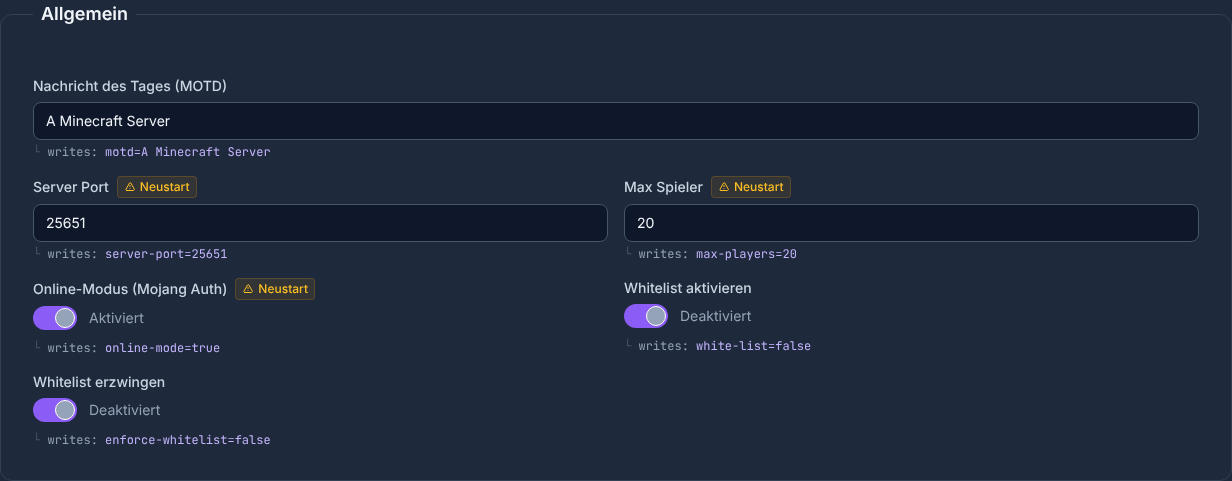 (Enlarge image)
Create a backup before changing the world name, seed, Hardcore mode, or resource pack. Change related settings together and test them afterward, instead of changing many unrelated rules at once.
Combine the most important settings correctly
gamemode sets the default; force-gamemode=true enforces it when players join. difficulty changes enemy and damage rules. hardcore=true affects death and the subsequent game mode, but it does not repair existing player data. Test this combination on a backed-up copy before changing an established community world.
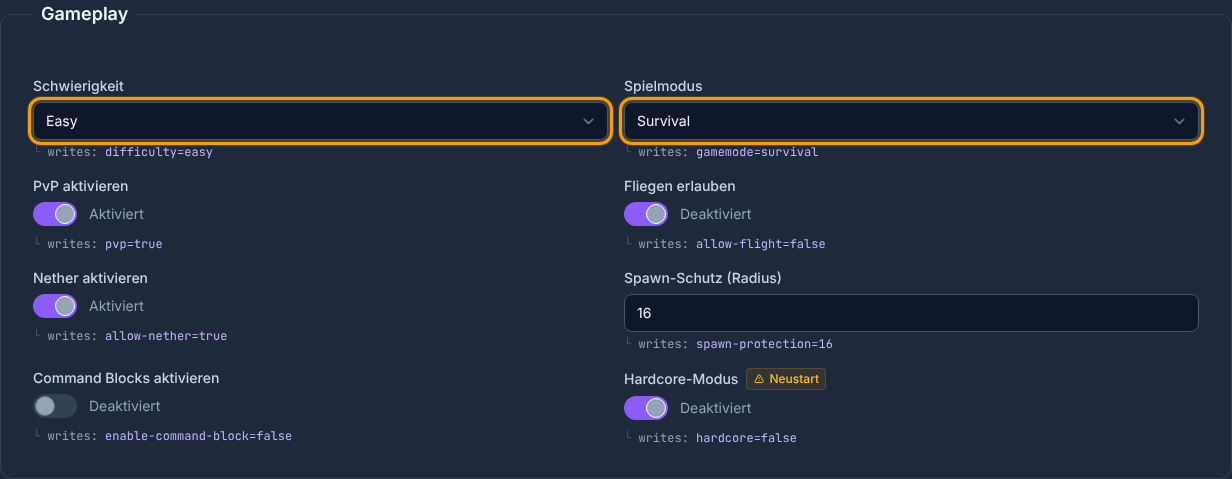 (Enlarge image)
level-name points to the world folder. A different name does not delete the old world, but it may generate a new world on the next startup. Enter the folder name exactly. level-seed, level-type, and generate-structures are mainly relevant when generating a new world.
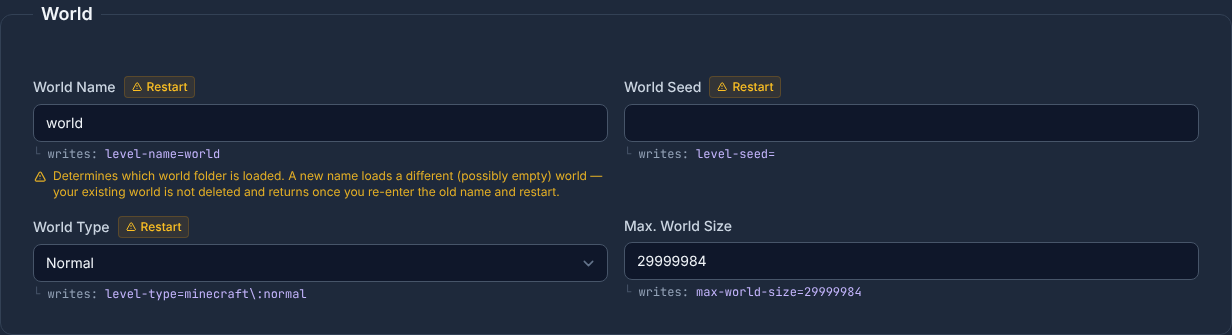 (Enlarge image)
For performance, view-distance and simulation-distance have different effects: view distance determines how far away chunks are sent to clients. Simulation distance determines the area in which ticks, mobs, and Redstone remain active. High values increase the load; change them gradually and monitor tick times and gameplay.
Presets as a controlled starting point
- Survival: normal difficulty, Survival, PvP, and 16 blocks of spawn protection.
- Creative: peaceful difficulty, Creative, no PvP, no spawn protection, and flight allowed.
- Hardcore: hard difficulty, Survival, Hardcore, and no spawn protection.
- PvP Arena: hard difficulty, Survival, 32 players, PvP, and no spawn protection.
A preset applies several settings together. Check the preview before saving, because a preset replaces the listed individual values.
Version notes: removed properties and new gamerule names
Mojang has removed several former server properties or moved them to gamerules. Since 1.21.2, spawn-animals and spawn-npcs are no longer effective settings. Since 1.21.9, this also applies to settings including pvp, allow-nether, enable-command-block, and spawn-monsters; current versions control these rules through the gamerule editor. The panel labels the affected legacy settings so that older servers remain understandable.
Starting with Java 1.21.11, gamerules were also moved to a registry with names such as minecraft:command_blocks_work. Earlier camelCase names in the reference refer to the 1.21.9 transition and are not universally valid current command syntax. Check the gamerule editor or command completion in your running version. Mojang describes the renaming in the 1.21.11 release notes. The gamerule guide explains the individual rules.
All settings in the current panel
The long reference is collapsed to keep the guide easy to read. Open it when you need the type, allowed range, panel default, effect, or restart status of a specific key.
All 36 server.properties settings and four presets
- File:
server.properties
| Key | Panel label |
Type and allowed values |
Default |
Effect / note |
UI restart status |
|---|---|---|---|---|---|
motd |
Message of the Day (MOTD) |
Text |
A Minecraft Server |
Text displayed for the server in the multiplayer list. |
Restart required |
server-port |
Server Port |
Integer · 1024 to 65535 |
25565 |
The port is assigned automatically when the server starts and cannot be changed here. Display only; the panel does not write this value. |
Display only |
max-players |
Max Players |
Integer · 1 to 200 |
20 |
Limits the number of simultaneously connected players; this setting alone does not reserve a specific amount of RAM. |
Restart required |
online-mode |
Online Mode (Mojang Auth) |
Toggle (true/false) |
true |
Java Edition: online authentication protects player names and UUIDs. Disabling it allows impersonation and is not recommended. |
Restart required |
white-list |
Enable Whitelist |
Toggle (true/false) |
false |
Allows only whitelisted players to join when enabled. |
Restart required |
enforce-whitelist |
Enforce Whitelist |
Toggle (true/false) |
false |
Removes connected players who are no longer allowed when the whitelist is reloaded. |
Restart required |
enable-status |
Enable Server List Status |
Toggle (true/false) |
true |
Responds to status queries from the multiplayer list. false hides the status and player count from queries. |
Restart required |
hide-online-players |
Hide Online Players |
Toggle (true/false) |
false |
Hides the list of currently connected player names in the server list response. |
Restart required |
broadcast-console-to-ops |
Send Console Messages to Operators |
Toggle (true/false) |
true |
Sends console command output to connected operators. |
Restart required |
broadcast-rcon-to-ops |
Send RCON Messages to Operators |
Toggle (true/false) |
true |
Sends RCON command output to connected operators. |
Restart required |
difficulty |
Difficulty |
Selection · peaceful, easy, normal, hard |
easy |
Sets the global difficulty from peaceful to hard, including enemy and damage rules. |
Restart required |
gamemode |
Game Mode |
Selection · survival, creative, adventure, spectator |
survival |
Sets the default game mode for new players. |
Restart required |
force-gamemode |
Enforce Game Mode on Join |
Toggle (true/false) |
false |
Resets players to the configured default game mode when they join. |
Restart required |
pvp |
Enable PvP |
Toggle (true/false) |
true |
Allows or prevents damage between players. Removed or ineffective starting with version 1.21.9. Replacement: gamerule pvp. |
Restart required |
allow-flight |
Allow Flight |
Toggle (true/false) |
false |
Prevents automatic kicks for flying; does not itself give players the ability to fly. |
Restart required |
allow-nether |
Enable Nether |
Toggle (true/false) |
true |
Allows access to the Nether through portals. Removed or ineffective starting with version 1.21.9. Replacement: gamerule allow. |
Restart required |
spawn-protection |
Spawn Protection (Radius) |
Integer · 0 to 100 |
16 |
Radius of the protected area around the world spawn; 0 disables protection. |
Restart required |
enable-command-block |
Enable Command Blocks |
Toggle (true/false) |
false |
Allows command blocks to execute. Removed or ineffective starting with version 1.21.9. Replacement: gamerule command. |
Restart required |
hardcore |
Hardcore Mode |
Toggle (true/false) |
false |
Enables Hardcore rules; death may prevent further normal joining. |
Restart required |
spawn-monsters |
Spawn Monsters |
Toggle (true/false) |
true |
Allows hostile mobs to spawn naturally. Removed or ineffective starting with version 1.21.9. Replacement: gamerule spawn. |
Restart required |
spawn-animals |
Spawn Animals |
Toggle (true/false) |
true |
Allows passive animals to spawn naturally. Removed or ineffective starting with version 1.21.2. |
Restart required |
spawn-npcs |
Spawn NPCs |
Toggle (true/false) |
true |
Allows villagers and other NPCs to spawn naturally. Removed or ineffective starting with version 1.21.2. |
Restart required |
level-name |
World Name |
Text |
world |
Determines which world folder is loaded. A new name loads a different (possibly empty) world — your previous world is not deleted and returns as soon as you enter the old name again and restart. |
Restart required |
level-seed |
World Seed |
Text |
Empty |
Seed for generating a new world; does not retroactively change chunks that have already been generated. |
Restart required |
level-type |
World Type |
Selection · normal, flat, largeBiomes, amplified |
normal |
Selects the generator type for newly generated world areas, such as normal, flat, or amplified. The list shows panel labels. When editing the file manually, check the generator ID against the running version, such as minecraft:normal; do not blindly copy old aliases. |
Restart required |
generate-structures |
Generate Structures |
Toggle (true/false) |
true |
Determines whether the world generator creates structures such as villages. |
Restart required |
max-world-size |
Max World Size |
Integer · 1 to 29999984 |
29999984 |
Limits the radius of world areas that can be newly generated; does not replace the world border set separately using /worldborder. |
Restart required |
view-distance |
View Distance |
Integer · 2 to 32 |
10 |
Java view distance in chunks. High values increase network, RAM, and CPU load. |
Restart required |
simulation-distance |
Simulation Distance |
Integer · 2 to 32 |
10 |
Java simulation distance for ticks, mobs, and Redstone. Do not equate this with Bedrock tick distance; high values increase CPU load. |
Restart required |
player-idle-timeout |
AFK Timeout (Minutes) |
Integer · 0 to 999 |
0 |
Time in minutes before inactive players are kicked; 0 disables AFK kicks. |
Restart required |
entity-broadcast-range-percentage |
Entity View Distance (%) |
Integer · 10 to 1000 |
100 |
Scales the distance up to which entities are sent to clients; 100 corresponds to the normal range. |
Restart required |
network-compression-threshold |
Compression Threshold (Bytes) |
Integer · -1 to 65535 |
256 |
Packet size in bytes at which network data is compressed; -1 disables compression. |
Restart required |
require-resource-pack |
Require Resource Pack |
Toggle (true/false) |
false |
Denies joining if a player rejects the configured resource pack. |
Restart required |
resource-pack |
Resource Pack URL |
Text · max. 2048 characters |
Empty |
Direct download URL of the resource pack offered to clients when they join. |
Restart required |
resource-pack-sha1 |
Resource Pack SHA-1 |
Text · max. 40 characters |
Empty |
SHA-1 identifies the resource pack version for the client and its cache; the checksum does not replace a trustworthy download source. |
Restart required |
rcon.password |
RCON Password |
Password |
Masked; confidential value |
Password for remote control through RCON; use only with a secured RCON configuration. Confidential value; masked in the panel. |
Restart required |
Presets
| Preset | Purpose |
Applied settings |
|---|---|---|
Survival (survival) |
Standard Survival experience with normal difficulty and PvP |
difficulty = normal; gamemode = survival; pvp = true; spawn-protection = 16; hardcore = false; allow-flight = false |
Creative (creative) |
Peaceful Creative mode without PvP or spawn protection |
difficulty = peaceful; gamemode = creative; pvp = false; spawn-protection = 0; hardcore = false; allow-flight = true |
Hardcore (hardcore) |
Maximum challenge: hard difficulty, Hardcore, PvP enabled, no spawn protection |
difficulty = hard; gamemode = survival; pvp = true; spawn-protection = 0; hardcore = true; allow-flight = false |
PvP Arena (pvp) |
Optimized for PvP: hard difficulty, 32 players, no spawn protection |
difficulty = hard; gamemode = survival; pvp = true; spawn-protection = 0; hardcore = false; max-players = 32; allow-flight = false |
Save, restart, and verify
Save the change and perform a controlled server restart. The editor marks all editable fields as Restart required; the server port is display only. Individual rules can also be changed using commands, but that does not prove that a file edit has taken effect immediately. Afterward, compare the active file, game version, and actual rule. If a new empty world appears, stop the server and first restore the previous level-name.
Common mistakes
- Change has no effect: The server was not restarted, or the Minecraft version in use no longer recognizes the legacy setting.
- New empty world:
level-namedoes not exactly match the existing folder. - Resource pack does not load: The URL, SHA-1, or
require-resource-packsettings do not match. - Players are rejected: Check
white-list,enforce-whitelist,online-mode, and the player limit together. - More lag after the change: Reset the view or simulation distance to its previous value and measure again.
FAQ
Do I need to edit server.properties using FTP?
Not for the 36 settings listed here. The panel reads and validates them directly. Keys outside this catalog may still require a specific file edit.
Which preset is suitable for a private Survival server?
The Survival preset is the most sensible starting point. Afterward, adjust only the player limit, whitelist, MOTD, and, if needed, view or simulation distance.
Why is pvp marked as deprecated in the editor?
Minecraft Java 1.21.9 moved this server property to a gamerule. The key remains relevant for older versions; for current versions, use the gamerule editor.
Are collapsed settings saved and read by search engines?
Expanding the section does not change any server file. The table is part of the page and is displayed collapsed only to improve readability.
Distinguish Vanilla defaults from panel defaults
Minecraft Java 26.3 sets white-list to true by default in a freshly generated Vanilla file. The reference table above, however, shows the panel schema default (false), not the guaranteed contents of every server file. What matters is the value actually read from your instance; existing files and different Eggs may differ. Check the whitelist before joining for the first time, and do not disable it just because an old guide says so. Mojang: Java 26.3
Sources and verification date
Last verified: November 16, 2026. The Default column describes the panel schema values, not Vanilla defaults across all versions. The field catalog is generated directly from the production panel schema. Version changes were checked against the official Minecraft releases:
