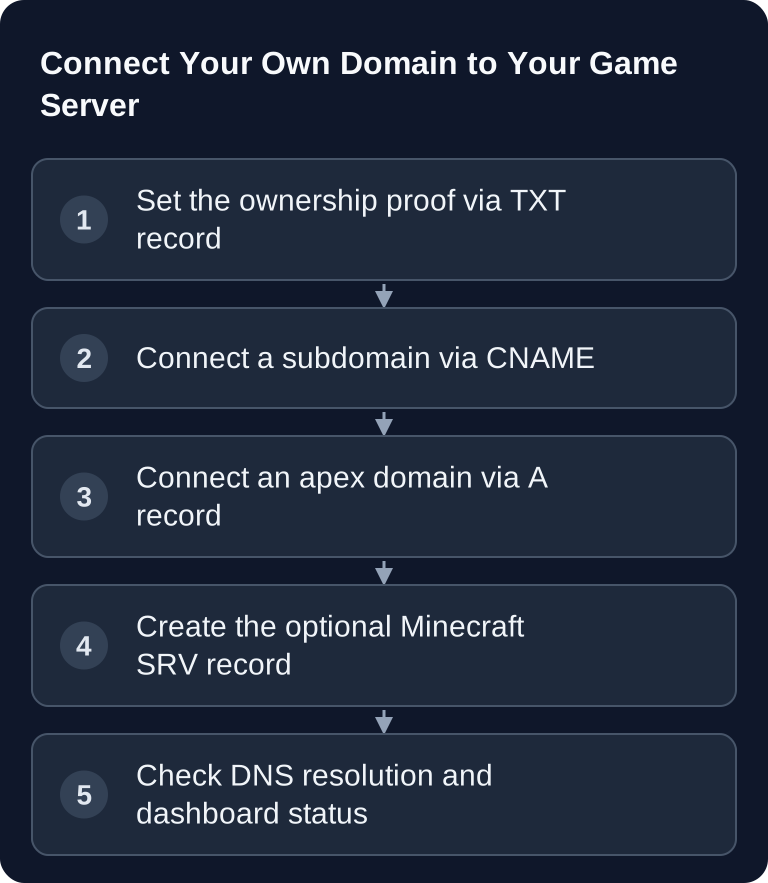
In the GSH dashboard, you connect your own domain using a TXT ownership proof and the server target shown there. A subdomain normally uses CNAME, an apex domain uses A. The DNS values and the actual game port belong to the selected instance; Minecraft Java can optionally find the port via _minecraft._tcp. This guide explains apex, subdomain and SRV, while the domain status guide describes the verification states.
Overview: Which DNS Records You Need
| # | Record | Purpose | Required? |
|---|---|---|---|
| 1 | TXT |
Ownership proof | yes |
| 2 | CNAME (subdomain) or A (apex) |
Connection to the server | yes |
| 3 | SRV (here Minecraft Java) |
Port resolution for a supported client | optional |
You create these records with your DNS provider, for example Cloudflare, Namecheap, IONOS or Strato. The exact values are shown in the game-serverhosting dashboard under "Custom Domain". Copy them exactly, especially the token, hostnames and port.
If you also want to manage files, worlds or configuration files on your server, the guide on SFTP access for game server files is helpful. For a DNS basics overview, you can also check out the guide Set Up Your Own Domain for Game Servers – DNS Guide.
Requirements
Before you start, you need access to your domain's DNS zone and access to your game-serverhosting dashboard. You should also know whether you want to use a subdomain like play.deinedomain.de or the apex domain deinedomain.de.
For most game servers, a subdomain is the more practical choice. It can point to your server's hostname via CNAME and therefore stays more flexible if the technical target address changes later. An apex domain works as well, but requires an A record pointing to the specific IP address.
Step 1: Ownership Proof via TXT Record
To make sure nobody can point a domain they don't own at your game server, you first prove that you control the domain. To do so, create a TXT record in your DNS zone:
Name:  _gsh-verify.deinedomain.de
Type:  TXT
Value: <full TXT value from your dashboard>
You can find the exact token in the dashboard. Copy it 1:1, without extra spaces or quotation marks, unless your DNS provider adds them automatically.
If you use a subdomain, the name is adjusted accordingly. For play.deinedomain.de, the TXT name is:
_gsh-verify.play.deinedomain.de
Some DNS interfaces only expect the host part instead of the full domain name. In that case, you enter _gsh-verify.play, for example, not _gsh-verify.play.deinedomain.de. What matters is the result of the DNS resolution.
Step 2: Set the Server Target
After the TXT record, the domain must point to your game server. Which record type is correct depends on whether you use a subdomain or an apex domain.
Connect a Subdomain via CNAME
For a subdomain like play.deinedomain.de, you create a CNAME pointing to your server's hostname:
Name:   play.deinedomain.de
Type:   CNAME
Target: deinserver.gs.game-serverhosting.com
If your DNS provider is Cloudflare, the entry must be set to DNS-only. That is the grey cloud. The Cloudflare proxy is intended for HTTP and HTTPS web traffic; raw game TCP or UDP traffic is not forwarded through it like a normal game server service. With the proxy active, your server may therefore be unreachable.
Connect an Apex Domain via A Record
An apex domain is the domain without a subdomain, for example deinedomain.de. For this, you use an A record pointing to the server IP:
Name:  deinedomain.de
Type:  A
Value: <your server's IP address>
Use the IPv4 address shown in the dashboard. An old additional AAAA record can send clients to a different IPv6 target; only keep it if you have a genuinely matching IPv6 assignment. If an announced server target changes, direct A/AAAA entries must be updated. A CNAME, on the other hand, points to the maintained target hostname; it does not move the game server or its data by itself.
The reason for this distinction is relevant on the DNS side: in RFC 1034, the IETF describes that a name with a CNAME should not carry other data at the same time. The basic DNS rule in RFC1034 explains this restriction. Since an apex domain in practice needs additional zone data, an A record is the right choice there.
Step 3: Optional SRV Record for Minecraft Java
Without an SRV record, Minecraft Java clients connect to the default port 25565. If your server runs on a different port, players would have to enter the address with the port, for example:
deinedomain.de:25584
With an SRV record, you can hide the port for Minecraft Java:
Name:  _minecraft._tcp.deinedomain.de
Type:  SRV
Value: 0 5 <Port> <Target>
Example for port 25584 with the target deinserver.gs.game-serverhosting.com:
0 5 25584 deinserver.gs.game-serverhosting.com
The values stand for priority, weight, port and target hostname. The SRV record lives in your own DNS zone and is optional. It does not affect the actual domain verification.
An SRV record does not conflict with an A record on the apex domain because it sits under its own name: _minecraft._tcp.deinedomain.de. So you can connect deinedomain.de via A record and additionally set the Minecraft SRV record.
If you want to bring an existing Minecraft world to the server, the guide Upload and Switch a Minecraft World is the right follow-up.
Verify the Result
After saving the DNS records, wait a few minutes. Depending on the provider and TTL, DNS changes can also take longer to become visible. In the dashboard, the domain is verified as soon as the TXT and the CNAME or A record are correctly detected.
First check the public DNS response, then test the actual join with the matching edition. Verified confirms ownership and target assignment, not the running game software. Without SRV resolution supported by the client, you use the domain plus the panel port. Back up your existing records before replacing a working name; if something goes wrong, you can restore these values and keep testing the previous game address.
Troubleshooting
The CNAME is set, but the server is unreachable
First check whether the orange cloud is active in Cloudflare. For game server connections, the record must be set to DNS-only. Also check that the CNAME points exactly to the hostname from the dashboard.
The TXT record is not detected
Check the name and the value. Common mistakes are duplicated domain suffixes, the wrong subdomain level or a differing token. If your provider only expects the host part, a fully entered name can turn into _gsh-verify.deinedomain.de.deinedomain.de.
The apex domain does not work with CNAME
Use an A record pointing to the server IP for deinedomain.de. CNAME is suitable for subdomains like play.deinedomain.de, not for the apex domain.
Players still have to enter the port despite the domain
Then either the SRV record is missing or it points to the wrong port or target. Without an SRV record, entering the port is normal.
FAQ
Can I use a subdomain and the root domain at the same time?
Yes, if you configure both DNS names properly. A subdomain can point via CNAME, the apex domain via A record. Each name needs its own clean DNS configuration.
Do I always have to set the SRV record?
No. The SRV record is only optional and mainly relevant for Minecraft Java if players should connect without :Port. For domain verification, TXT plus CNAME or A record is enough.
Why is DNS-only important with Cloudflare?
The Cloudflare proxy typically handles web traffic over HTTP and HTTPS. Game servers use other TCP or UDP connections. That is why the DNS entry should resolve directly and not run through the proxy.
How long does DNS verification take?
That depends on the DNS provider, the TTL and worldwide DNS propagation. Allow at least a few minutes. If nothing happens after a longer wait, check the record name, value, target and proxy status.
What happens if the server IP changes?
With an A record, you have to enter the new IP in your DNS zone yourself. With a CNAME pointing to the server hostname, maintenance is usually easier because the subdomain points to the hostname.