“No space left on device” means that a write operation can no longer get any available storage space. Stop the game server in a controlled way, back up existing data externally, and only then clean up selectively. If the disk is already full, even creating a new backup archive can fail.
First: Why This Is Dangerous
A full disk shows up as two messages that belong together:
java.io.IOException: No space left on device
Could not save data to /home/container/world/data/raids.dat
The second one is the more serious. It means the server wanted to write a world file and could not. If this happens during an automatic save, the affected changes are gone — built structures, inventories, progress since the last successful save.
That is why you follow this procedure, in this order:
- Stop the server. A running server keeps writing and can leave behind an inconsistent world while you clean up.
- Back up. Download a backup or at least the world folder — while there is still space. On a completely full disk, a new backup may not be possible.
- Only then delete.
If you reverse this order and clean up while the server is running, you solve the storage problem but may trade it for a corrupted world.
How Much Space Do You Really Have?
In the panel, the “Storage” display shows usage relative to your plan's limit in GB. These two numbers determine what to do next:
- Usage just below the limit, cause identifiable (an old modpack archive, a world folder from the last round) → cleaning up is enough.
- Usage permanently at the limit, nothing obviously dispensable → the plan is too small for what you are running.
You can also set up a disk usage warning that triggers before storage is full. This is the much more comfortable option, because an alert at 85 percent costs you five minutes of cleanup, while a full file system means an emergency operation.
The Usual Space Hogs
Across All Games
| Candidate | Where | Safe to delete? |
|---|---|---|
| Log files | logs/ |
After saving important error and diagnostic evidence; they usually contain no game progress |
| Crash reports | crash-reports/ |
Yes, after reading them |
| Uploaded archives | Server directory, .zip / .tar.gz |
Yes, if you still have the source |
| Old world folders | Server directory | Download first, then delete |
| Your own backups in the server directory | backups/ |
Check first what you still need |
Log files are the underrated item. A server with a chatty plugin writes gigabytes of logs over weeks without anyone noticing — until nothing works anymore.
Minecraft
By far the largest part of a Minecraft world is in the region/ folder. That is where the .mca files with the actual chunk data live; a single file can range from about 100 KB up to several MB. In addition there are the dimensions: in current versions, the Nether and the End are located under dimensions/minecraft/the_nether and dimensions/minecraft/the_end (in older worlds DIM-1 and DIM1).
Important: Do not delete individual .mca files to free up space. You would remove parts of your world, and often exactly the ones where someone has built something. If the world itself has become too large, a world border (worldborder) and a fresh start are the better way — or a larger plan.
level.dat, playerdata/ and data/ are smaller than you might think. Cleaning them up is not worth it, but the risk is.
Large Steam Games
With ARK, CS2 or Palworld, the problem is often not the world but the game installation itself. CS2 takes up around 66.5 GB before a single player has connected. If a reinstall or a larger update comes on top of that, the process needs additional space for the new files before the old ones are removed. If the plan is tightly sized, the update fails — not because of a bug, but simply because of space.
What Happens If You Do Nothing
- The server no longer starts. If there is not enough space, the server management refuses the start with a notice about insufficient storage. This is not a defect but a protective measure: a server that starts without being able to write produces exactly the world damage described above.
- Saving fails. If the server is still running, changes are silently lost.
- Downgrading your plan is blocked. If the used amount does not fit into the smaller plan, we prevent the downgrade and give you the concrete numbers — used versus available. This is intentional: a downgrade that cuts off data would be the most expensive way to save storage.
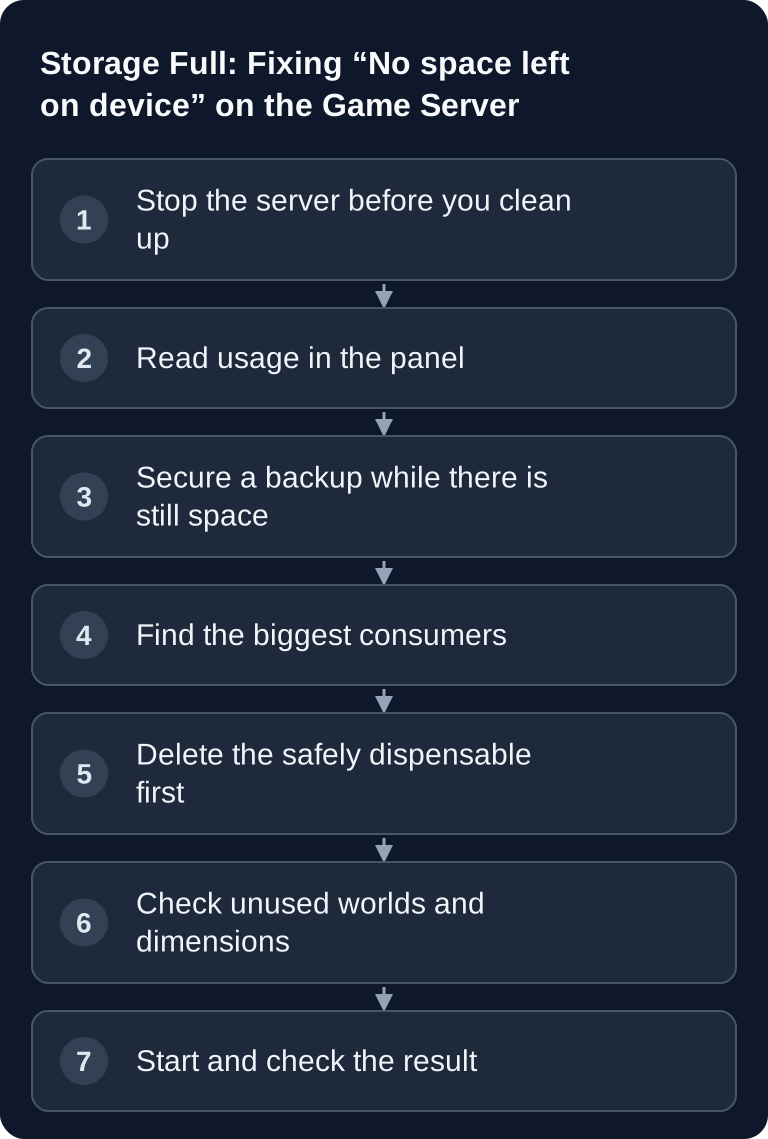
Cleaning Up Safely: The Order
- Stop the server.
- Secure a backup or download the world folder.
- Remove old logs and crash reports after relevant diagnostic evidence has been saved externally. First check whether they actually take up much space.
- Delete your own uploaded archives whose source you still have.
- Download old world folders, then remove them.
- Start the server and check the storage display again.
If there is still little free space afterwards, it was not a cleanup problem. Then the next larger plan is the honest answer — storage cannot be optimized away if the contents simply need it.
Prevention
- Set a warning threshold so you know before it becomes critical.
- Clear logs regularly, especially on servers with many plugins.
- Download old worlds after a round ends and take them off the server instead of leaving them “just in case”.
- Check space before big updates. An update temporarily needs more space than the end result.
- Remove modpack archives after extracting them. The
.zipis no longer needed after installation.
Troubleshooting
| Symptom | Check | Solution |
|---|---|---|
No space left on device on start |
Storage display in the panel | Clean up following the order above |
Could not save data to … |
Is the server still running? | Stop immediately, back up, clean up — risk of data loss |
| Start is refused with a storage notice | Usage versus plan | Free up space or upgrade the plan |
| Update or reinstall aborts | How much is free before the update? | Plan for twice the amount of space |
| Storage keeps filling up | Is logs/ growing quickly? |
Identify the plugin that writes the logs |
| Plan downgrade rejected | Message states used/available | Clean up first, then downsize |
FAQ
Can I just delete the world to free up space?
That frees up space and costs you all of your game progress. Download it first. If it is only about size, a world border is the gentler solution: it limits how far the world grows in the future without removing anything that exists.
Why does the server report no space even though the panel shows free storage?
The value is collected at intervals and is therefore a snapshot. An operation that writes a lot at once — an update, a backup, extracting a modpack — can use up the rest in seconds. If the numbers do not add up, stop the server and check in the file manager what is actually there.
Do my backups count against storage?
Backups stored in the server directory take up space there like any other file. Check the backups/ folder to see what has accumulated, and keep the ones you really need.
Does a larger RAM plan help?
Only if it also includes more storage space — they are two different things. RAM is working memory for running operation, storage space is the place for the world, mods and logs. When switching, pay attention to the storage figure, not just the RAM.
Is my server broken if it does not start because of storage space?
No. The start is refused deliberately, because a server without the ability to write can damage world data. After freeing up space, it starts normally.
If It Stays That Way
If storage remains tight even after cleaning up, note the following for a support request: used amount, plan limit, what you have already removed, and which file or folder is the largest item. This makes it possible to decide specifically whether a plan change, a world border or moving data elsewhere is the right way.
You can find suitable plans with enough storage at Rent a Game Server. How to download and re-upload files is shown in SFTP Access to Game Server Files; how to set up regular backups is explained in Creating a Minecraft Server Backup.
Sources and Verification Status
- Structure of a Minecraft world: Minecraft Wiki — Java Edition level format. Confirms that
region/with the.mcafiles accounts for the largest share and where the Nether and End are located today.
Verification status: August 24, 2026. The storage requirements of individual games change with their updates; the figure for CS2 corresponds to the measured state of our fleet.
Confirm Free Space Before Restarting
After cleaning up, check whether the panel shows sufficient reserve again and the first write error has disappeared. Remove only clearly dispensable archives or old logs whose contents you have already backed up. Active world, playerdata and mod files are not cleanup material. If the error persists despite free plan capacity, record the file path and message: besides GB usage, quota, many small files or the underlying file system can be relevant. Do not restart repeatedly while saving fails. After a successful start, check the last known world state and a controlled save.