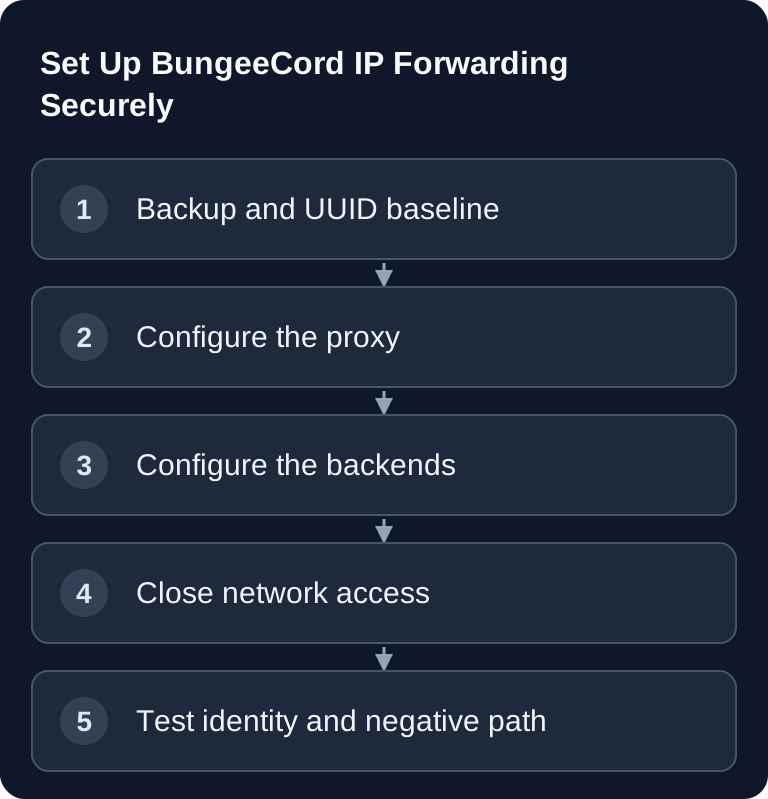
BungeeCord forwarding transmits the player IP, online UUID and profile information to the backend. For this, proxy and backend values must match and direct backend connections must be blocked. Before a changeover, also back up identity-bound data such as inventories, groups and economy.
ip_forward: trueis not a firewall. The classic BungeeCord format has no proxy-specific signature secret. Anyone who can reach an unprotected offline-mode backend can forge forwarding data and impersonate another player.
The four values
| Location | File/field | Normal value |
|---|---|---|
| BungeeCord | config.yml → online_mode |
true |
| BungeeCord | config.yml → ip_forward |
true |
| Backend | server.properties → online-mode |
false |
| Backend | spigot.yml → settings.bungeecord |
true |
For current Paper, add:
# config/paper-global.yml
proxies:
  bungee-cord:
    online-mode: true
This Paper value corresponds to the proxy's online mode. It stays true even though server.properties on the backend uses online-mode=false.
Why a backup belongs before the change
Without forwarding, the offline-mode backend generates a UUID from the player name. With correct forwarding, it receives the UUID originating from online authentication. These values are not identical. Inventory, ender chest, ranks or economy data may afterwards look as if they had vanished, even though they're stored under the old UUID.
Before the change:
- back up worlds,
playerdata, permission and plugin databases; - test a restore;
- document the old and expected UUID for a test player;
- check plugin-specific migration tools;
- never rename files blindly without knowing the references and data format.
The existing version change guide describes a suitable backup, copy and rollback path.
Step 1: Configure the proxy
Stop BungeeCord cleanly and edit the current config.yml:
online_mode: true
ip_forward: true
Keep public authentication active on the proxy. In parallel, check listeners, servers and priorities with the config.yml field reference.
Step 2: Configure the backend
Stop every backend completely and change:
# server.properties
online-mode=false
# spigot.yml
settings:
  bungeecord: true
On Paper, additionally set the shown proxies.bungee-cord.online-mode value. First restart the backends, then BungeeCord. A partial reload is not enough for this identity change.
Step 3: Close the backend path
Allow the backend TCP port exclusively from the verified proxy path. Depending on your own infrastructure, that's loopback, a real private network/VPN or a tight firewall rule. In container environments, an internal IP alone is not enough: a foreign instance on the same bridge must not pass as the proxy.
On game-serverhosting, the active guard binds supported BungeeCord backends to the specific proxy instance and re-resolves its current container source. Stop, missing or ambiguous source remain drop-only. Same-node, cross-node and external backend paths were verified with a real proxy join; independent direct access stayed blocked. This is a statement about these proven paths, not a guarantee for arbitrary external provider networks.
The complete setup guide puts these network variants in context.
Classifying BungeeGuard correctly
BungeeGuard adds a shared token to the legacy format. Use at least 1.4.0. The project's security page documents a token exposure for older BungeeCord setups; after upgrading, a possibly affected token must be rotated on the proxy and backends.
- generate the token locally with sufficient entropy;
- never copy it into tickets, logs, screenshots or Git;
- update the proxy and all backends in a coordinated way;
- remove the old token only after a successful test;
- treat the state as unverified if the version is unknown/old.
BungeeGuard is especially useful on shared hosting, but doesn't replace an available firewall/private network solution as the first protective layer.
Verification: four separate signals
- Process: Proxy and backend are fully started.
- TCP: The proxy reaches the backend listener.
- Lobby join: A real authenticated player gets from the proxy into the backend.
- Identity: The backend sees the expected online UUID and client IP, not the offline UUID or only the proxy IP.
The negative test follows: an independent source must not reach the backend port. An open listener or a successful ping alone is not proof of a join.
Typical errors
| Symptom | Cause | Next step |
|---|---|---|
| all players have the proxy IP | ip_forward or bungeecord off |
check both sides, restart completely |
| player has a new inventory | UUID mode changed | keep backup, compare UUIDs, migrate plugin-specifically |
If you wish to use IP forwarding... |
backend expects forwarding, proxy doesn't send it | check proxy value and exact started config |
| direct join under a foreign name possible | backend publicly reachable | fix firewall/private network immediately |
| proxy doesn't reach backend either | allow rule has wrong/stale source | re-evaluate specific proxy assignment, don't open broadly |
| no join after BungeeGuard update | token inconsistent | check redacted versions, rotate in a coordinated way |
If the start target is missing, the fallback error guide helps. Domains still point to the proxy; use the domain/SRV guide for that.
Plugins and crossplay
Permission, ban and economy plugins are especially UUID-sensitive. Back up their data and check whether a proxy and backend component is required. The plugin guide explains the platform separation.
In a proxy network, Geyser is installed only on the proxy. Bedrock UDP and Java TCP remain separate paths; key.pem is secret. Set up Geyser/Floodgate only once the Java forwarding and negative path are green.
FAQ
Is ip_forward: true a protection?
No. It only ensures that IP, UUID and profile are passed on to the backend. The classic format has no proxy-specific signature secret: anyone who directly reaches an unprotected offline-mode backend can forge this data. The protection is the network boundary, not the setting.
Why does the backend have online-mode=false?
Because authentication against Mojang already happens at the proxy — otherwise the backend would demand it a second time and reject every player. On Paper, proxies.bungee-cord.online-mode nevertheless stays true: this value reflects the proxy's online mode, not the backend's.
Why do players have an empty inventory after the changeover?
Because the UUID has changed. Without forwarding, an offline-mode backend generates the UUID from the player name; with forwarding, the real online UUID arrives. The old data isn't lost, it's stored under the old UUID — that's why a tested backup belongs before the change.
Do I need BungeeGuard?
It adds a shared token to the legacy format and is mainly useful on shared hosting, where you can't set your own firewall rule. Use at least version 1.4.0 and rotate the token after an upgrade. It doesn't replace an available firewall or private network solution.
Where does Geyser belong in a proxy network?
Exclusively on the proxy, not additionally on the backends. Bedrock runs over UDP, Java over TCP — both paths are checked separately, and key.pem is secret. Set up crossplay only once forwarding and the negative test on the Java side are green.
Primary sources
- BungeeCord IP Forwarding
- PaperMC: Forwarding methods and limits of legacy forwarding
- BungeeCord Security Warning
- Paper Global Configuration
- BungeeGuard Security
Safely narrowing down a UUID mismatch
Before the changeover, pick a known test player and note their previous UUID and data source. After joining via the proxy, check inventory, ender chest and permissions together. If only one area is empty, check its plugin or database storage; if all areas are missing, check the forwarding chain and identity. Don't copy files based only on the visible player name, because different UUIDs can belong to the same name. Keep the backend port closed and, if the result is contradictory, roll back the related configuration change. Only a documented mapping allows a targeted data migration.