UnsupportedClassVersionError names the required and the running Java version. class file version 65.0 requires Java 21; 61.0 corresponds to Java 17. First check which server, plugin or mod class is named before you change the runtime of the entire server.
Step by step in the customer panel (with video): Switching Server Software and Version in the Panel
Reading the Message
A typical line looks like this:
java.lang.UnsupportedClassVersionError: com/example/PluginMain has been compiled by a more
recent version of the Java Runtime (class file version 65.0), this version of the Java Runtime
only recognizes class file versions up to 61.0
It contains three pieces of information:
com/example/PluginMain— which class is incompatible with the running JVM. A plugin or mod name directs the check to that extension; whether the base server is also affected, you determine from its own startup.class file version 65.0— what is required: 65 − 44 = Java 21.only recognizes … up to 61.0— what is running: 61 − 44 = Java 17.
Translated: A plugin built for Java 21 sits on a server running Java 17.
Conversion Table
| class file version | Java version |
|---|---|
| 52.0 | Java 8 |
| 55.0 | Java 11 |
| 60.0 | Java 16 |
| 61.0 | Java 17 |
| 65.0 | Java 21 |
| 69.0 | Java 25 |
The numbers come from the official JVM specification. For the modern Java versions in this table, major version minus 44 gives the main Java version; historical Java 1.x versions and preview class files need separate classification — so you can calculate any future version yourself without the table being extended.
Note: The supported class file version is only a compatibility condition. A current JVM supports many older versions, but not newer ones than its specification allows. A Java 8 plugin can still fail under Java 21 because of removed APIs, libraries or loader requirements; class file compatibility does not guarantee that a plugin works.
Which Java Version Does Which Minecraft Version Need?
| Vanilla Minecraft version | Java baseline requirement |
|---|---|
| up to 1.16.5 | Java 8 |
| 1.17 – 1.17.1 | Java 16 (in practice Java 17) |
| 1.18 – 1.20.4 | Java 17 |
| 1.20.5 to 1.21.x | Java 21 |
| from 26.1 | Java 25 |
The table describes the Vanilla baseline. Paper, other forks and mod loaders can have their own requirements or recommendations; therefore check the specific server file. Paper, for example, recommends Java 21 for 1.20 to 1.21.11 and requires Java 25 from 26.1, see Paper requirements.
With us, you don't have to set this. We derive the runtime from your server's Minecraft version and set it automatically. If you order 1.21, you get Java 21 without having to look for a switch.
For server forks such as Leaf and Leaves, we additionally maintain an exact mapping per release instead of adopting the general rule. The reason: a fork may deviate from the Vanilla requirement, and an optimistic assumption would be wrong exactly when it matters. If no matching Java is found for a combination, we deliberately abort the process instead of starting a runtime that's too low — a server that doesn't start wrongly in the first place is easier to repair than one that's half running.
The Most Common Case: a Plugin, Not the Server
If your server was running until just now and the error occurred after adding a file, the matter is clear. Procedure:
- Note the class name from the message. It almost always names the project.
- Look for the matching build variant from the provider. Many plugins offer separate downloads for Java 17 and Java 21, often with the suffix
-java17or as a separate release branch. The newest file is not automatically the right one. - If there is no matching variant, you need a newer Minecraft version — because only that brings the newer runtime. How to switch the version without losing the world is described in Switching the Minecraft Server Version.
- Remove the plugin for now if the server urgently needs to run. How to add and remove plugins cleanly is shown in Installing Minecraft Mods and Plugins.
The Other Case: Java Is Too New
This case is rarely explained, but occurs regularly. Old Forge modpacks — the classic is 1.12.2 — are built for Java 8. Under Java 21 they fail, though usually not with UnsupportedClassVersionError, but with messages about missing internal classes or rejected startup parameters.
Sign: the pack used to run, or it runs for others, and your server names a very old Minecraft version. The solution then is not newer Java, but the Minecraft version that belongs to the pack in the panel — this makes us set the matching older runtime.
Honest note: Our automatic correction does not apply in this case. It only repairs in the “too old” direction, that is, when the server needs a newer Java than the one running. A Java that is too new is deliberately not treated as drift — otherwise a customer who deliberately chose an older runtime would automatically lose it again.
What We Handle Automatically
- Matching runtime from the order onward. The Java version follows the Minecraft version, without any setting.
- Correction on version change. If you switch to a version with a higher Java requirement, the runtime is updated along with it.
- The boot log wins. If your server itself names a required Java version at startup that is higher than the running one, we correct based on that measurement — not based on the derivation from the ordered version. A statement by the server about itself is more reliable than any table.
- Custom images are left untouched. If your server runs on a runtime you chose yourself, we don't intervene.
- Fail-closed instead of half right. If no matching Java exists for a combination, we abort and report it instead of starting a wrong runtime.
Troubleshooting
| Symptom | Check | Solution |
|---|---|---|
class file version 65.0 named, class name is a plugin |
Did the server run before adding it? | Download the plugin build for your MC version |
| Error right at server start, no plugin named | Which Minecraft version is running? | Align version and runtime |
| Old 1.12.2 modpack won't start | Does the log mention missing internal classes? | Java is too new — choose the matching MC version |
| Error after version change | Did it occur right after the switch? | Wait for the restart; if it persists, contact support with the full line |
| Plugin loads, but features are missing | Is there a warning in the log instead of an error? | Different cause — not the Java version |
FAQ
Can I Switch the Java Version Myself?
With us that isn't necessary: it results from your server's Minecraft version. If you need a different runtime, the right way is to change the Minecraft version — then the entire environment fits together.
Is Newer Java Always Better?
No. A minimum requirement is not a general upper limit. What matters is which runtimes the server core, loader and extensions support together. A higher version may work, but can impair older mods through API or startup parameter changes. Therefore switch according to documented compatibility and check a backed-up copy.
Why Does My Plugin Run Locally but Not on the Server?
Because your local Java installation may be newer than the server's. What matters is the runtime on the server, not the one on your computer.
How Do I Know Which Java My Server Is Currently Running?
The message tells you: only recognizes class file versions up to 61.0 means Java 17. Without an error message, the server start shows the Java version in the first console lines.
Do I Have to Recreate My World After a Java Change?
No. The runtime only affects execution, not the world format. A change of the Minecraft version, on the other hand, can change the world format — create a backup beforehand.
Next Steps
If the server is running again, but slowly, Minecraft Server Lagging: Fixing Watchdog Timeouts helps further. If the memory doesn't match the modpack size, the Minecraft RAM Calculator calculates the requirement.
Looking for a server on which the Java version automatically matches the game version? On Rent a Minecraft Server you'll find the plans.
Sources and Verification Status
- Java requirements per Minecraft version: Minecraft Wiki — Server/Requirements. Explicitly names Java 16 from 1.17, Java 17 from 1.18 and Java 21 from 1.20.5.
- Mapping of class file versions: Oracle — The Java Virtual Machine Specification, Java SE 21, Table 4.1-A. Documents 52 = Java 8, 55 = Java 11, 60 = Java 16, 61 = Java 17, 65 = Java 21 as well as the rule that a JVM supports only the listed versions and no higher ones.
- Java 25: Oracle — The Java Virtual Machine Specification, Java SE 25, Table 4.1-A. Documents major 69.
Verification status: August 24, 2026. New Minecraft versions can bring new Java requirements; the linked sources reflect the current state in each case.
Isolating a Single Incompatible File
Search the error for the full class name and assign it to a plugin or mod. Check its documented Java and platform requirements. If only this extension is rejected, remove it from the load path while the server is stopped and test the unmodified base server. If it works, you need a matching extension version or a jointly compatible runtime. A Java change can additionally affect older loaders. Before switching, note the actual Java version and server build; a JVM installed locally on your computer says nothing about the server runtime.
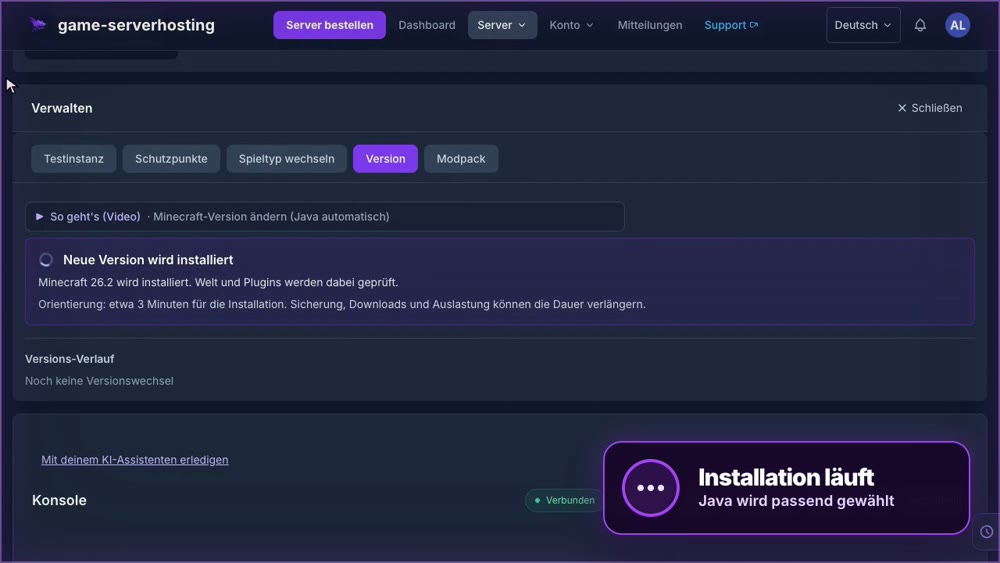
Change the Minecraft version (Java set automatically): view an example
Our own captures from a demonstration environment. The version and setup shown may differ from your server.
- Open Manage, then Version.
- Choose the target version, here 26.2, and enter the server name to confirm.
- Click Switch version. We set the matching Java version automatically.
GSH-Testserver · 2026-09-28