Analytics and advertising cookies only with your consent.We use cookies to improve your experience and analyze our website.
Prices are charged in euros. Amounts in USD are approximate, converted at the ECB reference rate of Nov 27, 2026 (1.0957 USD per euro).
open.mp server hosting
open.mp server from game-serverhosting starting at €2.69 per month (from 1 GB RAM). Data center in Germany, France or the USA, cancel monthly, set up in about 2 minutes.
from €2.69 ≈ $2.95/monthfrom €2.69 ≈ $2.95 per monthor €2.15/month with 12 months prepaidor €2.15 per month with 12 months prepaid€25.82 one-time, −20 %
Transparent monthly pricing
from 1 GB RAM
Minimum configuration
about 2 minAutomated setup
No minimum termBilling
Default: 2 GB RAM for €3.84/month.Default: 2 GB RAM for €3.84 per month.
Not sure how much RAM you need?
Unlimited player slots in every plan; set up to 500 players in the panel
Server locations: Germany (Falkenstein/Limburg) · France (Roubaix) · United States (Vint Hill).
Want a server closer to you?
This page measures the pingfrom your browser to each location.
At a glance
Price
From €2.69 per month, up to €10.74 per month
Example plans
1 GB RAM for €2.69 per month · 2 GB RAM for €3.84 per month · 4 GB RAM for €6.14 per month
Players
up to 500 players per server
Location
Germany, France, United States
Billing
Cancel monthly, no minimum term
Compatible with SA-MP 0.3.7 clients
Gamemodes (.amx) in the gamemodes folder, filterscripts in the filterscripts folder; the example gamemodes gungame, derby and simpletdm are included
Up to 500 players per server; server name, player count and join password are set in the panel
Settings in the config.json file, loaded gamemodes and filterscripts under pawn.main_scripts and pawn.side_scripts
Optional RCON password for in-game administration; you choose the open.mp version in the panel
NVMe SSD, data centre DDoS protection, manual and scheduled backups
We are not affiliated with Rockstar Games, Take-Two or the open.mp and SA-MP projects. Every player needs their own copy of GTA San Andreas and a compatible client.
Pay 12 months in advance and you pay 20% less. More tiers up to 8 GB RAM for €10.74 per month. Click a price to open the configurator with that plan.
How much does a open.mp server cost and what is included?
Servers for open.mp: from €2.69 ≈ $2.95 per month (from 1 GB RAM), located in Germany (Falkenstein/Limburg), France (Roubaix) or the USA (Vint Hill), set up in about 2 minutes.
open.mp (Open Multiplayer) is a multiplayer server for GTA San Andreas that is compatible with SA-MP 0.3.7 clients. Your open.mp server runs around the clock, loads your gamemodes and filterscripts and has room for up to 500 players, from 1 GB RAM.
Price:
From €2.69 ≈ $2.95 per month, up to €10.74 ≈ $11.77 per month.
Resources:
1 to 8 GB RAM selectable.
Provisioning:
about 2 min.
Choose your server location: Germany, France or the USA
280+ servers hosted
open.mp server hosting
Configure server
Choose RAM, term and more options to your liking.
open.mp
· Starter: 1 GB RAM from €2.69/month per month · Recommended: 2 GB RAM €3.84/month per month
Our commitments to you
Cancel monthly, right in your account
The monthly plan has no minimum term. Use “Cancel contracts” at the bottom of every page and, once logged in, you are done in three clicks. Longer discounted terms are optional.
Support at no extra cost
Our team reviews and sends every ticket reply. We don't charge extra for it.
Price before you pay
You see the final price, RAM and term in the configurator before you pay.
What your panel looks like
The four areas you will use most after ordering. We recorded the clips and screenshots on our own test server.
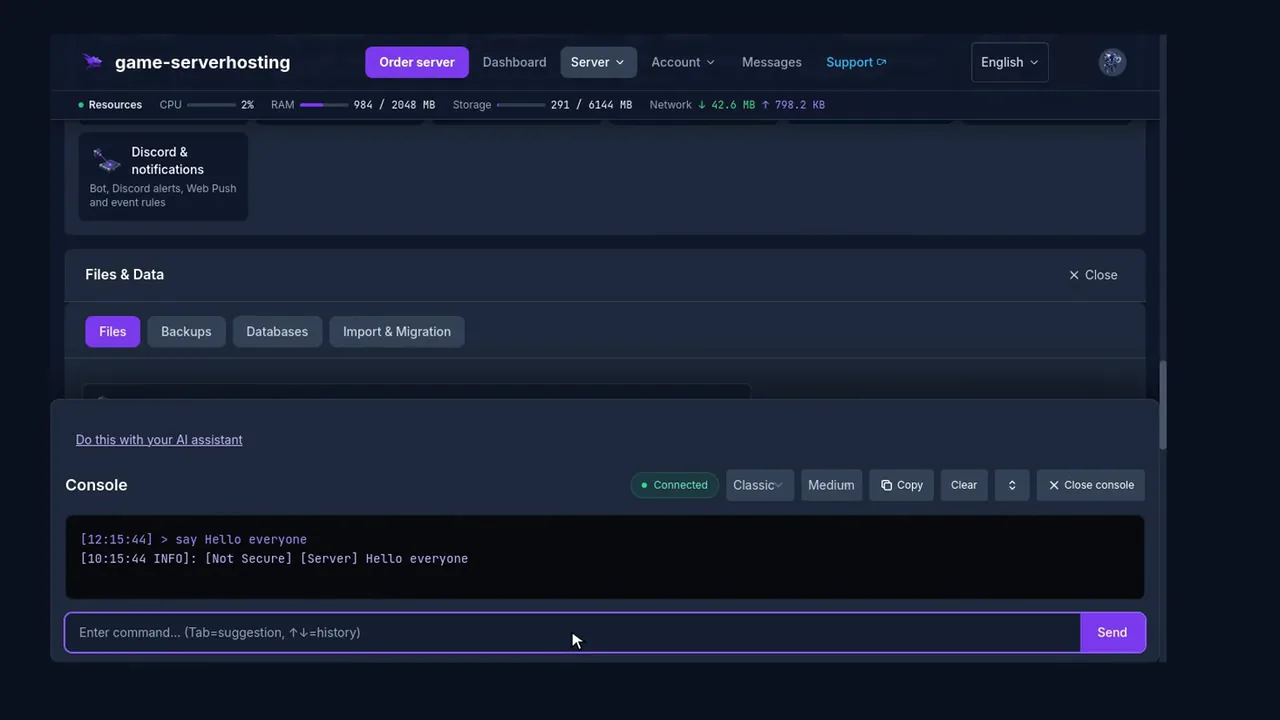
The console shows the output of your server. You enter commands right in the browser.
You edit the files of your server right in the browser. For larger uploads you use SFTP with a password you set yourself.
You create backups in the panel and restore them there. How many backup slots are included is shown in your order before you buy.
Invite friends as collaborators so they can help run the server. Pending invitations are listed in the same view.
Claude Code · Codex
Tell your game server what you have in mind.
Connect Claude or ChatGPT to your server to investigate startup problems, adjust settings, or install plugins. You decide which servers your assistant is allowed to access.
Check my server status. Do not change anything yet.
Applies to every package on this page. You choose the package and price in the order wizard.
depending on the package
1–4 vCPU
NVMe SSD storage
from 4 GB
availability target
99.5%
network uplink
1 Gbit/s
Performance
Computing power (vCPU)
Per package: 1 GB RAM = 1 vCPU · 2 GB RAM = 1 vCPU · 4 GB RAM = 2 vCPU. Cores are shared: several servers run on the same machine, and no core is reserved for you alone.
Processor by location
Germany: AMD Ryzen 7 5800X (Zen 3, up to 4.8 GHz) or AMD Ryzen 9 5900X (Zen 3, up to 4.9 GHz) · France: AMD Ryzen 9 9950X (Zen 5, up to 5.7 GHz) · USA (Virginia, US East): AMD Ryzen 7 5800X (Zen 3, up to 4.8 GHz). Which of these processors your server gets in Germany is set at order time, based on free capacity; both are Zen 3, boosting up to 4.8 or 4.9 GHz.
Storage
4 GB NVMe SSD in the smallest package, growing with RAM up to 32 GB. Backups do not count towards it.
Network
Traffic at no extra cost; every machine is connected at 1 Gbit/s or more.
Operations and protection
Backups
2 backups are included. You can set the schedule from hourly to monthly and the retention to up to 365 days. In the panel, you can restore and download backups yourself. With Backup+, you get 10 backups for €1.99 per month. 12 months: €23.88 (12 × €1.99).
Files
Upload your own savegames, worlds and configurations via SFTP or the file manager in the panel.
Restarts
In the panel, you can schedule restarts, backups, commands and announcements.
DDoS protection
Included at every location: automatic network-level DDoS protection from the data center. Servers on OVH game hardware additionally run behind OVH's game firewall.
Availability
Target: 99.5% monthly average (terms of service). The status page shows the current state.
Support
By ticket and email. Support languages: English, German, Spanish, French, Dutch, Portuguese, Russian. We usually reply within a few hours (median over the last 90 days: 1.6 hours), but we do not guarantee it.
Your server sits behind the data centre’s network DDoS protection. It is included in the price and works automatically.
Normal operation, no attackSimulated attack: the filter drops the attack packets
Players
Attack
Anti-DDoS filter
Data centre network
Your server
Online
Dropped packets
Simulation counter
Player connection
stays even in the simulation
Server status
Onlinestays reachable in the simulation
Simplified illustration. Packets, counter and graph are simulated, not measurements. The protection lowers the risk of downtime but cannot prevent every disruption.
What happens during an attack
Traffic reaches the data centre
Every connection to your server first passes through the data centre’s network.
The filter recognises attack patterns
The protection filters volumetric attacks at network level (layer 3/4), automatically and at no extra charge.
Game traffic carries on
Connections the filter rates as normal reach your server as usual.
Protection by location
Germany
OVH Anti-DDoS + Hetzner DDoS Protection
France
OVH Anti-DDoS
United States
OVH Anti-DDoS
Data center DDoS protectionIncluded at every location
NVMe SSDFast Storage
Germany, France or the USALow ping across Europe
Scheduled BackupsManual or scheduled
What's included in the price
The configurator shows which features and protection apply to your server before you order.
Custom Subdomain
Choose your own address like mein-server.gs.game-serverhosting.com — no ugly IP:Port combinations.
Free Extras
One click in the dashboard: Uptime Kuma, Game Server Watcher and one bot such as Sinusbot are included per server at no extra cost. Every additional bot costs extra.
Uptime KumaSinusbotServer Watcher
Automated setup
After you order, setup creates your server along with its subdomain and DNS records. You can add backup schedules in the panel whenever you need them.
Zero-config setup
Frequently asked questions
How much does a open.mp server for 4 friends cost?
The smallest package has 1 GB RAM and costs €2.69 per month. Four players can connect; you set the player count in the panel, up to 500.
How much RAM does an open.mp server need?
The open.mp server is lightweight. 1 GB RAM is enough for small servers; for many players and large gamemodes with lots of scripts we recommend 2 GB RAM.
How many players fit on the server?
open.mp allows up to 500 players per server. You set the player count in the panel; the server starts with 50 slots.
How do my players connect to the server?
Your players enter the IP and port from your dashboard in their client and connect. The server accepts SA-MP 0.3.7 clients. You set a join password in the panel.
How do I add my own gamemodes?
Upload the compiled gamemode (.amx) to the gamemodes folder and filterscripts to the filterscripts folder through the file manager. In the config.json file, list the gamemode under pawn.main_scripts and filterscripts under pawn.side_scripts, then restart the server. The example gamemodes gungame, derby and simpletdm are included to get you started.
Can I administer the server through RCON?
Yes. Set an RCON password in the panel with 8 to 32 characters made of letters, digits, underscores and hyphens, including at least one letter. It is written to the config.json file.
How do I get started after ordering?
Your open.mp server is ready in about 2 minutes. In the panel you set the server name, player count and optionally a join password. You find the address and port in the dashboard.
Do I get my own subdomain?
Yes, every server includes a subdomain like my-server.gs.game-serverhosting.com, and you can change it anytime in the dashboard.
What are the free extras?
For every server you enable Uptime Kuma (server monitoring) and Game Server Watcher (server status in Discord/Telegram) with one click in the dashboard at no extra cost, plus one bot such as Sinusbot (music bot for Discord/TeamSpeak). Every additional bot costs extra.
How quickly is my server online?
Typical initial setup: about 2 minutes. Queues or large installations can take longer. Setup creates the subdomain and DNS records automatically, and for Minecraft also accepts the EULA and installs Geyser.
Is there a minimum contract term?
Not by default. You can turn off automatic renewal at any time in the customer area, and cancellation takes effect at the end of the paid period. Terms of 3, 6 or 12 months come with discounts: no commitment with prepayment, and with monthly payment a minimum term of exactly that period.
Are the servers located in Germany?
You choose the location at checkout: Germany (Falkenstein/Limburg), France (Roubaix) or United States (Vint Hill). Your customer account and invoices always stay in the European Union. Players in Germany, Austria and Switzerland get the lowest pings from the European locations, players in North America from the US location.
Which provider is best for my server?
The best provider is the one that shows you what you get before you pay: RAM, slots, location, price and cancellation terms. Here the price and resources are visible in the configurator before checkout, there is no minimum term and setup is automated — feel free to compare that with other offers. open.mp starts here at €2.69 per month, and setup typically takes about 2 minutes.
Should I host the server myself or rent one?
Self-hosting costs power, time and a machine that runs around the clock; port forwarding, updates and backups are on you. A rented open.mp server is online after the automatic setup (typically about 2 minutes), keeps running when your PC is off, and updates and backups are included; data-center DDoS protection is included at every location. For one or two friends on a single evening self-hosting is often fine — for a persistent world, renting pays off.
Can I increase or decrease the RAM later?
Yes, you can do it yourself in the customer area using a slider. An upgrade takes effect immediately: you only pay the prorated difference for the remaining term, and the new price applies from the next renewal. A downgrade takes effect on the next renewal date. Your world, settings and subdomain are kept, and depending on the game, a restart is required afterwards. With monthly payment and a minimum term, the change is only possible once that term has ended.
Which processor and how many cores does a open.mp server get?
Processor by location: Germany: AMD Ryzen 7 5800X (Zen 3, up to 4.8 GHz) or AMD Ryzen 9 5900X (Zen 3, up to 4.9 GHz) · France: AMD Ryzen 9 9950X (Zen 5, up to 5.7 GHz) · USA (Virginia, US East): AMD Ryzen 7 5800X (Zen 3, up to 4.8 GHz). Which of these processors your server gets in Germany is set at order time, based on free capacity; both are Zen 3, boosting up to 4.8 or 4.9 GHz. Per package: 1 GB RAM = 1 vCPU · 2 GB RAM = 1 vCPU · 4 GB RAM = 2 vCPU. Cores are shared: several servers run on the same machine, and no core is reserved for you alone.
How much storage does a open.mp server have and how do backups work?
4 GB NVMe SSD in the smallest package, growing with RAM up to 32 GB. Backups do not count towards it. 2 backups are included. You can set the schedule from hourly to monthly and the retention to up to 365 days. In the panel, you can restore and download backups yourself. With Backup+, you get 10 backups for €1.99 per month. 12 months: €23.88 (12 × €1.99).
Can I upload files via SFTP and schedule restarts for my open.mp server?
Upload your own savegames, worlds and configurations via SFTP or the file manager in the panel. In the panel, you can schedule restarts, backups, commands and announcements.
How reliable is a open.mp server and how fast does support help?
Target: 99.5% monthly average (terms of service). The status page shows the current state. Traffic at no extra cost; every machine is connected at 1 Gbit/s or more. Included at every location: automatic network-level DDoS protection from the data center. Servers on OVH game hardware additionally run behind OVH's game firewall. By ticket and email. Support languages: English, German, Spanish, French, Dutch, Portuguese, Russian. We usually reply within a few hours (median over the last 90 days: 1.6 hours), but we do not guarantee it.
Two extra ports at no extra cost. Allocate up to two extra ports per game server for plugins and mods, including on free plans. Each extra port supports TCP and UDP.
Which server fits your group? Tell me the game and the player count and I will name tier and price.
Drag or use the arrow keys, with Shift in large steps. Double-click or Home restores the default size.
How should the advisor answer?
With AI chat, an automated AI system from game-serverhosting answers, not a member of staff. It understands questions in your own words. Answers can contain mistakes and are not an offer; only the prices in the order process are binding. Your messages go to Anthropic (Ireland, with processing also in the USA). We keep the conversation for 30 days and an anonymised copy without e-mail addresses and phone numbers for 13 months, to improve the answers. We need neither your name nor your e-mail.
We remember your choice for 180 days. You can change it at any time at the bottom of the chat.
Details in the privacy policy
•
This page has been updated in the meantime. Reload it so everything works correctly.
 Cancel monthly, right in your account