New in v1.0.5 and v1.0.4: Retest Server, Mods and Building Rules
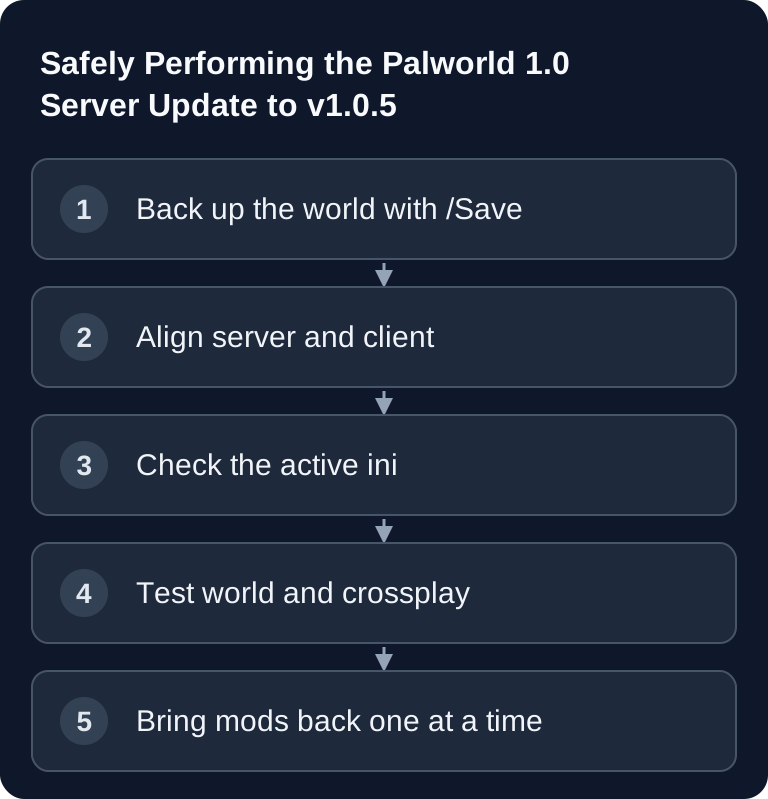
For a Palworld 1.0 update, you back up your world and configuration, stop the server in a controlled way, and then align the server and client versions. Check joining and existing player saves before adding new mods. A server that merely starts and is reachable does not confirm full update compatibility.
After the update, test joining, sorting Pals and material usage on a backed-up world, using the permissions you have actually set up. Do not adopt a guessed ini key for the new building limit: use the parameter documented for your installed build, or an existing setting provided for it. The patch notes do not name a configuration key here.
Sources: Pocketpair: v1.0.5, Pocketpair: v1.0.4.
Update note checked on September 16, 2026: Palworld v1.0.5. Here is how you update an existing server: back up the world, align server and clients, check the current configuration and test joining. For a fresh installation, use Create a Palworld Dedicated Server. The detailed cleanup of old mods can be found in Migrating Mods for Palworld 1.0.
What Has Been Relevant on the Server Side Since Palworld 1.0
Pocketpair released Palworld 1.0 in July 2026. Existing saves can continue to be used; before any major version change, an externally verified backup remains mandatory. The full release added, among other things, Sunreach, the World Tree and 72 new Pals, as well as changes to bases, multiplayer and performance.
Fixes followed:
- v1.0.2 fixed crashes and connection drops on dedicated servers during the Panthalus fight and reduced the load in Sunreach.
- v1.0.3 brought further balance and bug fixes; since then, the linked documentation may carry a newer version state. Check its version selector.
You can also find current patch states and sources in the Palworld Update Hub.
Before the Update: Secure Your World and Operating State
Set an AdminPassword, authenticate in-game with /AdminPassword <password> and run /Save. Then stop the server cleanly. Back up at least:
- world and save data,
- the active
PalWorldSettings.ini, - launch parameters,
- mods installed manually or via the Workshop,
- the last working server build, if your operating method provides it for a rollback.
Check that the backup is actually readable and up to date. An existing file name alone does not prove a restorable backup.
Bring Server and Clients to the Same Build
Update the server through the intended hosting workflow and start it first without unconfirmed mods. All players update their clients to the same compatible version. A common reason for failed connections after a patch is not the world, but build or mod drift between client and server.
Check the startup log for the detected version, repeated crash loops and configuration warnings. Connect with a test account first before ending maintenance for everyone.
Check PalWorldSettings.ini Against the Documentation for Your Build
On Linux, Pal/Saved/Config/LinuxServer/PalWorldSettings.ini is the active file. DefaultPalWorldSettings.ini is only the template; changes there have no effect. The directories are only created after the first server start.
Particularly relevant today:
CrossplayPlatforms=(Steam,Xbox,PS5,Mac)as the documented default,bIsUseBackupSaveDatafor rolling world backups with additional disk load,AdminPassword,ServerPasswordandServerPlayerMaxNum,bAllowClientModfor controlled mod access.
Pocketpair also points out that since v1.0, omitting the old arguments -useperfthreads -NoAsyncLoadingThread -UseMultithreadForDS can improve performance. Do not remove them blindly on a production system: compare startup time, log and load with the same world in a controlled test.
Run a Complete Functional Test
After the update, check the following:
- The server starts without new recurring errors.
- The correct world loads with bases, Pals, guilds and progress.
- A test account can join fully and interact.
- Admin authentication and
/Savework. - The required platforms can connect via crossplay.
- Only then do confirmed mods come back one at a time.
For platform errors, Checking Palworld Crossplay helps; for load questions, see Planning Palworld Performance and RAM.
Troubleshooting
Server does not start after the update
Start without mods, compare the active ini with the current documentation and check the first relevant log event rather than just the last follow-up error message. If the start remains broken, stop further write attempts and work with the backed-up world copy.
The world looks empty or wrong
First check whether the server is loading the correct save path and the correct world. Only restore a backup once a wrong slot, path or permission error has been ruled out.
Crossplay players cannot join
Compare client and server build, CrossplayPlatforms, address and port. The documented default array allows Steam, Xbox, PS5 and Mac, but does not replace a version comparison.
Load increases after the update
Compare the same world and player count without mods. Check bases, active Pals and backup disk load; do not adopt a blanket RAM table from an old patch announcement.
Primary Sources
- Pocketpair: Palworld v1.0.3
- Pocketpair: Palworld v1.0.2
- Pocketpair: Configuration Parameters
- Pocketpair: Admin Commands
- Pocketpair: Launch Arguments
FAQ
Do I have to start a new world for the update?
No. An existing world can continue to be used. Back it up anyway and check it after the update, especially with mods or very old data states.
Which file do I need to edit?
On Linux, the active Pal/Saved/Config/LinuxServer/PalWorldSettings.ini, not just DefaultPalWorldSettings.ini.
Which version should players use?
The same compatible version as the server. As of September 16, 2026, v1.0.5 is the patch state checked here.
Does mod cleanup belong here?
Only as an update gate. The full inventory, removal and step-by-step reintroduction of old mods is covered by the separate mod migration guide.
Check World and Character Separately After the Update
First connect a player whose platform and previous character are known. Check the base, containers and Pals, as well as inventory and guild membership. If only a new character appears, check the platform identity and join method before replacing the world archive. If, on the other hand, structures or entire base areas are missing, halt further write operations and compare the active save path and the backup time. Test mods only after this basic comparison. Returning to older software requires a save that is compatible with it; do not overwrite the pre-update backup with the already updated state.