Minecraft server from €2.80/month, cancel monthly. Build together, add plugins or explore a modpack. Configure a Minecraft server that fits your group.
The monthly plan has no minimum term. Use “Cancel contracts” at the bottom of every page and, once logged in, you are done in three clicks. Longer discounted terms are optional.
Support at no extra cost
No chatbot brushing you off and no paid express ticket: every reply to your ticket is reviewed and sent by our team.
Price before you pay
You see the final price, RAM and term in the configurator before you pay.
Claude Code · Codex
Tell your game server what you have in mind.
Connect Claude Code or Codex to your server. Ask your assistant to install plugins, adjust settings or investigate startup issues. You choose which servers it can access.
Check my server status. Do not change anything yet.
Integration included at no extra charge. You need a compatible AI assistant; its provider may charge separately.
game-serverhosting / PANEL
Manage your world here
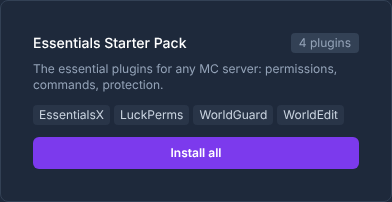
Plugin selection on a Minecraft Paper server: choose compatible extensions directly in the panel.
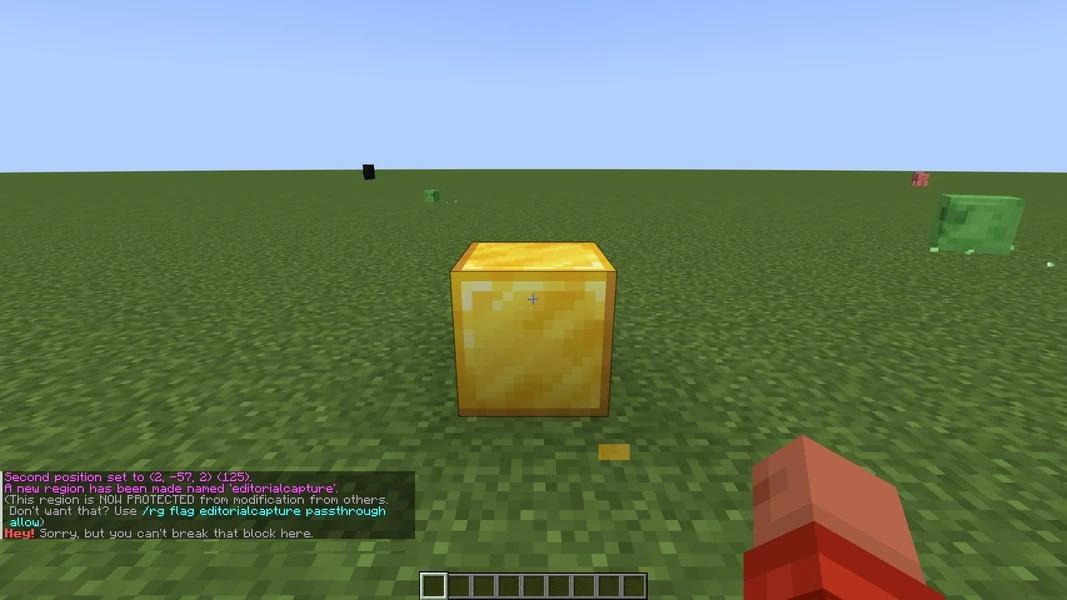
WorldGuard: view an example
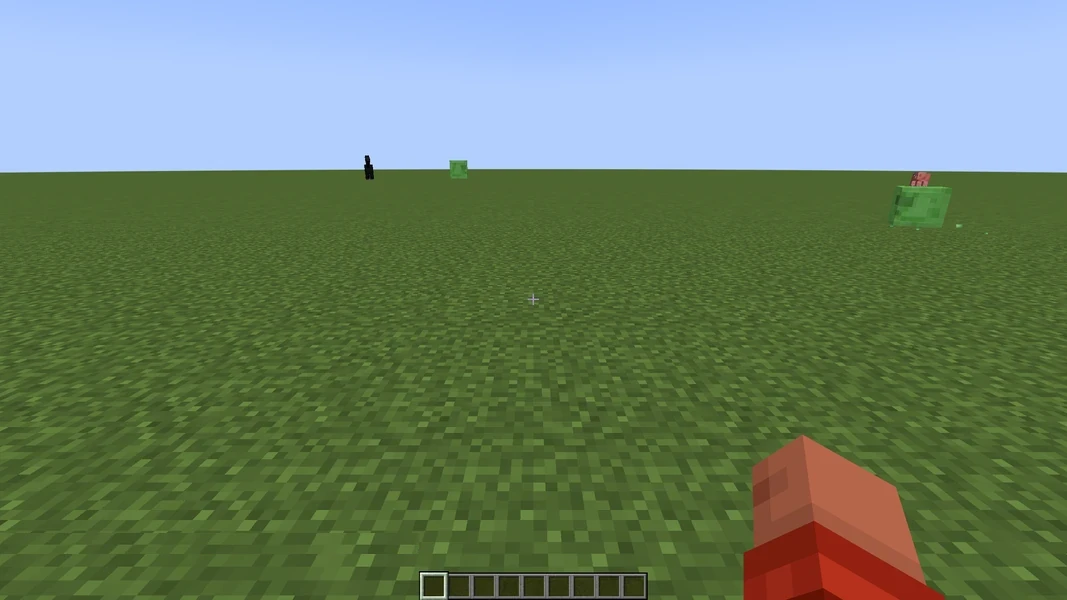
Our own captures from a demonstration environment. The version and setup shown may differ from your server.
The protected gold block remains after the break attempt.
WorldGuard 7.0.12 · 2026-09-12
In the allowed test state, the gold block was removed.
WorldGuard 7.0.12 · 2026-09-12
Who can join?
This page is for Minecraft Java. Bedrock players can join supported Paper stacks through Geyser and Floodgate. Forge and Fabric modpacks remain Java-only; consoles may require an additional connection method.
A Fabric pack needs a matching Minecraft version, loader and dependencies. Also check which mods your players need on their clients before inviting them.
How much does a Minecraft Java Edition server cost and what is included?
Servers for Minecraft Java Edition: from €2.80 per month (from 2 GB RAM), located in Germany or France, set up in about 3 minutes.
Minecraft Java server from €2.80/month, cancel monthly: start a Java server in minutes. Choose Paper for plugins and Bedrock clients through Geyser, or Forge/Fabric for Java modpacks with matching Java clients.
Price:
From 2.80 EUR per month, up to 40.24 EUR per month.
Resources:
2 to 32 GB RAM selectable.
Provisioning:
Typical initial setup: about 3 minutes. Queues or large installations can take longer.
All Minecraft flavours: Paper, Forge, Fabric, Spigot
Simple Voice Chat: assign a dedicated UDP port and manage range, groups and recordings in the dashboard
Public 4 GB profile with TPS and MSPT measurements
NVMe SSD, data-center DDoS protection, manual and scheduled backups
Facts about Minecraft Java Edition servers
Price
From 2.80 EUR per month, up to 40.24 EUR per month
Pricing model
RAM-based — the configurator shows the price before checkout
Resources
2 to 32 GB RAM selectable
Example plans
2 GB RAM with 6 GB NVMe for 2.80 EUR per month · 4 GB RAM with 12 GB NVMe for 4.88 EUR per month · 8 GB RAM with 24 GB NVMe for 10.29 EUR per month
CPU limit (vCPU)
vCPU grows with RAM (up to 4 vCPU)
Extra core (+1 vCPU)
Extra cores (+1 vCPU each) can be added later in the panel for 2.99 €/month each
Billing
Monthly subscription with no minimum term; automatic renewal is enabled by default and can be disabled
Provisioning
Typical initial setup: about 3 minutes. Queues or large installations can take longer.
Location
Germany, France — selectable when ordering, subject to free capacity
Processor
Germany: Desktop CPUs with at least 4.4 GHz boost (AMD Ryzen 5000 / Intel 12th Gen) · France: AMD Ryzen 9 9950X (Zen 5, up to 5.7 GHz)
DDoS protection
Included at every location: automatic network-level DDoS protection from the data center. Servers on OVH game hardware also run behind the OVH game firewall.
Storage
NVMe SSD, 6 to 96 GB depending on the RAM tier
Backups
Manual backups and configurable backup schedules in the panel
Free subdomain
Included, e.g. myserver.gs.game-serverhosting.com
Control panel
Console, file manager, and settings in your browser
Price
From 2.80 EUR per month, up to 40.24 EUR per month
Pricing model
RAM-based — the configurator shows the price before checkout
Resources
2 to 32 GB RAM selectable
Example plans
2 GB RAM with 6 GB NVMe for 2.80 EUR per month · 4 GB RAM with 12 GB NVMe for 4.88 EUR per month · 8 GB RAM with 24 GB NVMe for 10.29 EUR per month
CPU limit (vCPU)
vCPU grows with RAM (up to 4 vCPU)
Extra core (+1 vCPU)
Extra cores (+1 vCPU each) can be added later in the panel for 2.99 €/month each
Billing
Monthly subscription with no minimum term; automatic renewal is enabled by default and can be disabled
Provisioning
Typical initial setup: about 3 minutes. Queues or large installations can take longer.
Location
Germany, France — selectable when ordering, subject to free capacity
Processor
Germany: Desktop CPUs with at least 4.4 GHz boost (AMD Ryzen 5000 / Intel 12th Gen) · France: AMD Ryzen 9 9950X (Zen 5, up to 5.7 GHz)
DDoS protection
Included at every location: automatic network-level DDoS protection from the data center. Servers on OVH game hardware also run behind the OVH game firewall.
Storage
NVMe SSD, 6 to 96 GB depending on the RAM tier
Backups
Manual backups and configurable backup schedules in the panel
Free subdomain
Included, e.g. myserver.gs.game-serverhosting.com
Control panel
Console, file manager, and settings in your browser
When does an extra core help?
Every plan includes a CPU limit in vCPU that scales with RAM. An extra core raises it by 1 vCPU – that is 100% additional compute time of one logical processor core. The hardware is shared; it is not an exclusively reserved core.
Helps if …
your server is being throttled by its CPU limit – we measure this for your server in the panel,
work is running on additional threads alongside the game: pre-generating the world (e.g. Chunky), rendering maps (e.g. BlueMap, Dynmap), loading and generating chunks, garbage collection,
mods or plugins use their own threads, or you run Folia, which distributes the world across multiple cores.
Does not help if …
the game's main thread is maxed out: Minecraft calculates ticks, mobs, redstone and farms on a single thread – more cores will not make it faster,
your server never reaches its CPU limit – in that case it is not lacking compute time,
the bottleneck is memory, the connection, or a single plugin or mod.
Try these for free first
Lower the view distance and simulation distance, pre-generate the world once, use performance mods like Lithium and FerriteCore (Fabric) or ModernFix (Forge/NeoForge), and check with spark what is taking up time.
Available for Minecraft Java (including Paper, Fabric, Forge, NeoForge and modpacks), Folia and Palworld – not for Minecraft Bedrock.
2.99 € per extra core per month, charged pro rata until the end of the current billing period, cancellable at the end of the period.
All prices are calculated live from the configurator; the figures shown always reflect the moment of your page visit.
Our current default maps Minecraft 1.21.11 to Java 21, matching Paper's official matrix. Separately, the recommended 4 GB plan matches the published Paper measurement profile at a 100% CPU limit and 12 GB of storage. PaperMC identifies 20 TPS as the target and below 50 MSPT as the requirement for sustaining it. Across 3 usable runs, our Paper baseline measured a median 20.0 TPS at 1.0 MSPT.
The reproducible synthetic test uses a fixed world seed, 4225 pre-generated chunks, 200 passive entities, 120 seconds of warm-up and a 300-second window under one resource profile. Mojang provides no blanket hardware table, so we measure resources. We verify version and Java against upstream documentation. Paper offers several launch paths for modern Java, so we publish the measured profile instead of claiming universally optimal JVM flags.
This test covers only that resource and load profile on our infrastructure. The aggregate omits the complete JVM launch configuration, real-player latency and arbitrary mods, worlds or plugins. It is no blanket guarantee and cannot predict other plans.
Median TPS
20.0
Target: 20 TPS
Median MSPT
1.0
Limit: below 50 MSPT
Usable runs
3
Minimum: 3 runs
Measured October 12, 2026 · Sources reviewed September 20, 2026
The plugin browser covers supported projects; each recommendation may need a different setup method.
Why rent a Minecraft server from us?
Budget prices
The monthly price depends on your configuration. 2 GB RAM from 2.80 € per month; the recommended option with 4 GB costs 4.88 € per month. You'll see the full price and any term discounts in the configurator before ordering.
All server types included
Vanilla, Paper, Spigot, Forge, Fabric, NeoForge, Bedrock, BungeeCord, Velocity - all variants are available at no extra cost. Before switching, check that the server software, version and world are compatible, and back up your world. Java and Bedrock worlds are not directly interchangeable.
Optimized performance
For Paper, we publish a reproducible 4 GB measurement profile with TPS and MSPT results, methodology and explicit limitations. NVMe SSDs support fast chunk loading.
Flexible & transparent
Monthly cancellable subscription with no minimum term. RAM can be scaled at any time from 2GB to 32GB; automatic renewal can be disabled.
Minecraft server RAM recommendations
RAM figures are starting recommendations, not performance guarantees. Version, mods, view distance, world size, farms and active players affect CPU and memory needs. Each row shows the price for its smallest Vanilla/Paper configuration.
Players
Vanilla/Paper
With plugins
Modpacks
Price/month
3–6
2 GB
3 GB
4-6 GB
from 2.80€
10–18
4 GB
5-6 GB
6-8 GB
from 4.88€
17–30
6 GB
8 GB
10-12 GB
from 6.89€
24–42
8+ GB
10+ GB
16+ GB
from 10.29€
Available server types
Paper
Plugins + Performance
Forge
Mods
Fabric
Modulare Mods
Vanilla
Original
Spigot
Plugins
Bedrock
Crossplay
BungeeCord
Legacy proxy · no game world
Velocity
Modern proxy · no game world
More sandbox & survival games
Love Minecraft but want to explore more? Here are similar games we also host:
The configurator shows which features and protection apply to your server before you order.
Custom Subdomain
Choose your own address like mein-server.gs.game-serverhosting.com — no ugly IP:Port combinations.
Java: no port needed (SRV record)
NEW
Bedrock Cross-Play
Bedrock clients can join supported Paper stacks through Geyser + Floodgate; modloaders remain Java-only.
For supported Paper/Bukkit stacks
Free Extras
One click in the dashboard: Uptime Kuma, Game Server Watcher and one bot such as Sinusbot are included per server at no extra cost. Every additional bot costs extra.
Uptime KumaSinusbotServer Watcher
Frequently asked questions
How much does a Minecraft Java Edition server cost?
A Minecraft Java Edition server costs from €2.80 per month with us (from 2 GB RAM), up to €40.24 for the largest tier. The configurator shows the exact monthly price before you pay; the subscription can be cancelled monthly. Examples: 2 GB RAM with 6 GB NVMe for €2.80; 4 GB RAM with 12 GB NVMe for €4.88; 8 GB RAM with 24 GB NVMe for €10.29.
Can I rent a Minecraft Java Edition server for free?
There is no free Minecraft Java Edition server at game-serverhosting: every server runs on fixed, booked resources. The entry tier costs €2.80 per month with no minimum term, and automatic renewal can be switched off.
Which is better: a Minecraft Realm or your own server?
According to minecraft.net, a Realm for Java Edition costs USD 7.99 per month and lets you and ten other people play at the same time (as of 29 Sep 2026). A Realm is the simpler choice with nothing to configure. Your own server gives you more freedom: you pick the server software (Paper for plugins, Forge or Fabric for modpacks), the version and the RAM, and how many players can join depends on the resources rather than a fixed plan. With us, a server starts at €2.80 per month.
Can Bedrock players (mobile/console) join my server?
Geyser + Floodgate are configured on supported Paper/Bukkit stacks. Forge, Fabric, NeoForge and Quilt modpacks with client-required mods are not generally compatible with Bedrock clients.
How do my friends connect?
You get a custom subdomain like my-server.gs.game-serverhosting.com. Java players simply enter the subdomain (no port needed thanks to the SRV record). Bedrock players use the same address with the Bedrock port.
How much RAM does a Minecraft server need?
For Vanilla/Paper servers: 2 GB for 3–6 players, 4 GB for 10–18 players. Add 1–2 GB extra for plugins. Modpacks need 4–10 GB depending on the pack: light packs such as Create+ or BetterMC 4–6 GB, All the Mods 9/10 about 10 GB; large packs with many players 12–16 GB.
Can I switch server type later?
You can switch server type. Create a backup first and check world, plugin and mod compatibility; switching between Java and Bedrock world formats requires controlled conversion.
How do I enable the whitelist on my Minecraft server?
Enable the whitelist via the server console with `/whitelist on`. Add players with `/whitelist add PlayerName`. With Paper or Spigot you can also manage the whitelist in the dashboard under server settings — changes apply immediately without a restart.
How long does Minecraft server installation take?
Typical initial setup: about 3 minutes. Queues or large installations can take longer. Vanilla and Paper servers start the fastest.
Can I upload my existing world?
Yes — directly in the web interface, no FTP and no support ticket needed. In the Server Hub, open Game settings → Worlds, upload your Java world folder as a .zip or .tar.gz and pick a name for the new world. The archive must contain a valid Java world (level.dat). After the upload, restart the server once so the new world becomes active.
Can I use Simple Voice Chat on my Minecraft server?
Yes, on compatible Minecraft Java setups. Install Simple Voice Chat on the server and for every player who wants to use voice chat. Our assistant assigns a dedicated UDP port and manages the essential server settings in the dashboard.
Do I get my own subdomain?
Yes. Every server includes a subdomain like my-server.gs.game-serverhosting.com, and you can change it anytime in the dashboard.
What are the free extras?
For every server you enable Uptime Kuma (server monitoring) and Game Server Watcher (server status in Discord/Telegram) with one click in the dashboard at no extra cost, plus one bot such as Sinusbot (music bot for Discord/TeamSpeak). Every additional bot costs extra.
How quickly is my server online?
Typical initial setup: about 3 minutes. Queues or large installations can take longer. Setup creates the subdomain and DNS records automatically, and for Minecraft also accepts the EULA and installs Geyser.
Is there a minimum contract term?
There is no long-term minimum. Billing is a monthly subscription and automatic renewal can be disabled. Longer terms may qualify for discounts.
Are the servers located in Germany?
You choose the location at checkout: Germany (Falkenstein and Limburg) or France (Roubaix) — all in the EU, connected to the major European exchanges. Low pings for players across Germany, Austria and Switzerland at both locations, and solid latency for the rest of Europe.
Which provider is best for my server?
The best provider is the one that shows you what you get before you pay: RAM, slots, location, price and cancellation terms. Here the price and resources are visible in the configurator before checkout, there is no minimum term and setup is automated — feel free to compare that with other offers. Minecraft Java Edition starts here at 2.80 EUR per month, and setup typically takes about 3 minutes.
Should I host the server myself or rent one?
Self-hosting costs power, time and a machine that runs around the clock; port forwarding, updates and backups are on you. A rented server is online within minutes, keeps running when your PC is off, and updates and backups are included; data-center DDoS protection is included at every location. For one or two friends on a single evening self-hosting is often fine — for a persistent world, renting pays off.
Can I increase or decrease the RAM later?
Yes, you can do it yourself in the customer area using a slider. An upgrade takes effect immediately: you only pay the prorated difference for the remaining term, and the new price applies from the next renewal. A downgrade takes effect on the next renewal date. Your world, settings and subdomain are kept, and depending on the game, a restart is required afterwards. With monthly payment and a minimum term, the change is only possible once that term has ended, and for games with a slot-based plan it is not available.
What does an extra core do?
An extra core raises your server's CPU limit by 1 vCPU for 2.99 € per month. It helps when your server is being throttled by its CPU limit or when work runs on additional threads alongside the game, such as world pre-generation, map renderers, or mods and plugins with their own threads. It does not help if the game's main thread is maxed out or if your server never reaches its CPU limit. We show you in the panel whether your server is being throttled. Available for Minecraft Java (including Paper, Fabric, Forge, NeoForge and modpacks), Folia and Palworld – not for Minecraft Bedrock.





 Cancel monthly – right in your account

 When does an extra core help?