
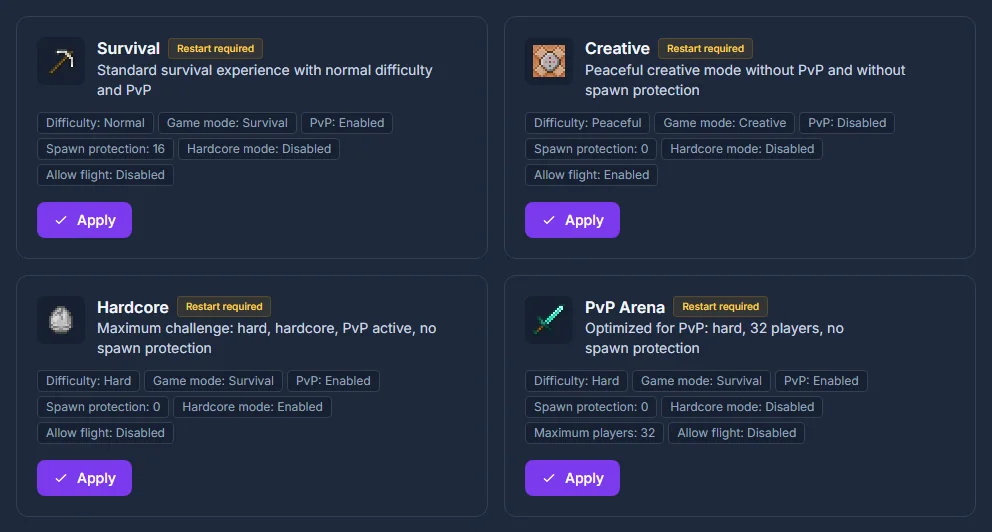
Under Game Settings → Presets you switch your Minecraft Java server to Survival, Creative, Hardcore or PvP with
one click. A preset sets six settings, the PvP preset seven. Everything else in server.properties stays as it is.
Then you restart the server.
 (Enlarge image)
Which values each preset sets
| Setting | Survival |
Creative |
Hardcore |
PvP Arena |
|---|---|---|---|---|
Difficulty (difficulty) |
normal |
peaceful |
hard |
hard |
Game mode (gamemode) |
Survival |
Creative |
Survival |
Survival |
PvP (pvp) |
on |
off |
on |
on |
Spawn protection (spawn-protection) |
16 blocks |
0 |
0 |
0 |
Hardcore (hardcore) |
off |
off |
on |
off |
Allow flying (allow-flight) |
off |
on |
off |
off |
Max players (max-players) |
unchanged |
unchanged |
unchanged |
32 |
PvP Arena is the only preset that changes the player count. It sets it to 32, no matter how many slots were set before.
Apply a preset
- Open Game Settings → Presets.
- Click Apply on the preset you want.
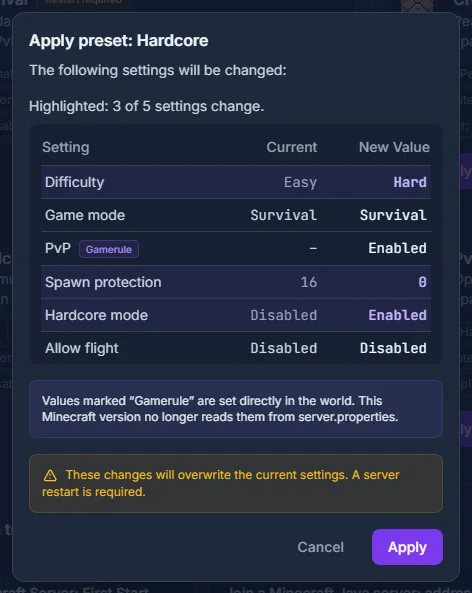
- The panel shows every setting with its current and its new value. What changes is highlighted, and at the top it says, for example, "3 of 5 settings change". Check the list and click Apply.
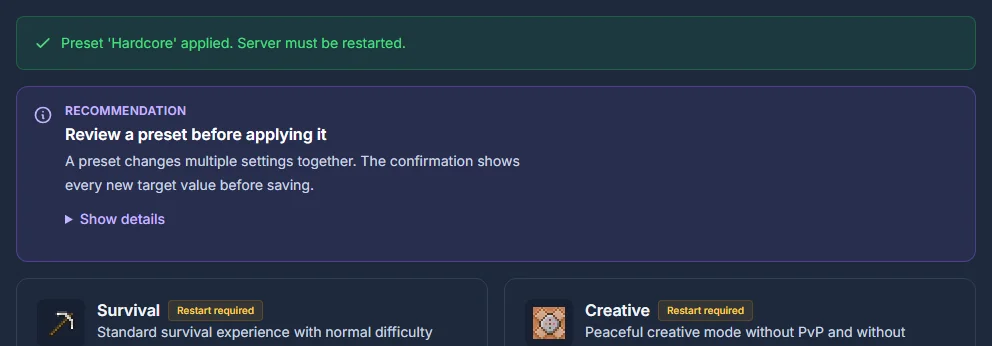
- The panel reports "Preset 'Hardcore' applied. Server must be restarted." Restart the server. Only then do the values apply.
 (Enlarge image)
 (Enlarge image)
From Minecraft 1.21.9: PvP is a game rule
Since 1.21.9, pvp is no longer in server.properties but is a game rule. The panel detects the version, marks PvP
with "Gamerule" in the confirmation and sets the game rule pvp directly in the world as soon as you apply the
preset. The server has to be running for this. If it is off, you get an error message; start it and apply the preset
again. More on game rules: Gamerules explained.
Players who have been on the server before
The game mode from the preset applies to players joining for the first time. On our test server, a new player arrived
in Creative mode after the Creative preset, while a player who had been there before stayed in Survival mode. You
switch existing players with /gamemode creative <Name>. Or you set force-gamemode to true in the
configuration: then every player gets the server's game
mode when joining. For the command you need OP permissions.
Hardcore on an existing world
The Hardcore preset writes hardcore=true to server.properties. A world that already exists stays a normal world,
though: on our test server, Hardcore was still off in the world file (level.dat) after the restart. Only a new world
starts as a Hardcore world. You get one by entering a new world name (level-name) in the configuration and
restarting; the old world stays as its own folder. In Hardcore mode you have one life only, and whoever dies becomes a
spectator.
Back to the previous state
- The easiest way is to apply the Survival preset. It sets the default values for normal play.
- You get exactly the old state back through the backup. Before every preset, the panel creates a copy
server.properties.bak.<date_time>under Files, and the five newest are kept. The time in the file name is in UTC, so in winter it is one hour behind German time. To restore it, use Actions → Rename under Files to first rename the currentserver.propertiesand then rename the backup toserver.properties. Then restart. - From 1.21.9 the game rule
pvpis not in this file. You reset it with the Survival preset or with/gamerule pvp true. - You can see what was changed and when in the history under View game, plugin and interface history.
FAQ
Why does nothing change after applying? The server has to restart. After that the values apply.
Can I adjust a preset? Yes. Apply it and then change individual values under Configuration.
Sources and Verification
Verification: This guide reflects the state of 22 November 2026. On that day we applied the presets on our own
Paper test server with Minecraft 26.3: confirmation and message in the panel, the game rule pvp (set at once in all
three dimensions), a new and a returning test player after the Creative preset, Hardcore on the existing and on a new
world (entry in level.dat) and the backup server.properties.bak.<date_time> under Files. The images come from this server.
- Minecraft: Minecraft Wiki: server.properties:
gamemodeis the default game mode, withforce-gamemode=trueplayers always join in that mode,hardcoreapplies to newly created worlds, andspawn-protection=0turns spawn protection off. With version 1.21.9,pvpmoved from the file to a game rule. - Our panel: the values of the four presets from the panel configuration, plus the confirmation, the backup and the messages as the panel shows them.
- Not verified: versions before 1.21.9, where PvP is still in
server.properties, and fully restoring a backup by renaming. The test players were bots, not real players.
